- PCOs are the start of every budget or cost change; they are exposure until approved.
- COR → OCO is the owner side and moves the budget; SCOs move supplier commitments.
- Budget Only PCOs take a Budget Change; In Scope PCOs take a Cost Change via RFQs and SCOs.
- Keep ACC's job number identical to the ERP's so the two can be reported together.
The pieces: budgets, contracts, cost items
- Budgets — the job's budget lines, one per budget code (a cost code, often with a cost-type segment). The owner side: original budget, approved changes, revised budget.
- Contracts — subcontracts and purchase orders with suppliers, linked to the budget lines they buy out. The commitment side.
- Cost items — the individual priced items inside a change. Autodesk describes them as the link "back to the affected budget, contract, and supplier."
- Change orders — the documents that move budgets and contracts, below.
- Payment applications — billing to the owner and from suppliers against those budgets and contracts.
The change order chain
Autodesk's help puts it plainly: potential change orders "are the starting point of any budget or cost change." From a PCO the chain splits into an owner side and a supplier side:
| Document | What it is | Moves |
|---|---|---|
| PCO — potential change order | A possible change, with its cost items, before anyone has agreed to it | Nothing yet — it is exposure |
| RFQ — request for quotation | Asks a supplier to price the PCO's cost items | Nothing — it gathers the price |
| COR — change order request (RCO in the API) | One or more PCOs sent to the owner for approval | Nothing until the owner accepts |
| OCO — owner change order | One or more CORs the owner has approved | The budget and the contract with the owner |
| SCO — supplier / subcontract change order | Changes a supplier's contract; generated from an OCO or a PCO | The commitment |
A PCO's scope decides which way it can go: a Budget Only PCO offers a Budget Change (owner side only), an In Scope PCO a Cost Change (supplier side, through RFQs and SCOs).
One change, worked through
The owner asks for soffits in the lobby of job J-1104:
The order matters. If the SCO is issued before the owner approves the OCO, the job carries $28,000 of committed cost with no approved revenue behind it — the gap the change order guide calls working at risk. Reporting on open PCOs and unapproved CORs is how that exposure stays visible.
Reporting on it: exposure, buyout and the ERP
Three numbers per job come straight out of this structure:
- Pending exposure — open PCOs and submitted CORs. Money that may move the budget and the costs, not yet approved.
- Buyout — contracts against the budget lines they buy out; see committed cost for the arithmetic.
- Cost at risk — SCOs whose OCO isn't approved.
The ERP holds the other half: posted cost, payroll and payments. Autodesk's project record carries a job number field, which is the key to join the two — keep it identical to the ERP job number (the integration guide covers why). Autodesk exposes budgets, contracts and each change order type through its Cost Management API, which is how reporting tools read it; Constructelligence reads budgets, contracts and owner and supplier change orders from ACC and sets them beside Sage's budget and cost per job.
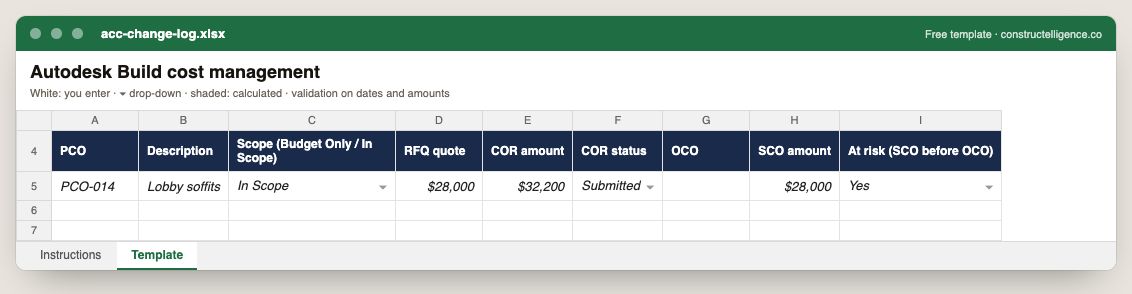
Each potential change order through the Autodesk Build chain: scope type, RFQ quote, COR amount and status, owner change order, supplier change order amount and whether the SCO is at risk ahead of the OCO.
9 columns: 6 you fill in and 3 picked from drop-down lists, so every row uses the same values. In the Excel version, 3 columns reject entries of the wrong type (a date column only takes dates, an amount column only numbers), the header row stays frozen with filters on it, and the workbook opens on an Instructions sheet that lists every column below.
Every column, and how it is captured
| Column | Type | What goes in it |
|---|---|---|
| PCO | Text | Free text. |
| Description | Text | What the line is, in words the other party will recognise. |
| Scope (Budget Only / In Scope) | Drop-down | Options: Budget Only / In Scope. |
| RFQ quote | Amount ($) | Enter the amount in dollars. |
| COR amount | Amount ($) | Enter the amount in dollars. |
| COR status | Drop-down | Options: Draft / Submitted / Approved / Rejected. |
| OCO | Text | Free text. |
| SCO amount | Amount ($) | Enter the amount in dollars. |
| At risk (SCO before OCO) | Drop-down | Options: Yes / No. |
See it on real-looking numbers
Constructelligence is a construction intelligence platform: it reads your ERP, project and field systems read-only and does this arithmetic every week, for every job. The demo runs it on a sample eight-job portfolio.
Try the demoJoin the private betaFrequently asked questions
What is a PCO in Autodesk Build?
A potential change order: the starting point of any budget or cost change in Cost Management. It holds cost items linked to the affected budget, contract and supplier, and from it you generate RFQs, CORs, OCOs or SCOs.
What is the difference between a COR and an OCO?
A COR (change order request) is one or more PCOs submitted to the owner for approval. An OCO (owner change order) is one or more CORs the owner has approved, and it is what changes the budget and the owner contract.
What is an SCO in Autodesk Build?
A change order on a supplier or subcontractor contract. It changes the commitment and can be generated from an OCO or directly from a PCO.
What is the difference between a Budget Change and a Cost Change?
A Budget Change affects only the budget side and is used for owner-directed changes (Budget Only PCOs). A Cost Change affects supplier contracts through RFQs and SCOs (In Scope PCOs).
How do I report on Autodesk Build cost data next to my ERP?
Keep the ACC project's job number identical to the ERP job number, then read ACC's budgets, contracts and change orders and the ERP's posted cost into one report joined by job. Track pending exposure (open PCOs and CORs) separately from approved changes.
Related guides
More in Data & integrations
- Procore ERP integration: what syncs with your accounting system, and how
- Construction data migration: move job cost history without losing a dollar
- Setting up a construction reporting database in SQL Server