


 A
A


 B
B CH
CH- Sort construction AI tools by the question they answer — takeoff, schedule, progress, safety, documents, finance.
- The cheapest start is the AI already inside the platform you run.
- Every tool needs the right data: a current model, coded job cost, or cameras someone watches.
- Trial on a past job with a known answer, and count the review time.
How this list works
Tools are grouped by the problem they solve, not ranked by score — the right tool for a 40-person electrical sub is the wrong one for a $2B data-center program. Each entry says what the vendor’s product does, the kind of contractor it suits, and the first thing to test in a trial.
We make Constructelligence, which appears once below and is marked as ours. We have no commercial relationship with any other vendor listed. Descriptions summarise each vendor’s own public material as of September 2026; features move quickly, so confirm current capabilities, pricing and data terms in a demo.
| Category | Answers | Tools below |
|---|---|---|
| Platforms | What is happening across my projects? | Procore Helix, Autodesk Forma |
| Estimating & takeoff | What will this cost to build? | Togal.AI, Beam AI, Kreo |
| Scheduling | When will it really finish? | ALICE Technologies, nPlan |
| Progress & reality capture | What is actually installed? | OpenSpace, Buildots, Doxel, DroneDeploy |
| Safety | Where is someone about to get hurt? | Oracle (Newmetrix), viAct |
| Documents & contracts | What did we agree to? | Document Crunch, Trunk Tools |
| Finance & forecasting | Is this job making money? | Constructelligence, Briq |
| Robotics | Can a machine do this task? | Dusty Robotics, Canvas, Hilti Jaibot |
| General assistants | Can it draft this for me? | ChatGPT, Claude, Microsoft 365 Copilot |
Project platforms with AI built in
If you already run a project-management platform, its own AI features are the cheapest place to start: the data is already there.
Procore Helix
Platform AIProcore’s intelligence layer across its platform: Procore Assist answers questions from specs, RFIs, submittals and project records, and Agent Builder lets teams create no-code AI agents for repetitive workflows.
- Best for
- Contractors already running projects in Procore.
- Check
- Which of your Procore tools and records Assist actually reads, and who can build and approve agents.
Autodesk Forma (formerly Autodesk Construction Cloud)
Platform AIAutodesk’s construction platform includes Construction IQ, which scores and prioritises risk across issues, quality and safety records; AutoSpecs, which builds a submittal log from the spec book; and an assistant and project-data agent.
- Best for
- Teams already on Autodesk Build and Forma Data Management (formerly Autodesk Docs).
- Check
- How much of your issue and checklist history is in Forma — Construction IQ ranks what it can see.
Estimating and takeoff
The most mature category: computer vision reading drawings to count and measure. See the AI estimating guide for how to test one.
Togal.AI
TakeoffDetects, measures and labels spaces and features on floor plans automatically, so area and count takeoff starts from a first pass instead of a blank sheet.
- Best for
- Estimators doing a lot of area-driven takeoff: interiors, flooring, drywall, painting.
- Check
- Accuracy on your own drawing sets, especially revised and scanned sheets.
Beam AI
Takeoff serviceReads plans and specs and returns a trade takeoff, reviewed by the vendor’s QA team before delivery, as Excel and PDF.
- Best for
- Subs and GCs who want takeoffs delivered rather than done in-house.
- Check
- Turnaround on a live bid, and how revisions are handled once the takeoff is delivered.
Kreo
Takeoff & estimatingBrowser-based takeoff with AI-assisted measurement and estimating on 2D drawings.
- Best for
- Smaller estimating teams that want takeoff and pricing in one tool.
- Check
- Whether its cost output maps to your cost codes and estimating format.
Scheduling and schedule risk
Two different ideas: generate better sequences, or forecast how likely the current one is. More in the AI scheduling guide.
ALICE Technologies
Generative schedulingSimulates many alternative construction sequences from your model, crews and constraints to find faster or cheaper schedules before and during a project.
- Best for
- Large, complex programmes where resequencing is worth real money.
- Check
- How long it takes to build the model it needs, and who on your team maintains it.
nPlan
Schedule risk forecastingUses machine learning trained on a large library of past project schedules to forecast the likely outcome of yours and flag the activities that carry the risk.
- Best for
- Owners and contractors on long programmes with maintained P6 or MS Project schedules.
- Check
- Whether the forecast explains which activities drive the risk, not just a date.
Progress tracking and reality capture
Cameras and scanners that compare what is built with the plan. Safety and progress are covered together in the site monitoring guide.
OpenSpace
360° capture360° cameras capture the site as someone walks it; images are mapped to the plans automatically, and its progress tracking measures installed work against the schedule.
- Best for
- GCs who want a searchable visual record of every floor, every week.
- Check
- Who walks the site, how often — and whether progress output feeds your schedule updates.
Buildots
Progress trackingHardhat-mounted 360° capture compared element by element against the BIM model and schedule, to report what is complete and where work is falling behind.
- Best for
- BIM-led commercial projects with a model that is kept current.
- Check
- Model quality — tracking against a stale model reports the wrong gaps.
Doxel
Progress trackingLidar and camera capture analysed by computer vision to measure installed quantities and track progress for earned-value style reporting.
- Best for
- Large, fast projects such as data centers and healthcare.
- Check
- How quantities reconcile with your pay applications and schedule of values.
DroneDeploy
Reality captureDrone and ground capture turned into maps, models and progress views, with AI analysis on top.
- Best for
- Sitework, civil and large horizontal projects.
- Check
- Flight rules on your sites and who processes the captures.
Safety
Oracle Construction Intelligence Cloud (Newmetrix)
Safety riskNewmetrix, acquired by Oracle, analyses jobsite photos and project data with computer vision to flag safety risks, and is embedded in Oracle’s construction products.
- Best for
- Contractors on Oracle Aconex or Primavera with a steady flow of site photos.
- Check
- False-positive rate on your photos, and who is expected to act on each flag.
viAct
Video safetyComputer-vision analytics on site cameras for PPE, exclusion zones, and plant–people proximity.
- Best for
- Large fixed sites with cameras already installed.
- Check
- Alert volume per camera per day, and how alerts are reviewed and closed.
Documents, contracts and RFIs
Large language models are strongest here: reading a lot of text and finding the relevant part. See the AI document review guide.
Document Crunch
Contract reviewReviews construction contracts and highlights key clauses, risk areas and obligations, so a PM can find what the contract says without reading it end to end.
- Best for
- GCs and subs signing many contracts with non-standard terms.
- Check
- Whether it cites the exact clause for every answer, and how it handles your standard exhibits.
Trunk Tools
Document agentsAI agents over project documents and drawings — answering field questions with cited sources, spotting drawing revisions, drafting RFIs and checking submittals against specs. Connects to Procore, Autodesk, SharePoint, Box, Egnyte and Dropbox.
- Best for
- Commercial GCs with heavy document sets across several systems.
- Check
- Answer citations on your own specs, and which folders it can and cannot see.
Finance, forecasting and construction intelligence
The category that tells you whether jobs are making money. It depends less on clever models and more on reading the ERP correctly.
Constructelligence (our product)
Construction intelligenceReads your accounting, project, payroll and scheduling systems read-only and forecasts cost at completion, WIP and cash weekly, flagging jobs going over while they are still running. The forecasts are transparent statistics and rules you can trace to ledger rows, not a black-box model; an optional AI model reads hard documents.
- Best for
- Contractors whose ERP holds coded job cost and who want the answer before month-end.
- Check
- Try the public demo on the sample portfolio, then check the rows behind any figure.
Briq
Financial automationFinancial automation for contractors, with AI-based forecasting, search and workflow automation over construction financial data.
- Best for
- Finance teams automating forecasting and AP workflows.
- Check
- Which ERP it connects to for your company, and how forecasts are explained.
Robotics
Dusty Robotics
LayoutA robot that prints the building layout directly onto the slab from the digital model.
- Best for
- Interior trades and GCs doing repeated layout on large floor plates.
- Check
- Floor condition and how model changes reach the robot.
Canvas
Drywall finishingA robotic system that sprays and finishes drywall compound.
- Best for
- Drywall contractors on large commercial interiors.
- Check
- Crew model and the finish levels it achieves on your specs.
Hilti Jaibot
Overhead drillingA semi-autonomous robot that drills ceiling holes for MEP installation from BIM data.
- Best for
- MEP contractors on repetitive overhead install.
- Check
- BIM readiness — it drills where the model says.
General AI assistants
ChatGPT, Claude, Microsoft 365 Copilot and Gemini are not construction products, but they are the AI most contractors actually use every day: drafting RFIs and letters, summarising meeting notes, rewriting scopes, explaining a clause. They know nothing about your jobs unless you paste it in — which is exactly where the risk is. The ChatGPT for construction guide has 30 prompts and the rules for what not to paste.
How to choose between them
- Start from the question, not the tool. Name the decision you want made faster — bid/no-bid, which job is going over, is this floor done.
- Check you have the data. A progress tool needs a current model; a forecasting tool needs coded job cost; a safety tool needs cameras and someone to act.
- Trial on your own history. Run it on a past job where you know the answer. The buyer’s guide has ten questions to ask any vendor.
- Count the review time. Every AI output needs a person to check it. Savings are what is left after the review.
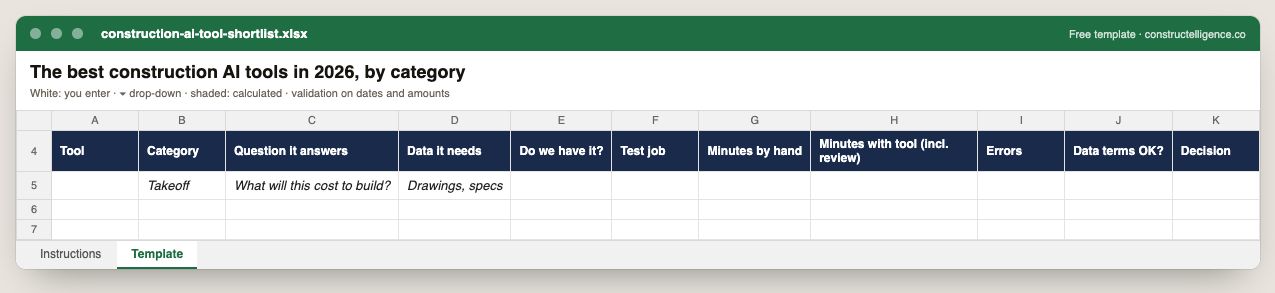
Every tool on the shortlist with the question it answers, the data it needs and whether you hold it, and the result of a timed test on a real job — minutes by hand, minutes with the tool including review, errors — plus the data-terms check and the decision.
11 columns: 9 you fill in and 2 picked from drop-down lists, so every row uses the same values. In the Excel version, 3 columns reject entries of the wrong type (a date column only takes dates, an amount column only numbers), the header row stays frozen with filters on it, and the workbook opens on an Instructions sheet that lists every column below.
Every column, and how it is captured
| Column | Type | What goes in it |
|---|---|---|
| Tool | Text | Free text. |
| Category | Text | Free text. |
| Question it answers | Text | Free text. |
| Data it needs | Text | Free text. |
| Do we have it? | Drop-down | Options: Yes / No. |
| Test job | Text | Free text. |
| Minutes by hand | Number | Enter a number. |
| Minutes with tool (incl. review) | Number | Enter a number. |
| Errors | Number | Enter a number. |
| Data terms OK? | Drop-down | Options: Yes / No. |
| Decision | Text | Free text. |
See it on real-looking numbers
Constructelligence is a construction intelligence platform: it reads your ERP, project and field systems read-only and does this arithmetic every week, for every job. The demo runs it on a sample eight-job portfolio.
Try the demoJoin the private betaFrequently asked questions
What are the best AI tools for construction?
It depends on the job: Togal.AI, Beam AI and Kreo for takeoff; ALICE Technologies and nPlan for scheduling; OpenSpace, Buildots and Doxel for progress tracking; Document Crunch and Trunk Tools for contracts and documents; Procore Helix and Autodesk Forma inside those platforms; and construction intelligence platforms such as Constructelligence for job cost forecasting.
What is the most used AI in construction?
General assistants such as ChatGPT, Claude and Microsoft 365 Copilot are the most widely used, for drafting and summarising. Among construction-specific tools, AI takeoff and the AI features inside Procore and Autodesk are the most common because they sit where contractors already work.
Is AI in construction worth it for a small contractor?
Usually, if it targets a task you do every week. A small estimating team gains most from AI takeoff; a small GC from better job cost forecasting and document search. Trial on a past job and count the review time before paying for a year.
How do I evaluate a construction AI tool?
Run it on a past job where you already know the right answer, measure the time including review, check where your data is stored and whether it trains shared models, and confirm it connects to the systems you run today rather than on a roadmap.
Related guides
More in AI in construction
- AI for construction scheduling and project management
- AI for construction safety and progress tracking
- AI for construction documents: contracts, specs, submittals and RFIs
- ChatGPT for construction: 30 prompts for contractors
Free tools for this topic: Construction PDF to Excel converter · Schedule PDF to Excel (P6 & MS Project) · Construction schedule health check
All ai in construction resources →