- Construction AI is three technologies: computer vision, language models and forecasting from history.
- Mature today: takeoff, document search, progress tracking, forecasting and drafting.
- Your data decides the result — it must be coded, current and reachable.
- Start with one decision, pilot on past jobs, then run live on one job with a named owner.
What AI in construction actually means
Three different technologies sit under the label, and they fail in different ways:
| Technology | What it does | Construction examples |
|---|---|---|
| Computer vision | Reads images, drawings and video | Takeoff from plans, progress from 360° photos, PPE detection |
| Large language models (LLMs) | Reads and writes text | Contract review, spec search, drafting RFIs, answering questions over documents |
| Predictive models & statistics | Forecasts from history | Schedule risk, cost at completion, cash flow, safety risk scores |
Much of what gets called construction AI is the third kind done well — arithmetic over data that used to be too scattered to use. That is not a criticism: a forecast you can check line by line is often more useful than a clever one you cannot.
The use cases that work today
- Estimating and takeoff. Computer vision counts and measures from drawings; estimators review instead of trace. The most mature category. Guide →
- Document search and contract review. LLMs find the clause, the spec section or the RFI answer in seconds, with a citation. Guide →
- Progress tracking. 360° capture and scans compared with the model and schedule show what is really installed. Guide →
- Safety monitoring. Cameras and photo analysis flag PPE gaps and exclusion-zone breaches — useful where someone acts on the alert.
- Schedule risk and generative scheduling. Forecasting how likely the finish date is, or testing thousands of sequences. Guide →
- Job cost and cash forecasting. Forecasting cost at completion and cash weekly from the ERP, flagging jobs going over while they are running. Guide →
- Drafting and admin. General assistants writing RFIs, letters, meeting minutes and scopes. 30 prompts →
The list of construction AI tools names the products in each category.
Where it is not ready yet
- Fully automatic estimates. AI gets quantities; pricing, means and methods and risk still need an estimator.
- Autonomous decisions on site. Tools flag; people decide. Anything that acts without review needs a very low error rate you have tested yourself.
- Answers from data you do not have. No model can forecast labor from hours that are not coded to cost codes, or track progress against a model nobody updates.
Your data decides what AI can do
Every use case above runs on data most contractors already hold — drawings, schedules, the job cost ledger, timecards, contracts and photos. The difference between a tool that works and one that doesn’t is usually whether that data is coded, current and reachable:
- Coded: cost and hours posted to the right job and cost code.
- Current: schedules updated weekly, models kept to the latest revision.
- Reachable: in systems a tool can read — an ERP database, SharePoint, a platform API — not in someone’s inbox.
Fixing these pays off twice: it improves every report you have today, and it is the precondition for anything AI does next.
The risks, and how to manage them
| Risk | What it looks like | Control |
|---|---|---|
| Confidently wrong answers | An LLM invents a clause, or a takeoff misses a revised sheet | Require citations; review every output that leaves the company |
| Data leaving your control | Contracts pasted into a consumer chatbot | Business plans with no training on your data; a written rule on what can be pasted |
| Alert fatigue | Hundreds of camera alerts nobody reads | Pilot on one site; measure false positives per day |
| Black-box forecasts | A risk score nobody can explain in a meeting | Only buy forecasts that show the rows and working behind them |
| Write access | A tool that can change your ERP | Prefer read-only connections |
A 90-day plan to start
- Weeks 1–2: pick one decision. The one that costs most when it is late — usually “which jobs are going over” or “can we bid more work with the same estimators”.
- Weeks 3–4: check the data. Is it coded, current and reachable? Fix the gaps first.
- Weeks 5–8: pilot on history. Run one tool on two or three finished jobs where you know the answer. Score it with the calculator below.
- Weeks 9–12: run it live on one job. Weekly, with a named owner who acts on what it says. Decide on the evidence.
- Write the rules. What staff may paste into general assistants, and who reviews AI output before it goes to an owner or a sub.
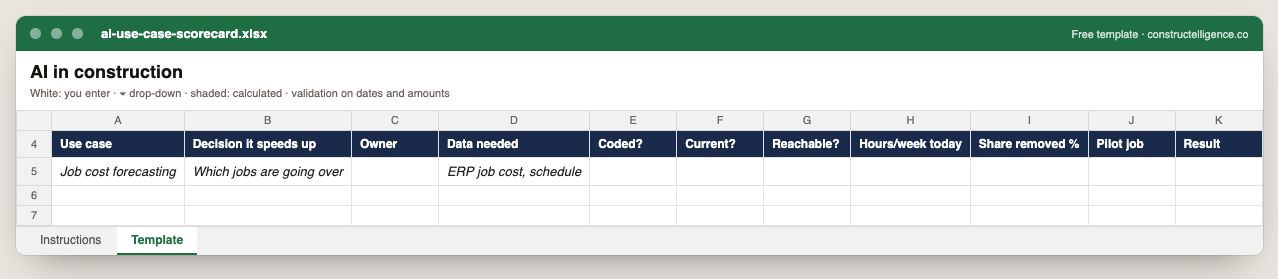
Each AI use case with the decision it speeds up, its owner, the data it needs scored for coding, currency and reach, the hours a week it costs today, the share a tool removes, and the pilot and its result.
11 columns: 8 you fill in and 3 picked from drop-down lists, so every row uses the same values. In the Excel version, 2 columns reject entries of the wrong type (a date column only takes dates, an amount column only numbers), the header row stays frozen with filters on it, and the workbook opens on an Instructions sheet that lists every column below.
Every column, and how it is captured
| Column | Type | What goes in it |
|---|---|---|
| Use case | Text | Free text. |
| Decision it speeds up | Text | Free text. |
| Owner | Text | The person responsible for the row. |
| Data needed | Text | Free text. |
| Coded? | Drop-down | Options: Yes / No. |
| Current? | Drop-down | Options: Yes / No. |
| Reachable? | Drop-down | Options: Yes / No. |
| Hours/week today | Number | Enter a number. |
| Share removed % | Percent | Enter a percentage, 0–100. |
| Pilot job | Text | Free text. |
| Result | Text | Free text. |
See it on real-looking numbers
Constructelligence is a construction intelligence platform: it reads your ERP, project and field systems read-only and does this arithmetic every week, for every job. The demo runs it on a sample eight-job portfolio.
Try the demoJoin the private betaFrequently asked questions
How is AI used in construction?
The main uses today are AI takeoff and estimating from drawings, document search and contract review, progress tracking from 360° photos and scans, safety monitoring from cameras, schedule risk forecasting, job cost and cash forecasting, and drafting RFIs, letters and minutes with general AI assistants.
Will AI replace construction jobs?
Not the ones on site, and not estimators or project managers. It removes repetitive work — tracing takeoffs, searching documents, rebuilding reports — so the same team can bid more work and catch problems earlier. Every output still needs a person to review it.
What is the best way to start using AI in a construction company?
Pick one decision that costs money when it is late, check you have coded and current data for it, pilot a tool on past jobs where you know the answer, then run it live on one job with a named owner for a few weeks before buying more widely.
Is it safe to put construction documents into ChatGPT?
Only on a business plan whose terms say your data is not used to train models, and only with a company rule about what may be pasted. Contracts, pricing and personal data should stay out of consumer accounts.
Related guides
More in AI in construction
- AI construction estimating: how AI takeoff works and how to test it
- AI for construction scheduling and project management
- AI for construction safety and progress tracking
- AI for construction documents: contracts, specs, submittals and RFIs
Free tools for this topic: Construction PDF to Excel converter · Schedule PDF to Excel (P6 & MS Project) · Construction schedule health check
All ai in construction resources →