- Most change-order losses are work performed before anyone signed for it.
- Track unsigned work in place — cost coded to changes with no approved revenue — every week.
- Give every change its own cost code the day it is identified.
- Escalate anything pending more than 30 days; get a CCD if work must continue.
The documents, in order
| Document | What it is |
|---|---|
| PCO — potential change order | An internal record that something has changed: an RFI answer, an owner request, a field condition. |
| COR — change order request | The priced request sent to the owner or GC: labor, material, markup and any time extension. |
| CCD — construction change directive | The owner directs the work before price is agreed. You must proceed; the price is settled later. |
| CO — change order | The signed amendment to the contract sum and/or time. Only now is the revenue real. |
Why unsigned work in place is the number that matters
Between the PCO and the signed CO, cost keeps posting. That gap — cost booked against a change that has no approved revenue — shows up as a margin loss on the WIP and as under-billing, and it gets harder to recover every week it ages.
Until CO-07 is signed, this job carries $118,000 of cost with no matching revenue, and pay applications can’t include it.
For more inputs, a second forecast and a shareable link: the change order pricing calculator →
The KPIs to track weekly
- Unsigned work in place — cost coded to pending changes. The headline number.
- Days pending — age of each COR since it was submitted. Anything past 30 days needs an escalation.
- Approval rate and haircut — share of CORs approved, and the average reduction from requested to approved. Both feed better pricing.
- Change orders as % of contract — by job and by owner. High numbers early often predict a difficult job.
A weekly process that works
- Give every change its own cost code (or phase) the day it is identified, so its cost is separable from base scope.
- Price and send the COR within a set number of days, with the backup attached.
- Review unsigned work in place every week, job by job, with the oldest first.
- Stop or slow work on high-value unsigned changes where the contract allows — or get a CCD.
- Bill approved changes on the next pay application, not the one after.
With the ledger, the CO log and the documents read together, this review takes minutes: the change orders view in the demo shows every pending change with its cost in place.
Asking for time as well as money
A change that adds work often adds days. Pricing only the dollars leaves the contractor carrying the delay — extended general conditions, and possibly liquidated damages. The request for time rests on the schedule:
- Model the change as new activities (a "fragnet") inserted into the current schedule with real logic.
- Run the schedule and see whether the finish moves. Only a change on or near the critical path earns days; work absorbed by float doesn't.
- Price the time: the days the finish moves, times the job's daily general conditions.
- Meet the notice deadline in your contract. Under AIA A201, for example, claims must be started within 21 days of the event that gives rise to them — a late notice can lose a valid claim.
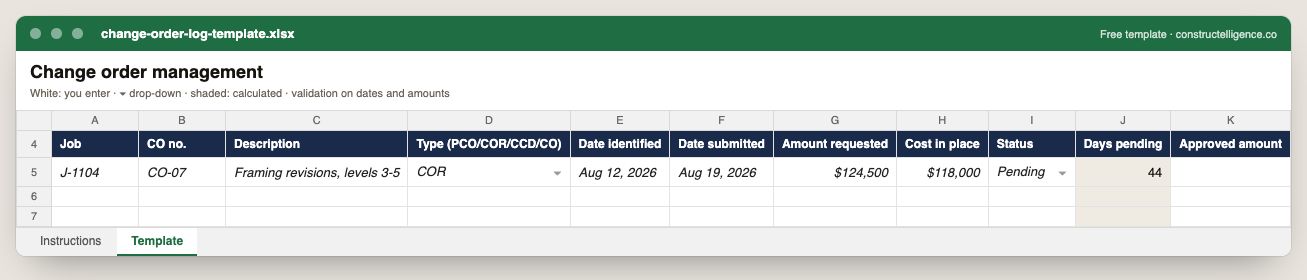
Every change from first notice: job, number, type, dates identified and submitted, amount requested, cost already in place, status, days pending and approved amount.
11 columns: 8 you fill in, 2 picked from drop-down lists, so every row uses the same values and 1 calculated by formula and filled down 200 rows, so nothing is worked out by hand. In the Excel version, 5 columns reject entries of the wrong type (a date column only takes dates, an amount column only numbers), the header row stays frozen with filters on it, and the workbook opens on an Instructions sheet that lists every column below.
Every column, and how it is captured
| Column | Type | What goes in it |
|---|---|---|
| Job | Text | Job number exactly as in your accounting system (e.g. J-1104), so rows join to job cost. |
| CO no. | Text | Free text. |
| Description | Text | What the line is, in words the other party will recognise. |
| Type (PCO/COR/CCD/CO) | Drop-down | Options: PCO / COR / CCD / CO. |
| Date identified | Date | Enter the date. |
| Date submitted | Date | Enter the date. |
| Amount requested | Amount ($) | Enter the amount in dollars. |
| Cost in place | Amount ($) | Enter the amount in dollars. |
| Status | Drop-down | Where the item stands; pick from the list so the log can be filtered and counted. Options: Identified / Submitted / Pending / Approved / Rejected / Void. |
| Days pending | Calculated | Calculated — days since the change was submitted (= TODAY() − [Date submitted]) |
| Approved amount | Amount ($) | Enter the amount in dollars. |
See it on real-looking numbers
Constructelligence is a construction intelligence platform: it reads your ERP, project and field systems read-only and does this arithmetic every week, for every job. The demo runs it on a sample eight-job portfolio.
Try the demoJoin the private betaFrequently asked questions
What is the difference between a PCO, a COR and a change order?
A potential change order (PCO) records that something changed. A change order request (COR) is the priced request sent to the owner. A change order (CO) is the signed contract amendment. Only a signed CO adds approved revenue to the contract.
What is unsigned work in place?
It is cost already booked against a change that has not been approved. The contractor is carrying that cost with no matching revenue, which shows up as margin loss and under-billing until the change order is signed.
How long should a change order take to approve?
It depends on the contract, but most contractors escalate any change order request pending longer than 30 days. The longer approval takes, the more cost accumulates and the harder the claim becomes.
Should work on a change stop until it is signed?
Where the contract allows, slowing or stopping high-value unsigned work protects margin. If the owner needs the work to continue, a construction change directive (CCD) documents the direction while price is agreed.
What is a time impact analysis?
A schedule analysis that inserts the activities of a change or delay into the current schedule and measures how far the project finish moves. It is the usual basis for a request for a time extension.
How long do I have to give notice of a change or claim?
Whatever your contract says — read the changes and claims clauses before work starts. AIA A201 requires claims to be started within 21 days of the event giving rise to them; other contracts set different deadlines.
Related guides
More in Running the business
- Subcontractor bid leveling: find the real low bid
- Construction KPIs: the 12 financial metrics that actually matter
Free tools for this topic: Change order pricing calculator · Contractor overhead recovery and break-even calculator · Construction markup vs margin calculator
All running the business resources →