- Clean and map the masters (jobs, cost codes, vendors) before anything that references them.
- Open jobs move with full detail; older history can be summarized, as a written decision.
- Cut over at a frozen month-end and tie out before anyone posts.
- Tie out per job, not just in total — matching totals can hide cost moved between jobs.
What actually moves
Construction data falls into three kinds, and each moves differently:
| Kind | Examples | How it moves |
|---|---|---|
| Masters | Jobs, cost codes, cost categories, vendors, customers, employees | Cleaned and mapped first. Everything else points at them. |
| Open items | Open AP and AR invoices, retainage held and owed, open commitments, unbilled work | Moved in full, at cutover, so they can be paid, billed and closed in the new system. |
| History | Posted job cost, paid invoices, payroll, closed jobs | Moved as detail, as summaries, or left readable in the old system — a decision, not a default. |
Most migration trouble is a master problem showing up later: a cost code that mapped to two places, a vendor entered three times, a job number that changed format. Clean the masters before anything that references them moves.
A migration plan, week by week
Most of the work happens before cutover. A plan that leaves room for two trial loads looks like this, counted back from the cutover month-end:
| When | Work | Done when |
|---|---|---|
| 8 weeks before | Inventory every master and open-item list; decide the history cut | A written list of what moves, as detail or summary |
| 7–6 weeks | Clean masters: merge duplicate vendors, close dead jobs, retire unused cost codes | Masters frozen for mapping |
| 6–5 weeks | Build and approve the crosswalks (cost codes, categories, GL accounts, job numbers) | Every old value has a new value or a written rule |
| 4 weeks | Trial load #1 into a test company; run every tie-out | Differences listed and each one explained or fixed |
| 2 weeks | Trial load #2 with the fixes; train the people who will post | Tie-outs clean on the trial |
| Cutover | Close, freeze, final load, tie-out, open for posting | Signed tie-out pack |
| 1 month after | First close in the new system, in parallel if possible | Both systems agree on the month |
The trial loads are the part teams are tempted to skip, and they are the part that finds the crosswalk mistakes while there is still time to fix them without a deadline.
How much history to bring
History is what forecasts, estimate feedback and warranty questions run on, so dropping it has a cost — but so does moving ten years of detail through a crosswalk. A workable split:
- Open jobs: full transaction detail from the job's first posting. A job that finishes in the new system has to show its whole cost history there, or its final cost report and WIP line are wrong.
- Recently closed jobs: detail for as far back as your warranty obligations and your forecasting look-back reach. Past-job forecasts and estimate-versus-actual reviews need cost by code and by week, not a single total.
- Older closed jobs: one summary line per job and cost code (budget, final cost, final contract), plus the old system kept readable — a read-only copy of its database is enough.
Whatever the cut, write it down with the date. "Detail from 2019 on, summaries before" is a sentence an auditor or a new controller can work with; "some history" is not.
Mapping: the crosswalk is the migration
Every master gets a crosswalk: old value, new value, and who approved it. The cost code crosswalk matters most, because it decides whether cost lands where estimates and forecasts expect it:
| Old code | Old description | New code | New cost type | Note |
|---|---|---|---|---|
| 09-250 | Drywall labor | 09 21 16 | Labor | One-to-one |
| 09-251 | Drywall material | 09 21 16 | Material | Two old codes → one code, split by cost type |
| 01-900 | Misc | — | — | Review: re-code open-job cost by hand, summarize closed |
Rules that keep the crosswalk honest:
- Many-to-one is fine; one-to-many is not. If one old code has to split into two new ones, the split needs a rule (by cost type, by date, by phase) or a person. Otherwise history lands in one of them arbitrarily.
- Map cost categories to cost types explicitly. Labor, material, subcontract, equipment and other must mean the same thing on both sides, or every category report changes meaning at cutover.
- Keep job numbers identical where the new system allows it. Every other system — the PM platform, payroll, the bank's draw reports — refers to jobs by number.
- Deduplicate vendors before, not after. Match on tax ID first, then name and address. Merging vendors after history has moved splits their spend across two records for good.
The cost codes guide covers how to structure the new code list itself.
Cutover: pick a month-end and freeze
Cut over at a month-end close, never mid-period. The sequence that keeps both systems reconcilable:
- Close the period in the old system — payroll posted, AP entered, billing out, WIP adjustments booked.
- Freeze it. No new postings to the closed period. Anything late goes into the new system's first period.
- Extract masters, open items and history from the frozen period, run them through the crosswalks, and load.
- Tie out (next section) before anyone posts to the new system.
- Run one close in parallel if you can afford it: post the first new month in both systems and compare. The second system catches mapping mistakes that tie-outs on history can't, because they only show up in new postings.
The tie-outs that prove nothing was lost
Every tie-out compares one total in the old system with the same total in the new one, at the cutover date. A difference is either explained (a documented mapping or summarization) or it is an error. Run them in this order, broadest first:
| Tie-out | Old system | New system | Must match |
|---|---|---|---|
| Trial balance | Every GL account balance | Same accounts after the chart-of-accounts map | To the cent, per account |
| Job cost by job | Cost to date per job | Cost to date per job | Per job |
| Job cost by cost type | Per job × labor/material/sub/equipment/other | Same | Per job and type |
| AP and AR aging | Open balance by vendor / customer and age bucket | Same | Per vendor / customer |
| Retainage | Held from subs, held by owners | Same | Per job |
| Commitments | Committed and remaining per subcontract / PO | Same | Per commitment |
A worked tie-out for one job, J-1104:
Only the unexplained column matters, and its tolerance is zero at the job level. Totals that tie at the company level while individual jobs differ mean cost moved between jobs — the worst kind of error, because every job's forecast and WIP line is now wrong while the trial balance looks perfect.
Migrating off Sage 300 CRE or QuickBooks
The two systems contractors most often leave have their own shapes, and each one decides part of the crosswalk:
- Sage 300 CRE structures cost as job → extra (optional) → cost code → category. The category is what decides labor, material, subcontract, equipment or other, and each company can define its own category codes — so map categories to cost types from that company's category list, not from a default. Jobs that use extras need a rule for where the extra goes: into the job number, a phase, or a separate job. Data comes out through its ODBC driver or its report writer; a reporting copy in SQL (see the setup guide) makes the extract and the tie-out queries far easier.
- QuickBooks has no native cost code. Contractors usually model codes as items or classes, and jobs as customer:job pairs, so the first mapping step is deciding which QuickBooks field was playing the cost-code role — often it differs by year. Committed cost and retainage usually live outside QuickBooks entirely (spreadsheets, subcontract logs) and have to be gathered before cutover. The QuickBooks job costing guide covers those workarounds.
Common data migration mistakes
- Mapping before cleaning. Every duplicate vendor and dead cost code that survives into the crosswalk becomes a permanent row in the new system.
- Tying out only in total. Company totals can match while cost has moved between jobs. Tie out per job and per cost type.
- Cutting over mid-period. Neither system can then produce the month's close or WIP schedule on its own.
- Forgetting open items that live outside the ERP — retainage logs, unissued change orders, subcontract commitments kept in spreadsheets.
- Losing the old system. Keep it readable (a read-only database copy is enough) until at least one audit has closed on the new one.
- Changing job numbers. Every other system and every person refers to jobs by number; a new format breaks matching everywhere at once.
When two systems stay live: ERP and project management
Not every migration retires a system. A contractor adding Procore or Autodesk Construction Cloud next to the ERP keeps both, and the job is keeping them agreeing rather than moving data once:
- One system of record per field. Cost and payments live in the ERP; RFIs, submittals and field records in the PM platform. Budgets and commitments are where the two overlap — decide which side is master and sync one way.
- Identical job numbers. The PM platform's project number should be the ERP job number exactly. Matching "J-1104" to "j 1104" is safe; matching "0104" to "104" is a guess, and a wrong match puts one job's commitments on another.
- The same cost code structure, so a commitment line in the PM system lands on the ERP code the budget uses.
Constructelligence reads both sides without writing to either: Sage job cost from the reporting database, and projects, commitments, change orders, RFIs and submittals from Procore or ACC, matched to jobs by number. The reporting database setup guide covers the SQL side.
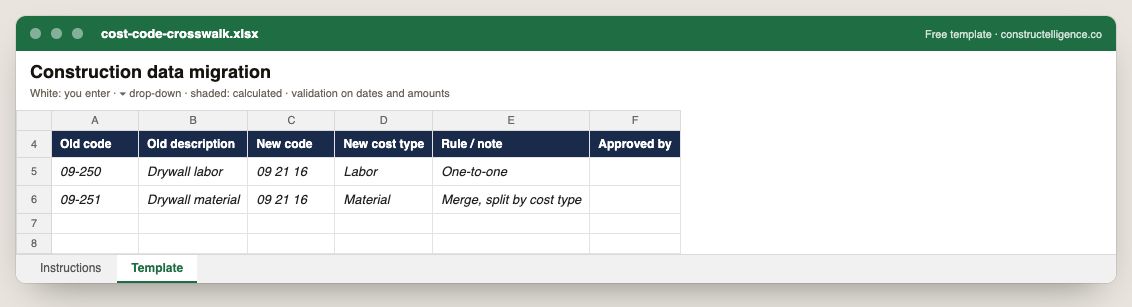
Each old cost code mapped to its new code and cost type, with the rule and who approved it.
6 columns: 6 you fill in. In the Excel version, the header row stays frozen with filters on it, and the workbook opens on an Instructions sheet that lists every column below.
Every column, and how it is captured
| Column | Type | What goes in it |
|---|---|---|
| Old code | Text | Free text. |
| Old description | Text | Free text. |
| New code | Text | Free text. |
| New cost type | Text | Free text. |
| Rule / note | Text | Free text. |
| Approved by | Text | Free text. |
See it on real-looking numbers
Constructelligence is a construction intelligence platform: it reads your ERP, project and field systems read-only and does this arithmetic every week, for every job. The demo runs it on a sample eight-job portfolio.
Try the demoJoin the private betaFrequently asked questions
How long does a construction ERP migration take?
It depends mostly on master-data cleanup and how much history moves, not on the load itself. Plan the cutover for a month-end, allow at least one full close to run in parallel if you can, and schedule the tie-outs before anyone posts to the new system.
Should I migrate all historical job cost data?
Move full detail for open jobs and for closed jobs inside your warranty and forecasting look-back, summaries by job and cost code for older jobs, and keep a read-only copy of the old system. Moving everything as detail is rarely worth the crosswalk effort for jobs nobody will query.
What is a cost code crosswalk?
A table mapping every old cost code to its new code and cost type, with a note for each code that splits, merges or needs review. It decides where historical cost lands, so estimate-versus-actual and forecasts keep meaning the same thing after cutover.
How do you verify a data migration?
Tie out totals between the old and new systems at the cutover date: the trial balance by account, job cost by job and by cost type, AP and AR aging, retainage and commitments. Every difference must be explained by a documented mapping; unexplained differences are errors, even if company totals match.
Why cut over at month-end?
A closed, frozen period gives both systems the same starting point. Cutting over mid-period splits a month's postings across two systems, and neither one can then produce a clean month-end or WIP schedule for it.
What is a parallel run?
Posting the first month after cutover in both the old and the new system and comparing the results. It catches mapping mistakes that only show up in new transactions, which tie-outs on history cannot find.
What data should be cleaned before a migration?
The masters: duplicate vendors (match on tax ID, then name and address), closed or dead jobs, unused cost codes, and inconsistent job number formats. Anything left uncleaned becomes a permanent row in the new system.
How do you migrate from QuickBooks to a construction ERP?
Decide which QuickBooks field played the cost-code role (items or classes), map customer:job pairs to jobs, gather committed cost and retainage from wherever they were tracked outside QuickBooks, then cut over at a month-end and tie out job cost, AP, AR and retainage per job.
Related guides
More in Data & integrations
- Construction software integration: connecting ERP, project management and field tools
- Procore ERP integration: what syncs with your accounting system, and how
- Autodesk Build cost management: budgets, contracts and the change order chain