- % complete = cost to date ÷ forecast total cost (cost-to-cost input method).
- Earned revenue = contract × % complete; billed − earned is over- or under-billing.
- A job forecast to lose money recognises the whole loss now.
- A WIP is only as good as the forecasts behind it — stale forecasts overstate progress.
Percentage of completion, in one line
Most contractors recognise revenue over time using the cost-to-cost input method under ASC 606: the share of revenue earned equals the share of total expected cost incurred.
earned revenue = contract value × % complete
over / (under) billing = billed to date − earned revenue
Note the denominator: estimated total cost, which is the job’s current forecast at completion — not the original budget. A WIP is only as good as the forecasts behind it.
A worked example
This job is also forecast to lose money — cost at completion exceeds the contract — so under GAAP the whole expected loss ($100,000 here) is recognised now, not spread over the remaining work.
For more inputs, a second forecast and a shareable link: the full over/under billing calculator →
What over- and under-billing tell you
- Over-billing (billed ahead of earned) is a liability: cash received for work not yet done. Modest over-billing is healthy cash management. Large or growing over-billing can mean a front-loaded schedule of values — or a forecast that is too low.
- Under-billing (earned ahead of billed) is an asset, but a weak one: the contractor is financing the owner. Persistent under-billing often means unapproved change orders, missed billing, or cost that is running ahead of the work.
- Fade is gross profit shrinking from one WIP to the next. It is the number sureties watch most, because it shows forecasts that were optimistic.
The errors that make a WIP misleading
- Stale forecasts. Updating cost every month but the forecast every quarter overstates percent complete and hides losses.
- Unapproved change orders in the contract value. Include only what is approved or probable of approval — and document why.
- Uninstalled materials in cost. Material delivered but not installed inflates percent complete; many contractors exclude it from the cost-to-cost calculation.
- Rebuilt by hand. A WIP assembled in a spreadsheet each month is a reconciliation risk. Generated from the same ledger and forecasts that run the business, it can be produced any day.
Producing it weekly instead of monthly
Every figure in the WIP already exists in the job cost ledger, the contract and billing records, and the forecast. When those are read directly, the WIP becomes a view rather than a month-end project — see the WIP & billing view in the demo, and check your own numbers with the free calculators. Which accounting systems can produce a WIP on their own is covered in the construction accounting software guide.
Reviewing the WIP: five questions per job
- Did the estimated gross profit fall since last month? Profit fade is the most common sign a forecast was optimistic.
- Is the job under-billed, and for how long? A month of under-billing is timing; three months is often unbilled change work or an overstated percent complete.
- Does percent complete agree with the schedule? Cost-to-cost percent complete can run ahead of physical progress when material is bought early.
- Are pending change orders in the contract value? Unapproved changes in revenue inflate profit; the cost may already be in.
- Is any job forecast to lose money? The whole loss is recognised now, not spread over the remaining months.
Answering these needs the forecast behind each line, not just the ledger — see job cost forecasting and committed cost.
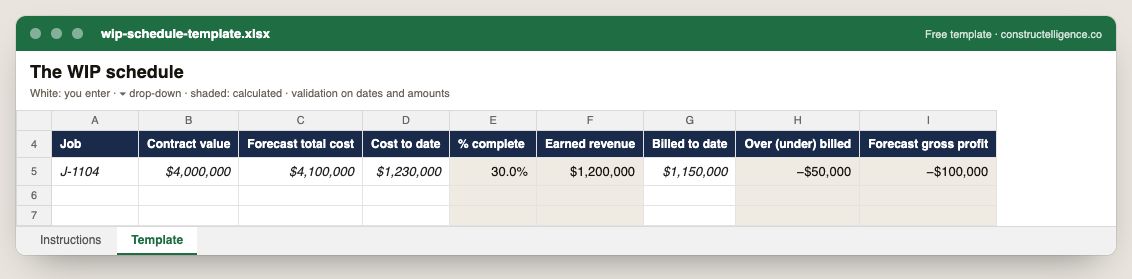
Per job: contract value, forecast total cost, cost to date and billed to date, with percent complete, earned revenue, over or under billing and forecast gross profit calculated.
9 columns: 5 you fill in and 4 calculated by formula and filled down 200 rows, so nothing is worked out by hand. In the Excel version, 4 columns reject entries of the wrong type (a date column only takes dates, an amount column only numbers), the header row stays frozen with filters on it, and the workbook opens on an Instructions sheet that lists every column below.
Every column, and how it is captured
| Column | Type | What goes in it |
|---|---|---|
| Job | Text | Job number exactly as in your accounting system (e.g. J-1104), so rows join to job cost. |
| Contract value | Amount ($) | Contract value including approved change orders. |
| Forecast total cost | Amount ($) | Enter the amount in dollars. |
| Cost to date | Amount ($) | Enter the amount in dollars. |
| % complete | Calculated | Calculated: [Cost to date] ÷ [Forecast total cost] |
| Earned revenue | Calculated | Calculated: [Contract value] × [% complete] |
| Billed to date | Amount ($) | Enter the amount in dollars. |
| Over (under) billed | Calculated | Calculated: [Billed to date] − [Earned revenue] |
| Forecast gross profit | Calculated | Calculated: [Contract value] − [Forecast total cost] |
See it on real-looking numbers
Constructelligence is a construction intelligence platform: it reads your ERP, project and field systems read-only and does this arithmetic every week, for every job. The demo runs it on a sample eight-job portfolio.
Try the demoJoin the private betaFrequently asked questions
What is a WIP schedule in construction?
A work-in-progress schedule lists every open job with its contract value, forecast cost, cost to date, percent complete, earned revenue and billings, and shows whether each job is over-billed or under-billed. Lenders and sureties use it to judge whether revenue and profit are real.
How do you calculate over and under billing?
Percent complete is cost to date divided by forecast total cost. Earned revenue is contract value times percent complete. Billed to date minus earned revenue is over-billing if positive and under-billing if negative.
Is under-billing good or bad?
Under-billing means you have earned revenue you have not invoiced, so you are financing the job. A little is normal timing; a lot, or a trend, usually points to unbilled change orders, missed billings or cost running ahead of progress.
How often should a WIP schedule be prepared?
At least monthly for financial reporting, but the underlying numbers change weekly. Generating the WIP from live job cost and forecasts lets you see over- and under-billing before the pay application goes out rather than after month-end.
What is profit fade in construction?
A fall in a job's estimated gross profit from one WIP report to the next. Persistent fade usually means early forecasts were optimistic, and it is one of the first things sureties and lenders look for.
Why do sureties care about the WIP schedule?
It shows whether a contractor's jobs are making the profit it expected, whether billings run ahead of or behind the work, and how much work remains — the basis for bonding capacity decisions.
Related guides
More in Billing & cash
- The schedule of values: how to build one, bill against it and avoid front-loading
- Construction invoice template: what to put on it, a filled-in example, and a free download
- AIA G702 and G703: filling out a pay application, line by line
- Retainage in construction: how it works and how to get it back
- Lien waivers in construction: the four types, when to sign each, and how to track them
- Construction cash flow forecasting: a 13-week model that works
Free tools for this topic: Over/under billing calculator (WIP) · Pay application and retainage calculator · G703 continuation sheet PDF to Excel
All billing & cash resources →