


- Construction accounting must cost every dollar to job, cost code and cost type — and track committed cost.
- Payroll complexity (union, certified, multi-state) narrows the choice fastest.
- Test a real month-end in the demo, including a pay app with retainage and a WIP.
- Before replacing an ERP, check whether reading it properly gets you the answers.
What construction accounting has to do
- Job costing by job, cost code and cost type (labor, material, subcontract, equipment, other).
- Committed cost: subcontracts and purchase orders tracked before they are invoiced.
- Progress billing: AIA G702/G703 on a schedule of values, with retainage.
- Payroll: certified payroll, prevailing wage, union fringes, multi-state.
- Revenue recognition on percentage of completion, and a WIP schedule.
- Multi-entity for contractors running several companies.
- Equipment costing for self-perform and heavy civil.
The main systems
Sage 300 Construction and Real Estate (Sage 300 CRE)
On-premise ERPLong-established construction accounting with job cost, payroll, AP, AR and equipment, running on the contractor’s own servers; a large installed base among mid-sized contractors.
- Best for
- Established mid-sized contractors with in-house IT.
- Check
- Reporting — the data is rich, but most firms rebuild reports in Excel.
Sage Intacct Construction
Cloud financialsSage’s cloud financials with construction capabilities, strong on multi-entity and dimensional reporting.
- Best for
- Growing and mid-sized contractors that want cloud and multi-entity reporting.
- Check
- Which construction functions (payroll, project management) need add-on modules or partners.
Viewpoint Vista (Trimble)
Construction ERPA full construction ERP with detailed job cost, payroll and equipment, part of Trimble’s construction portfolio.
- Best for
- Large contractors with complex job costing and payroll.
- Check
- Implementation effort and how it connects to Trimble’s field and PM tools.
Viewpoint Spectrum (Trimble)
Cloud construction ERPCloud construction accounting and ERP within Trimble Construction One.
- Best for
- Mid-sized and large contractors wanting a cloud ERP.
- Check
- Module coverage for your payroll and equipment needs.
Foundation Software
Construction accountingConstruction accounting with strong payroll — certified, union and prevailing wage — plus job cost and project management add-ons.
- Best for
- Specialty and union contractors with heavy payroll requirements.
- Check
- Reporting and integrations with your PM platform.
CMiC
Enterprise construction ERPA single platform for construction financials, project management and operations, aimed at large contractors.
- Best for
- Large GCs and CMs with complex, multi-office portfolios.
- Check
- Implementation timeline and the internal team it needs.
Acumatica Construction Edition
Cloud ERPCloud ERP with construction job costing, project accounting and budgeting on a general ERP platform.
- Best for
- Small and mid-sized contractors that want a modern cloud ERP.
- Check
- Depth of construction payroll and AIA billing for your trade.
QuickBooks (with construction add-ons)
SMB accountingGeneral small-business accounting; job costing is basic, and many contractors add construction-specific tools for billing, payroll and reporting.
- Best for
- Small contractors early in growth.
- Check
- The point at which job costing, retainage and WIP outgrow it.
How to choose
- Write down your payroll reality first — union, certified, multi-state. It eliminates systems faster than anything else.
- Count entities and decide how you will consolidate.
- Run a real month-end in the demo: a job with committed cost, a change order, a pay app with retainage, and a WIP.
- Check how data gets out — reports, APIs, database access. You will want answers the standard reports do not give.
- Budget for implementation and the cost-code clean-up that should come with it.
If the choice means leaving your current system, the move itself is its own project — crosswalks, a month-end cutover and tie-outs per job. The construction data migration guide lays out the plan week by week.
Getting more from the ERP you already have
Replacing an ERP is a two-year project. Often the faster win is reading the one you have properly: job cost, commitments, billing and payroll are all already in it, usually in more detail than any report shows. Constructelligence reads construction ERPs read-only — Sage 300 CRE and QuickBooks Desktop today, with Viewpoint, Sage Intacct and others in build — and turns them into weekly forecasts, WIP and early warnings without a migration.
One report most ERPs undersell is committed cost — signed subcontracts and POs not yet invoiced. Tracking it per job, with buyout by scope, finds overruns months before the invoices post.
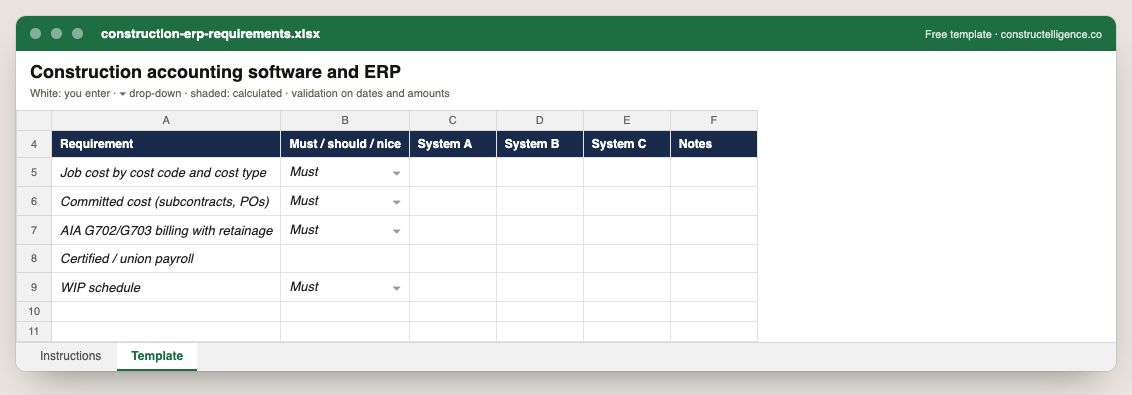
Each requirement ranked must, should or nice, scored against up to three systems, with notes from the demos.
6 columns: 5 you fill in and 1 picked from drop-down lists, so every row uses the same values. In the Excel version, the header row stays frozen with filters on it, and the workbook opens on an Instructions sheet that lists every column below.
Every column, and how it is captured
| Column | Type | What goes in it |
|---|---|---|
| Requirement | Text | Free text. |
| Must / should / nice | Drop-down | Options: Must / Should / Nice. |
| System A | Text | Free text. |
| System B | Text | Free text. |
| System C | Text | Free text. |
| Notes | Text | Anything that explains the row; free text. |
See it on real-looking numbers
Constructelligence is a construction intelligence platform: it reads your ERP, project and field systems read-only and does this arithmetic every week, for every job. The demo runs it on a sample eight-job portfolio.
Try the demoJoin the private betaFrequently asked questions
What is the best construction accounting software?
It depends on size and payroll: QuickBooks with add-ons for small contractors; Sage Intacct Construction, Acumatica or Viewpoint Spectrum for growing mid-sized firms wanting cloud; Sage 300 CRE, Foundation or Viewpoint Vista for established contractors with complex job cost and payroll; CMiC for large enterprise contractors.
What is the difference between construction accounting software and an ERP?
Construction accounting software covers job cost, AP, AR, payroll and the general ledger. A construction ERP adds operations — equipment, project management, document control, service — in one system. Many products sit between the two and add modules as you grow.
Is QuickBooks good for construction?
For small contractors, yes, with limits: job costing is basic, and retainage, AIA billing, certified payroll and WIP usually need add-ons or spreadsheets. Most contractors move to a construction-specific system somewhere between $10M and $50M in revenue or when payroll gets complex.
What features does construction accounting software need?
Job costing by cost code and cost type, committed cost tracking, AIA progress billing with retainage, certified and union payroll, percentage-of-completion revenue and WIP reporting, multi-entity consolidation, and equipment costing for self-perform work.
Related guides
More in Construction software & tech
- The best construction management software in 2026: 12 platforms compared, and how to choose
- Construction estimating software: takeoff and bid tools compared
- Construction scheduling software: Primavera P6, Microsoft Project and the rest
- Construction technology trends in 2026: what is actually changing
- Sage 300 CRE reporting: job cost, WIP and dashboards without rebuilding Excel
- QuickBooks job costing for contractors: setup, reports and when you outgrow it
Free tools for this topic: Construction PDF to Excel converter · Schedule PDF to Excel (P6 & MS Project) · Construction schedule health check
All construction software & tech resources →