- Committed cost = signed subs + issued POs + approved change orders on them.
- Remaining committed is cost certain to post; leave it out and forecasts run low.
- Track buyout by scope: budget of bought scopes against what they were committed for.
- Projected cost = committed + still-to-buy + self-perform to date + to complete.
What counts as committed
Committed cost is the whole value of each commitment, not what is left of it. Two figures follow from it:
- Invoiced against commitments — what subs and suppliers have billed so far.
- Remaining committed = committed − invoiced. Money already agreed that will post as cost later. A cost report showing only posted cost leaves this out, which is why jobs "go over" suddenly late in the schedule.
Pending change orders — priced but not yet approved — are not committed, but they belong in the forecast as exposure. The change order guide covers tracking them.
Buyout: bought scope against its budget
Buyout is the process of awarding the subcontracts and purchase orders the estimate assumed. Track it by scope, comparing what each bought scope was budgeted at with what it was committed for:
| Scope | Budget | Committed | Buyout variance |
|---|---|---|---|
| Concrete | $640,000 | $612,000 | +$28,000 |
| Framing | $780,000 | $846,000 | −$66,000 |
| Drywall | $630,000 | $722,000 | −$92,000 |
| Bought so far | $2,050,000 | $2,180,000 | −$130,000 |
| Still to buy (MEP trim, specialties) | $400,000 | — | — |
Buyout variance = budget of scopes bought − committed on them
Here buyout is $2,050,000 ÷ $2,450,000 = 83.7%, and the scopes bought so far came in $130,000 over their budget. That overrun is certain today — the subcontracts are signed — even though almost none of it has been invoiced yet.
Projecting final cost with commitments
Split the budget into what is bought out and what is self-performed, and project each on its own terms:
For the job above, with a $3,520,000 budget of which $2,450,000 is to be bought out and $1,070,000 self-performed:
The $160,000 is the $130,000 buyout overrun plus $30,000 of self-perform labor running over — two different problems with two different owners, which is why the projection keeps them apart. For how the self-perform side is forecast, see job cost forecasting and labor forecasting.
Where committed cost lives — and why it goes missing
Commitments are often written in the project-management platform and recorded in the ERP, and the gap between the two is where committed cost goes missing:
- Written but not entered. A subcontract signed on site that hasn't reached the ERP — the ERP's committed cost is low, and so is its forecast.
- Change orders on commitments approved in one system and waiting in the other.
- Purchase orders outside the system — issued by email or from a supplier portal, never entered at all.
The fix is one system of record for commitments and a monthly tie-out per job between the systems; the Procore ERP integration guide shows that check. Constructelligence reads commitments from Procore or Autodesk Construction Cloud next to Sage's budget and cost, and reports buyout percentage and uncommitted budget per job.
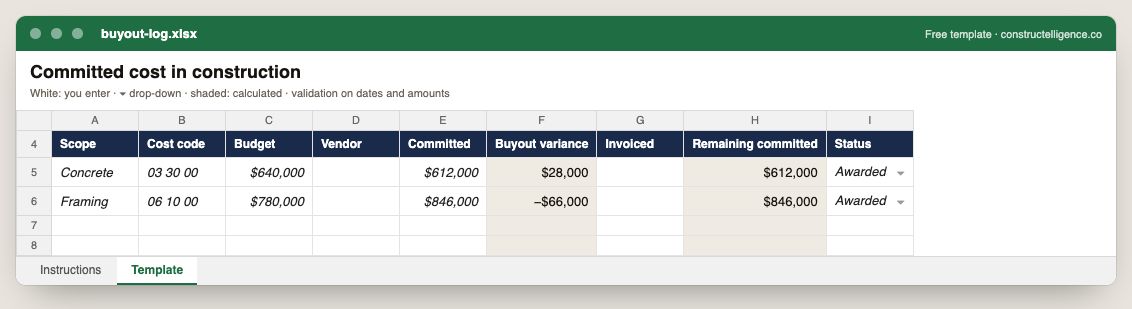
Each scope bought out: budget, vendor, committed amount, buyout variance, invoiced and remaining commitment, and status.
9 columns: 6 you fill in, 1 picked from drop-down lists, so every row uses the same values and 2 calculated by formula and filled down 200 rows, so nothing is worked out by hand. In the Excel version, 3 columns reject entries of the wrong type (a date column only takes dates, an amount column only numbers), the header row stays frozen with filters on it, and the workbook opens on an Instructions sheet that lists every column below.
Every column, and how it is captured
| Column | Type | What goes in it |
|---|---|---|
| Scope | Text | Free text. |
| Cost code | Text | Cost code from your cost code list, matching the estimate and the ERP. |
| Budget | Amount ($) | The budget for the line, from the estimate plus approved changes. |
| Vendor | Text | Vendor or subcontractor name as it appears in your vendor master. |
| Committed | Amount ($) | Enter the amount in dollars. |
| Buyout variance | Calculated | Calculated: [Budget] − [Committed] |
| Invoiced | Amount ($) | Enter the amount in dollars. |
| Remaining committed | Calculated | Calculated: [Committed] − [Invoiced] |
| Status | Drop-down | Where the item stands; pick from the list so the log can be filtered and counted. Options: Not bought out / Out to bid / Awarded / Contract signed. |
See it on real-looking numbers
Constructelligence is a construction intelligence platform: it reads your ERP, project and field systems read-only and does this arithmetic every week, for every job. The demo runs it on a sample eight-job portfolio.
Try the demoJoin the private betaFrequently asked questions
What is committed cost in construction?
The total value of signed subcontracts, issued purchase orders and approved change orders on them — money the contractor has agreed to spend, whether or not it has been invoiced yet.
What is the difference between committed cost and actual cost?
Actual cost is what has posted to the job ledger (invoices, payroll). Committed cost is what has been agreed in subcontracts and POs. Remaining committed — committed minus invoiced — is cost certain to post later, and a forecast without it is too low.
What is buyout in construction?
Awarding the subcontracts and purchase orders the estimate assumed. Buyout percentage is the budget of the scopes awarded divided by the budget of all scopes to be bought; buyout variance compares each awarded scope's budget with its committed value.
How do you calculate projected cost with committed cost?
Add committed cost, the budget (or best quote) for scopes still to buy, self-perform cost to date, and the self-perform estimate to complete. Compare the total with the budget, keeping buyout variance and self-perform variance separate.
Why does committed cost differ between Procore and my ERP?
Usually because a commitment or change order has been approved in one system and not yet synced or approved in the other. Tie out committed cost per job monthly; anything not waiting for approval is a failed sync.
Related guides
More in Forecasting & cost
- Earned value management for construction, explained with one job
- Construction labor forecasting: from burn rate to machine learning
- Construction cost codes: how to structure them and what they can tell you
Free tools for this topic: Construction cost overrun calculator · Construction labor burden calculator · Construction markup vs margin calculator
All forecasting & cost resources →