- Give every field one system of record; sync one way from it.
- Job number, cost code structure and vendor ID must match across systems.
- Money into the ERP should pass an accounting approver.
- Own the error queue, check counts weekly, tie out commitments monthly.
Decide the system of record for every field
The first rule of integration is that every field has exactly one owner. Two systems both allowed to edit a commitment amount will disagree within a month. A typical split:
| Data | System of record | Flows to |
|---|---|---|
| Jobs, cost codes, cost types | ERP | PM platform, field tools |
| Vendors and subcontractors | ERP | PM platform |
| Original budget | ERP (from the estimate) | PM platform |
| Subcontracts and POs (commitments) | PM platform, approved by accounting | ERP |
| Change orders | PM platform | ERP once approved |
| Posted cost, payroll, payments | ERP | PM platform, reporting |
| Time and quantities | Field tool | Payroll in the ERP |
| RFIs, submittals, issues | PM platform | Reporting only |
Write the table down before choosing a connector. A connector that can't respect it — one that syncs a field both ways because it can — is the wrong connector.
The keys that join the systems
Records only line up if they share a key. Three matter more than the rest:
- Job number — identical in every system, character for character. "J-1104" in the ERP and "1104 Riverside" in the PM platform turns every cross-system report into a manual lookup.
- Cost code and cost type — the same structure everywhere, so a commitment line lands on the budget line it buys out. Push the ERP's code list to the other systems rather than maintaining two.
- Vendor ID — the ERP's vendor number carried into the PM platform. Matching vendors by name fails on "ABC Drywall" versus "ABC Drywall, Inc."
Most platforms have a field for the other system's ID — Procore calls it the Origin ID. Filling it is what marks a record as synced, and what lets a report join the two sides without guessing.
Sync direction and timing
For each flow in the table, decide three things:
- Direction. One way, from the system of record. Two-way sync is almost never needed and is the usual source of overwritten numbers.
- Trigger. On approval (a commitment goes to the ERP when accounting approves it), on a schedule (cost to the PM platform nightly), or on change (webhooks).
- Approval. Money moving into the ERP should pass an accounting approver. Procore's ERP integration is built around exactly this: records wait in a staging area until an accounting approver accepts them.
Four ways to integrate
| Method | How it works | Fits | Watch for |
|---|---|---|---|
| Native connector | Built by one of the two vendors | A common pairing both vendors support | Which fields it actually syncs, and in which direction |
| Integration platform | A middleware service with connectors for both sides | Several systems, or a pairing with no native connector | Another subscription and another place for errors to hide |
| Direct API | Your own code against both APIs | Unusual flows, or systems nothing else supports | You own the upkeep, token renewals and rate limits |
| Files | Scheduled exports and imports (CSV) | On-premises software with no API | Silent failures when a file is late or a column moves |
Reporting is a fifth case that needs no sync at all: a reporting layer can read both systems and join them by job number, leaving each system as it is. That is how Constructelligence works — it reads Sage job cost from a reporting database and pulls projects, commitments, change orders and RFIs from Procore, Autodesk Construction Cloud or QuickBooks Online, without writing to any of them.
Monitoring: notice when it stops
Integrations fail quietly. A token expires, a field is renamed, one job's number is typed differently — and the reports keep running on stale or partial data. Three habits catch most of it:
- An owner for the error queue. Every connector has a list of records that failed to sync. Someone must read it weekly.
- A weekly count check. Open jobs, vendors and commitments per system. Counts that drift apart mean records are being skipped.
- A monthly value tie-out. Committed cost per job in the PM platform against committed cost in the ERP, the same way a migration ties out. A difference is a sync failure until proven otherwise.
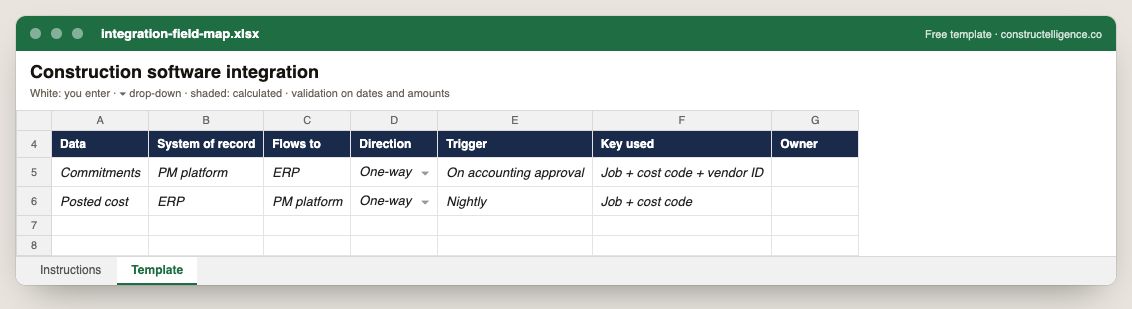
Each data item with its system of record, where it flows, direction, trigger, the key used to match it and the owner.
7 columns: 6 you fill in and 1 picked from drop-down lists, so every row uses the same values. In the Excel version, the header row stays frozen with filters on it, and the workbook opens on an Instructions sheet that lists every column below.
Every column, and how it is captured
| Column | Type | What goes in it |
|---|---|---|
| Data | Text | Free text. |
| System of record | Text | Free text. |
| Flows to | Text | Free text. |
| Direction | Drop-down | Options: One-way / Two-way. |
| Trigger | Text | Free text. |
| Key used | Text | Free text. |
| Owner | Text | The person responsible for the row. |
See it on real-looking numbers
Constructelligence is a construction intelligence platform: it reads your ERP, project and field systems read-only and does this arithmetic every week, for every job. The demo runs it on a sample eight-job portfolio.
Try the demoJoin the private betaFrequently asked questions
What is a system of record in construction software?
The one system allowed to create and edit a given piece of data. Jobs, cost codes and posted cost usually belong to the ERP; commitments, change orders and RFIs to the project-management platform. Other systems receive copies but never edit them.
Should construction software sync both ways?
Rarely. Each field should flow one way, from its system of record. Two-way sync lets two systems overwrite each other and is the usual cause of numbers changing with no one having changed them.
What keys should match between ERP and project management software?
The job number, the cost code and cost type structure, and the vendor ID. Store the other system's ID on each record (Procore's Origin ID field, for example) so reports can join the two sides without matching on names.
How do I know if an integration is working?
Give someone ownership of the connector's error queue, compare record counts per system weekly, and tie out committed cost per job between the PM platform and the ERP monthly.
Do I need an integration to report across ERP and project management data?
No. A reporting layer can read both systems and join them by job number without syncing anything. Integration is needed when one system must act on the other's data — approving a commitment into the ERP, for example.
Related guides
More in Data & integrations
- Autodesk Build cost management: budgets, contracts and the change order chain
- Construction data migration: move job cost history without losing a dollar
- Setting up a construction reporting database in SQL Server