- Seven layers: ERP, project management, field, scheduling, estimating, documents, intelligence.
- Every piece of data has one owning system; everything else reads from it.
- Integrations fail on keys — agree job numbers, cost codes and vendors first.
- Buy in order: accounting, then PM/field, then scheduling, then the layer across them.
The seven layers
| Layer | Owns | Typical systems |
|---|---|---|
| Accounting / ERP | Job cost, AP, AR, payroll, the general ledger — the money | Sage 300 CRE, Sage Intacct Construction, Viewpoint Vista & Spectrum, Foundation, CMiC, Acumatica, QuickBooks |
| Project management | RFIs, submittals, change events, drawings, daily logs | Procore, Autodesk Forma, Oracle Aconex, Trimble ProjectSight, Buildertrend |
| Field & labor | Timecards, production quantities, T&M tags | Field apps, crew time tools, the PM platform’s field tools |
| Scheduling | Activities, logic, the critical path | Primavera P6, Microsoft Project, Asta Powerproject |
| Estimating | Quantities, pricing, the bid | Takeoff and estimating tools, AI takeoff |
| Documents | Contracts, pay apps, invoices, the files themselves | SharePoint, Dropbox, Box, a common data environment |
| Intelligence | The answers across all of the above | Construction intelligence platforms, BI tools |
The rule that makes a stack work: every piece of data has one owner. The ERP owns cost; the PM platform owns the RFI; the schedule owns dates. Everything else reads from the owner rather than keeping a copy.
How the systems connect
- APIs. The modern route: Procore, Autodesk Forma and most cloud ERPs publish them. Check which objects the API actually exposes — commitments and change events are often thinner than the screens.
- Direct database reads. On-premise ERPs such as Sage 300 CRE keep everything in a database an authorised, read-only connection can query. Fast and complete, and nothing is written back.
- File exports. CSV and Excel on a schedule. Universal and fragile: the export breaks when a column moves, and nobody notices for a month.
- Integration platforms. Tools that move records between systems on rules. Good for syncing a vendor or a commitment; poor at answering a question across all of them.
For the connection decisions in detail — which system owns each field, the keys that must match, sync direction and how to notice a failed sync — see the construction software integration guide.
The three keys that must match
Integrations fail on identity, not technology. Before connecting anything, agree the three keys every system must share:
- Job number. One format everywhere —
J-1104, notJ1104in the ERP andRiverside Aptsin the PM tool. - Cost code and cost type. The same structure in the estimate, the budget, the commitments and the field app — see the cost codes guide.
- Vendor. One vendor record, so a subcontract in the PM platform and its invoices in AP are the same company.
What to buy first
| Company size | Start with | Add next |
|---|---|---|
| Under $10M, one office | Construction-aware accounting with job cost | A field/PM app your crews will actually use |
| $10M–$100M | A construction ERP and a PM platform, on the same job and cost-code keys | Scheduling discipline, then an intelligence layer across both |
| $100M+, several companies | Multi-entity ERP, enterprise PM, a common data environment | Weekly forecasting across every company and system |
The layer on top
Once cost lives in the ERP, changes in the PM platform and dates in the schedule, the questions a contractor actually asks — which jobs are going over, where is the cash, what changed this week — need all three at once. That is the intelligence layer: Constructelligence reads each system read-only, maps them to one construction data model and forecasts every job weekly. The demo’s connections view shows the model.
Retiring a system without losing its data
Stacks grow by addition, but some tools should go. Before a subscription ends:
- Export everything in a reusable format — CSV or the vendor's full export, not PDFs — including attachments you are obliged to keep.
- Keep it readable. A read-only copy or an archive account covers warranty questions and audits.
- Move the open work into the replacement at a clean cut-off, and tie out totals as you would in a data migration.
- Remove the integrations that fed it, so nothing keeps writing to a system nobody reads.
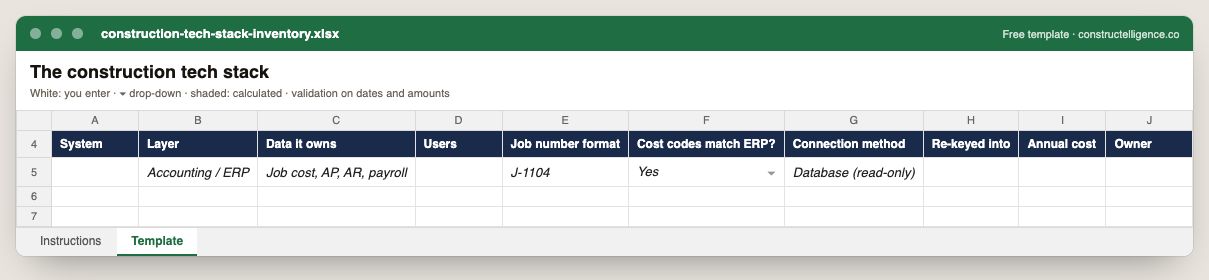
Every system in the company with its layer, the data it owns, users, job number format, whether cost codes match the ERP, how it connects, what gets re-keyed, its annual cost and owner.
10 columns: 9 you fill in and 1 picked from drop-down lists, so every row uses the same values. In the Excel version, 2 columns reject entries of the wrong type (a date column only takes dates, an amount column only numbers), the header row stays frozen with filters on it, and the workbook opens on an Instructions sheet that lists every column below.
Every column, and how it is captured
| Column | Type | What goes in it |
|---|---|---|
| System | Text | Free text. |
| Layer | Text | Free text. |
| Data it owns | Text | Free text. |
| Users | Number | Enter a number. |
| Job number format | Text | Free text. |
| Cost codes match ERP? | Drop-down | Options: Yes / No. |
| Connection method | Text | Free text. |
| Re-keyed into | Text | Free text. |
| Annual cost | Amount ($) | Enter the amount in dollars. |
| Owner | Text | The person responsible for the row. |
See it on real-looking numbers
Constructelligence is a construction intelligence platform: it reads your ERP, project and field systems read-only and does this arithmetic every week, for every job. The demo runs it on a sample eight-job portfolio.
Try the demoJoin the private betaFrequently asked questions
What software do construction companies use?
Most use an accounting or ERP system for job cost and payroll, a project management platform for RFIs, submittals and change events, a scheduling tool such as Primavera P6 or Microsoft Project, an estimating or takeoff tool, document storage, and increasingly a construction intelligence or BI layer that reports across all of them.
What is a construction tech stack?
The set of software a contractor runs — accounting/ERP, project management, field, scheduling, estimating, documents and reporting — and the connections between them. A good stack gives every piece of data one owning system and shares job numbers, cost codes and vendors across all of them.
How do you integrate construction software?
Through APIs where the systems publish them, read-only database connections for on-premise ERPs, scheduled file exports, or integration platforms. Whatever the method, agree one job number format, one cost-code structure and one vendor list first — most integration failures are mismatched keys.
What construction software should a small contractor buy first?
Construction-aware accounting with job costing, then a field or project app the crews will actually use. Add scheduling and reporting tools as the number of concurrent jobs grows.
How do you decide which construction software to cut?
List what each tool is the system of record for. A tool that owns no data and duplicates another's is a candidate to retire; one that is the only home of a record type needs a replacement or an export before it goes.
How long should construction project records be kept?
At least as long as your contracts, warranties, statutes of limitation and tax rules require, which often runs years past completion. Check with your legal and accounting advisers, and keep the records readable, not just stored.
Related guides
More in Construction software & tech
- Construction estimating software: takeoff and bid tools compared
- Construction scheduling software: Primavera P6, Microsoft Project and the rest
- Construction technology trends in 2026: what is actually changing
- Sage 300 CRE reporting: job cost, WIP and dashboards without rebuilding Excel
- QuickBooks job costing for contractors: setup, reports and when you outgrow it
Free tools for this topic: Construction PDF to Excel converter · Schedule PDF to Excel (P6 & MS Project) · Construction schedule health check
All construction software & tech resources →