- The G703 is the detail by SOV line; the G702 is the nine-line summary.
- G702 line 4 must equal the G703 column G total.
- Only approved change orders belong in line 2.
- Check billed against earned before you submit — under-billing is money left behind.
The G703 continuation sheet
The G703 is the detail: one row per schedule-of-values line.
| Column | What goes in it |
|---|---|
| A · Item no. | The SOV line number |
| B · Description | The scope of that line |
| C · Scheduled value | The line’s share of the contract sum |
| D · From previous application | Work completed on earlier applications |
| E · This period | Work completed since the last application |
| F · Materials presently stored | Stored materials not yet in D or E |
| G · Completed and stored to date | D + E + F, with G ÷ C as the % complete |
| H · Balance to finish | C − G |
| I · Retainage | If the rate varies by line |
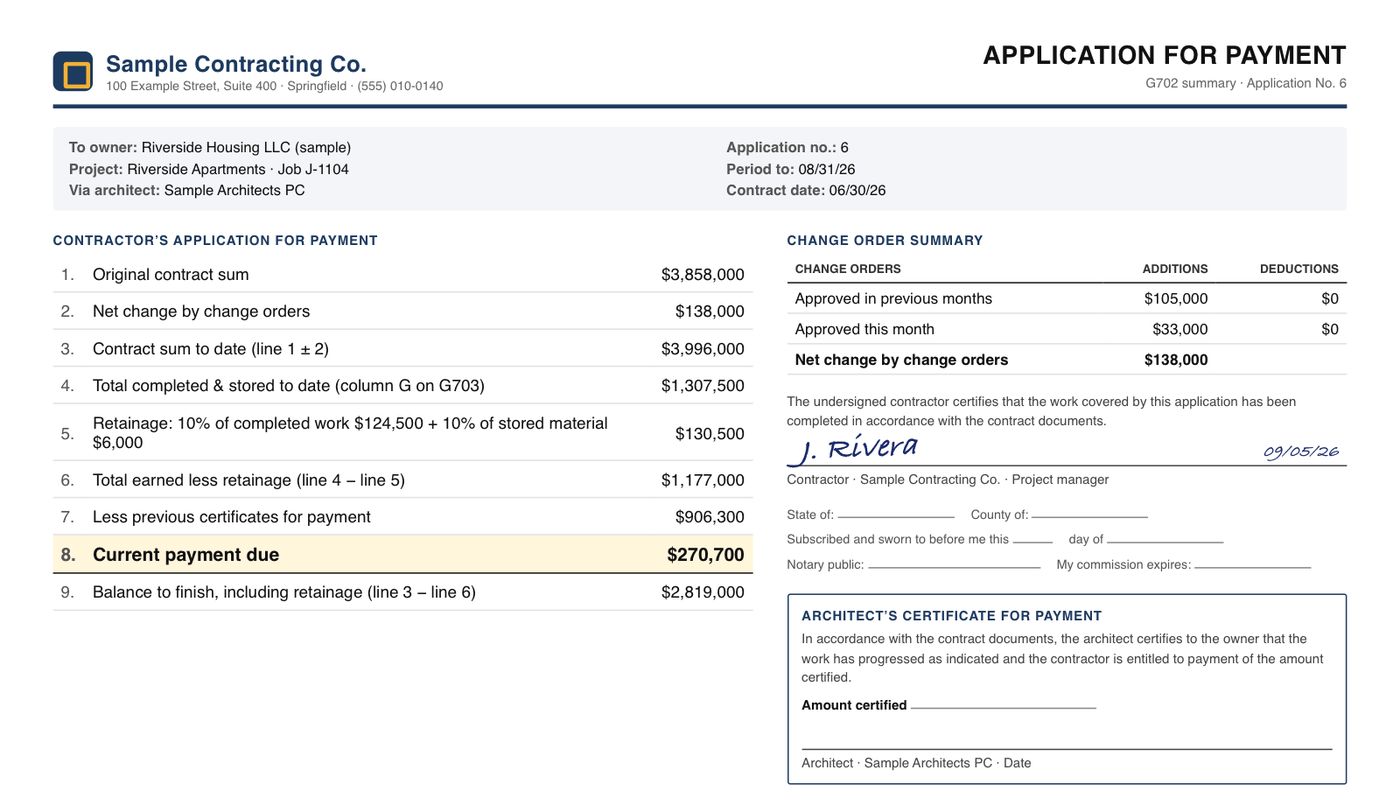
The G702, line by line
| 1 | Original contract sum |
| 2 | Net change by change orders (approved only) |
| 3 | Contract sum to date = 1 ± 2 |
| 4 | Total completed and stored to date = G703 column G total |
| 5 | Retainage on completed work and stored material |
| 6 | Total earned less retainage = 4 − 5 |
| 7 | Less previous certificates for payment |
| 8 | Current payment due = 6 − 7 |
| 9 | Balance to finish, including retainage = 3 − 6 |
A worked example
Before it goes out, check it against the job: if the work is really 30% complete on a $4.0M contract, $1,200,000 is earned — this application is $50,000 under-billed.
For more inputs, a second forecast and a shareable link: the pay application & retainage calculator →
Why pay applications get sent back
- Line 2 includes change orders that are not yet approved.
- G703 column G doesn’t total to G702 line 4.
- Stored materials billed without proof of storage or insurance.
- Percent complete on a line runs ahead of what the architect sees on site.
- Missing lien waivers for the previous period.
Every one of these is a check a system can run before submission — the WIP & billing view in the demo compares billed with earned for each job.
Check it before it goes to the owner
Most rejected pay applications fail on arithmetic or on numbers that do not match the contract. Run these checks on every application before it is signed:
- On every G703 line: G (completed & stored) = D + E + F, and H (balance to finish) = C − G.
- Column G total on the G703 equals line 4 on the G702.
- The scheduled values (column C) total the original contract plus approved change orders — and only approved ones.
- Retainage is at the contract rate, applied the way the contract says (including any reduction after a milestone).
- Stored materials are documented, insured and on the approved list.
- Percent complete by line matches what the site can show.
The G703 PDF-to-Excel converter pulls a continuation sheet into a spreadsheet and flags lines where the columns do not add up; the pay application calculator checks the payment due.
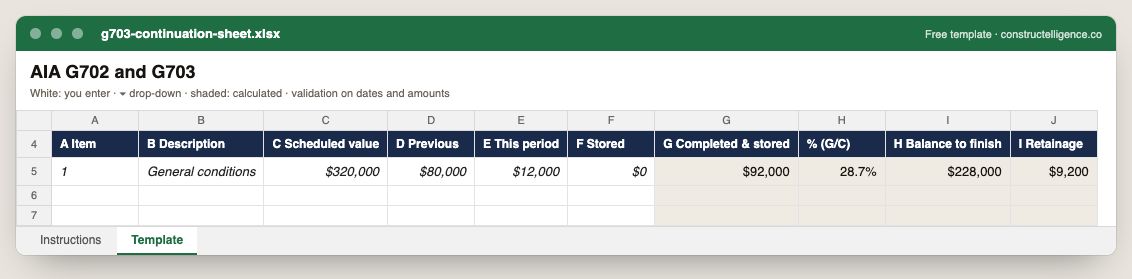
The G703 columns A to I: item, description, scheduled value, previous, this period and stored, with completed and stored, percent, balance to finish and retainage calculated.
10 columns: 6 you fill in and 4 calculated by formula and filled down 200 rows, so nothing is worked out by hand. In the Excel version, 4 columns reject entries of the wrong type (a date column only takes dates, an amount column only numbers), the header row stays frozen with filters on it, and the workbook opens on an Instructions sheet that lists every column below.
Every column, and how it is captured
| Column | Type | What goes in it |
|---|---|---|
| A Item | Text | Free text. |
| B Description | Text | Free text. |
| C Scheduled value | Amount ($) | Enter the amount in dollars. |
| D Previous | Amount ($) | Enter the amount in dollars. |
| E This period | Amount ($) | Enter the amount in dollars. |
| F Stored | Amount ($) | Enter the amount in dollars. |
| G Completed & stored | Calculated | Calculated: [D Previous] + [E This period] + [F Stored] |
| % (G/C) | Calculated | Calculated: [G Completed & stored] ÷ [C Scheduled value] |
| H Balance to finish | Calculated | Calculated: [C Scheduled value] − [G Completed & stored] |
| I Retainage | Calculated | Calculated: [G Completed & stored] × 0.1 |
See it on real-looking numbers
Constructelligence is a construction intelligence platform: it reads your ERP, project and field systems read-only and does this arithmetic every week, for every job. The demo runs it on a sample eight-job portfolio.
Try the demoJoin the private betaFrequently asked questions
What is an AIA G702?
The AIA G702 Application and Certificate for Payment is a one-page summary of a contractor's progress billing: contract sum, work completed, retainage, previous payments and the current payment due. It is certified by the architect before the owner pays.
What is the difference between G702 and G703?
The G703 continuation sheet lists each schedule-of-values line with work completed to date; the G702 summarises those totals into nine lines ending in the current payment due. Line 4 of the G702 equals the column G total of the G703.
How is current payment due calculated on a G702?
Take total completed and stored to date, subtract retainage to get total earned less retainage, then subtract previous certificates for payment. The result is line 8, current payment due.
Can unapproved change orders go on a pay application?
They should not be included in line 2, net change by change orders. Bill change orders once approved; unapproved work belongs in change order requests, not the pay application.
Why do pay applications get rejected?
Most often for arithmetic errors on the continuation sheet, scheduled values that include unapproved changes, retainage calculated at the wrong rate, or stored materials without documentation.
Related guides
More in Billing & cash
- The schedule of values: how to build one, bill against it and avoid front-loading
- Construction invoice template: what to put on it, a filled-in example, and a free download
- Lien waivers in construction: the four types, when to sign each, and how to track them
- Construction cash flow forecasting: a 13-week model that works
Free tools for this topic: Over/under billing calculator (WIP) · Pay application and retainage calculator · G703 continuation sheet PDF to Excel
All billing & cash resources →