- Bill the job, the contract number and the period — an invoice the payer cannot match waits.
- Progress invoices: completed to date − retainage − previous invoices = amount due.
- Only approved change orders go on the invoice, each on its own line.
- Send the lien waiver with it, and before the customer's cut-off.
What a construction invoice needs
Whatever the contract type, every invoice a contractor sends should carry these fields. Missing any of the first eight is the most common reason an invoice is returned unpaid:
| Field | Why it matters |
|---|---|
| Your company name, address and license number | Many states require the contractor's license number on invoices and contracts for home improvement work. |
| Bill-to: the customer's legal name and address | The party in the contract — the owner, or the general contractor if you are a subcontractor. |
| Invoice number and date | Sequential numbers make missing or duplicate invoices obvious to both sides. |
| Project name, address and job number | Lets the payer match it to the right job — and lets your own job costing do the same. |
| Contract, PO or subcontract number | The general contractor's AP team pays against it; an invoice without it is often returned. |
| Billing period (through date) | Progress invoices bill work completed through a date, which is also the date on the lien waiver. |
| Description of the work billed | Line items or schedule of values lines with percent complete — not "work performed". |
| Amount due and payment terms | The net amount after retainage and previous payments, the due date (Net 30, or the contract's terms) and how to pay. |
| Change orders included | Only approved change orders, each on its own line with its number. |
| Retainage held to date | Shows the payer and your own AR what is still owed after this payment. |
| Previous payments | So the amount due can be checked in one subtraction. |
| Lien waiver or notices | Often required with each invoice; some states also require specific notices on residential invoices. |
Which kind of invoice you need
| Invoice type | Used for | What it shows |
|---|---|---|
| Deposit | Residential and small jobs, before work or material orders | The deposit percentage or amount from the contract, credited on later invoices |
| Fixed price (lump sum) | Small jobs billed on completion, or on agreed milestones | The milestone or the job, the agreed price, any approved changes |
| Progress invoice | Most commercial work and longer residential jobs | Percent complete per line, retainage, previous invoices — the example below |
| AIA G702/G703 | Commercial jobs whose contract requires the AIA forms | The same progress figures on the standard forms; see the pay application guide |
| Time and materials (T&M) | Service work, repairs, extra work without a fixed price | Hours by worker and rate, materials with markup, signed field tickets |
| Cost-plus | Cost-plus contracts | Actual cost with backup (invoices, payroll), plus the agreed fee |
| Final invoice | Completion | The remaining contract balance, usually excluding retainage |
| Retainage release | After completion and close-out documents | The retainage held to date; see the retainage guide |
A filled-in progress invoice
Eastline Plumbing has a $186,000 subcontract with Cobalt Builders for a medical office building, plus one approved change order for $9,400. Its contract holds 10% retainage. This is invoice No. 4, for work completed through September 30:
| Item | Description | Scheduled value | Previously completed | This period | Completed to date | % |
|---|---|---|---|---|---|---|
| 1 | Underground & sleeves | $38,000 | $38,000 | $0 | $38,000 | 100% |
| 2 | Rough-in | $92,000 | $36,800 | $27,600 | $64,400 | 70% |
| 3 | Trim & fixtures | $56,000 | $0 | $0 | $0 | 0% |
| CO-01 | Added floor drains (approved) | $9,400 | $0 | $9,400 | $9,400 | 100% |
| Totals | $195,400 | $74,800 | $37,000 | $111,800 | 57.2% |
Two things make an invoice like this get paid on time. The scheduled values match the schedule of values the general contractor approved, line for line, so the GC can copy the percentages straight into its own pay application to the owner. And the arithmetic closes: completed to date ($111,800) less retainage ($11,180) less what was billed before ($74,800 less its $7,480 retainage, or $67,320) gives the amount due. The pay application calculator does the same sums on your own figures.
A time and materials invoice
T&M invoices are paid only as fast as the backup behind them. Bill from signed field tickets, one per day, and show the rates the contract allows:
| Item | Quantity | Rate | Amount |
|---|---|---|---|
| Plumber (2 workers × 6 h) | 12 h | $95.00 | $1,140.00 |
| Helper | 6 h | $62.00 | $372.00 |
| Materials at cost (supplier invoice attached) | 1 | $640.00 | $640.00 |
| Material markup | 15% | $96.00 | |
| Total | $2,248.00 |
Whether sales tax applies to materials, or to labor, depends on the state and on the type of work — check before you add a tax line. Work billed T&M on a fixed-price job is a change order: the field ticket should reference the change order request it belongs to.
Mistakes that delay payment
- Billing unapproved change orders. One unapproved line can hold the whole invoice. Bill approved changes; track the rest separately until they are signed.
- Values that don't match the approved schedule of values. The payer has to reconcile every difference before paying.
- Missing the cut-off. General contractors roll subcontractor invoices into their own monthly pay application; an invoice that arrives after the cut-off waits a month.
- No lien waiver, or the wrong one. A conditional waiver for the amount due usually has to travel with the invoice. See the lien waiver guide.
- Billing ahead of the work. Percentages the architect or GC will not certify get cut — and a pattern of it is how over-billing becomes a cash surprise later.
- Billing behind the work. The opposite mistake, and the more common one: work in place that is never invoiced is cash you are lending the customer.
How to use the free template
The template below downloads as a CSV that opens in Excel, Google Sheets or Numbers, with the totals and retainage already written as formulas. To use it:
- Add your header above the table once — company name, address, license number, the customer and the contract number — and save it as your master copy.
- For a progress invoice, enter the scheduled value of each line once, then each period only the completed-to-date figures.
- Keep previous invoices and retainage in the same sheet so the amount due always closes.
- Export to PDF, attach the lien waiver and any backup, and send before the customer's cut-off date.
Once you are billing several jobs a month, compare each job's percent billed with its percent of cost spent — that gap is your over- or under-billing, and the over/under billing calculator works it out per job.
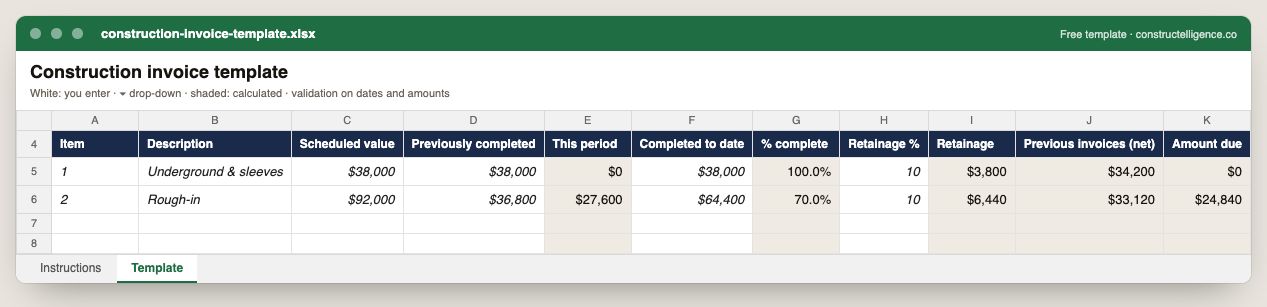
Each invoice line with scheduled value, previously completed and completed to date, with this period, percent complete, retainage, previous invoices net of retainage and the amount due calculated.
11 columns: 6 you fill in and 5 calculated by formula and filled down 200 rows, so nothing is worked out by hand. In the Excel version, 4 columns reject entries of the wrong type (a date column only takes dates, an amount column only numbers), the header row stays frozen with filters on it, and the workbook opens on an Instructions sheet that lists every column below.
Every column, and how it is captured
| Column | Type | What goes in it |
|---|---|---|
| Item | Text | Line number, so the row can be referred to. |
| Description | Text | What the line is, in words the other party will recognise. |
| Scheduled value | Amount ($) | Enter the amount in dollars. |
| Previously completed | Amount ($) | Enter the amount in dollars. |
| This period | Calculated | Calculated: [Completed to date] − [Previously completed] |
| Completed to date | Amount ($) | Enter the amount in dollars. |
| % complete | Calculated | Calculated: [Completed to date] ÷ [Scheduled value] |
| Retainage % | Percent | Retainage rate held under the contract, 0–100. |
| Retainage | Calculated | Calculated: [Completed to date] × [Retainage %] ÷ 100 |
| Previous invoices (net) | Calculated | Calculated: [Previously completed] − [Previously completed] × [Retainage %] ÷ 100 |
| Amount due | Calculated | Calculated: [Completed to date] − [Retainage] − [Previous invoices (net)] |
See it on real-looking numbers
Constructelligence is a construction intelligence platform: it reads your ERP, project and field systems read-only and does this arithmetic every week, for every job. The demo runs it on a sample eight-job portfolio.
Try the demoJoin the private betaFrequently asked questions
What should be included on a construction invoice?
Your company name, address and license number; the customer's name; an invoice number and date; the project name, address and job number; the contract or PO number; the billing period; a description of the work by line with percent complete; approved change orders; retainage; previous payments; the amount due; and payment terms.
How do you invoice for construction work in progress?
With a progress invoice: list each line of the schedule of values with its scheduled value and the value completed to date, subtract retainage and the amounts previously invoiced, and bill the difference. On AIA contracts the same figures go on the G702 and G703 forms.
How do you show retainage on a construction invoice?
Show the total completed to date, then subtract the retainage percentage of it, then subtract previous invoices net of their retainage. Show retainage held to date as its own figure so it can be invoiced when it is released.
What is the difference between a construction invoice and a pay application?
A pay application is a formal request for a progress payment, usually on AIA G702 and G703 forms, certified by the architect. A construction invoice is any bill for the work; on smaller jobs and many subcontracts a progress invoice carries the same figures without the AIA forms.
Can I use an Excel template for construction invoices?
Yes. A spreadsheet template with formulas for retainage and previous payments works well for a few jobs. As volume grows, invoicing from your accounting system keeps invoices tied to job cost and AR.
Related guides
More in Billing & cash
- The WIP schedule: over-billing, under-billing and why they matter
- Lien waivers in construction: the four types, when to sign each, and how to track them
- Construction cash flow forecasting: a 13-week model that works
Free tools for this topic: Over/under billing calculator (WIP) · Pay application and retainage calculator · G703 continuation sheet PDF to Excel
All billing & cash resources →