- The SOV splits the contract sum into lines; every pay application bills a percentage of each line.
- It is a price, not a cost — but each line should map to known cost codes.
- Front-loading shows up line by line: billed % running ahead of cost %.
- Change orders get their own lines; unapproved changes stay off.
What a schedule of values is, and who approves it
A schedule of values is a list of the parts of the work with the share of the contract sum allocated to each. On an AIA contract it is the contractor's job: the A201 general conditions require the contractor to submit a schedule of values to the architect before the first application for payment, and once accepted it becomes the basis for every application after it. Its lines are the rows of the G703 continuation sheet.
- It is a price, not a cost. The lines add up to the contract sum, so markup, overhead and profit are spread across them. It is not the estimate, and it should not be a copy of the cost budget.
- It is fixed once approved. Change orders get their own new lines rather than being folded into existing ones.
- It is the measure of progress. The owner pays for the percentage of each line that is complete, so the lines have to be things someone can walk the site and check.
Choosing the lines
Too few lines and every pay application turns into an argument about what "40% of the building" means. Too many and the monthly billing takes days. What works for most jobs:
- One line per trade or major scope — roughly the CSI divisions you self-perform or subcontract. Big scopes split by building, floor or phase so each line is a thing that finishes.
- Material and labor split on lines with large deliveries (steel, curtain wall, switchgear), so material stored on site can be billed before it is installed.
- General conditions as its own line, billed evenly over the schedule rather than claimed as a lump early on.
- Lines that map to your cost codes. If each SOV line rolls up a known set of cost codes, the percentage you bill on a line can be checked against the percentage of that line's cost you have spent. That comparison is what the WIP schedule does for the whole job, one line at a time.
- Bonds, insurance and mobilization as early lines only where the contract allows it — they are real costs incurred at the start.
A worked example
Riverside Apartments, job J-1104: original contract sum $3,862,000, ten SOV lines, and two approved change orders added as their own lines. This is the SOV as it stands at pay application No. 6:
| Item | Description of work | Scheduled value | Completed & stored to date | % | Balance to finish |
|---|---|---|---|---|---|
| 1 | General conditions | $386,000 | $115,000 | 29.8% | $271,000 |
| 2 | Sitework | $210,000 | $210,000 | 100.0% | $0 |
| 3 | Concrete | $540,000 | $432,000 | 80.0% | $108,000 |
| 4 | Framing & rough carpentry | $610,000 | $164,400 | 27.0% | $445,600 |
| 5 | Roofing | $180,000 | $0 | 0.0% | $180,000 |
| 6 | Doors, windows & glazing | $290,000 | $40,000 * | 13.8% | $250,000 |
| 7 | Drywall & finishes | $520,000 | $0 | 0.0% | $520,000 |
| 8 | Plumbing | $360,000 | $54,000 | 15.0% | $306,000 |
| 9 | HVAC | $410,000 | $41,000 | 10.0% | $369,000 |
| 10 | Electrical | $356,000 | $35,600 | 10.0% | $320,400 |
| CO-01 | Added storm drainage | $58,000 | $58,000 | 100.0% | $0 |
| CO-02 | Upgraded unit kitchens | $80,000 | $0 | 0.0% | $80,000 |
| Contract sum to date | $4,000,000 | $1,150,000 | 28.75% | $2,850,000 |
* Doors, windows & glazing: $40,000 is material presently stored on site, not installed work — billable under the contract with delivery tickets and insurance, and shown in its own column on the G703.
The totals are exactly what the G702 for application No. 6 carries: contract sum to date $4,000,000, total completed and stored $1,150,000, retainage at 10% $115,000. With $862,500 certified on earlier applications, the payment due this month is $172,500:
Front-loading, and how to catch it
Front-loading is putting more of the contract sum on the lines that finish early — sitework, concrete, mobilization — and less on the finishes at the end. Billing then runs ahead of the work, the contractor holds the owner's cash early, and the job shows over-billed on the WIP. Some of it is deliberate; much of it is accidental, when a markup is loaded unevenly or the SOV is copied from a bid form.
It costs the contractor more than it looks like it does:
- Owners and architects compare early lines with other bids and reject an SOV that is out of line, which delays the first payment.
- The cash comes back at the end: the finishing lines are underfunded, so the last months of billing do not cover the last months of cost.
- Over-billing is a liability on the balance sheet, and sureties read a pattern of it as a job borrowing from its own future.
The check is the same arithmetic as the WIP, run on a single line: what the line has earned is its scheduled value times the share of that line's cost spent so far. Riverside's concrete line is billed at 80%, but $310,000 of an estimated $420,000 of concrete cost is spent — 73.8% — so the line has earned $398,571 and is over-billed by $33,429. On one line that is timing; on every early line at once it is a front-loaded SOV.
Change orders, stored material and retainage
- Change orders get new lines (CO-01, CO-02…) with their approved value, and are billed like any other line. Unapproved changes do not go on the SOV at all — that is change order management, and billing them early is the most common reason a pay application comes back.
- Stored material is billable when the contract allows it, usually with delivery tickets, proof of insurance and sometimes a bill of sale. It moves from "stored" to "completed" when installed.
- Retainage is taken on every line's completed and stored value (sometimes at different rates on stored material), and the SOV's balance to finish plus retainage held is what is left to collect. See retainage in construction for reduction and release.
The monthly pencil draft
Most owners expect a pencil draft — the proposed percentages line by line — a week before the formal application. It goes faster when each line's percentage is backed by something the architect can check:
- Installed quantities from the field (square feet of board hung, cubic yards placed) for lines that are measured.
- Subcontractor pay applications for subcontracted lines — the sub's percentage and yours should agree.
- The schedule's percent complete for general conditions and lines billed over time.
- The line's cost percentage from the job cost ledger, as the sanity check on all of the above.
When the four disagree on a line, the line is either mis-billed or its cost is miscoded — both worth knowing before the owner asks.
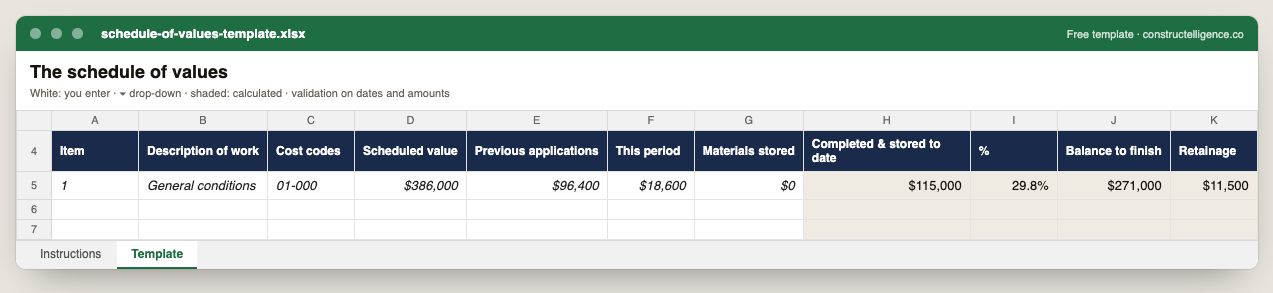
Each schedule of values line with its cost codes, scheduled value, previous applications, this period and stored materials, with completed to date, percent, balance to finish and retainage calculated.
11 columns: 7 you fill in and 4 calculated by formula and filled down 200 rows, so nothing is worked out by hand. In the Excel version, 4 columns reject entries of the wrong type (a date column only takes dates, an amount column only numbers), the header row stays frozen with filters on it, and the workbook opens on an Instructions sheet that lists every column below.
Every column, and how it is captured
| Column | Type | What goes in it |
|---|---|---|
| Item | Text | Line number, so the row can be referred to. |
| Description of work | Text | Free text. |
| Cost codes | Text | Free text. |
| Scheduled value | Amount ($) | Enter the amount in dollars. |
| Previous applications | Amount ($) | Enter the amount in dollars. |
| This period | Amount ($) | Enter the amount in dollars. |
| Materials stored | Amount ($) | Enter the amount in dollars. |
| Completed & stored to date | Calculated | Calculated: [Previous applications] + [This period] + [Materials stored] |
| % | Calculated | Calculated: [Completed & stored to date] ÷ [Scheduled value] |
| Balance to finish | Calculated | Calculated: [Scheduled value] − [Completed & stored to date] |
| Retainage | Calculated | Calculated: [Completed & stored to date] × 0.10 |
See it on real-looking numbers
Constructelligence is a construction intelligence platform: it reads your ERP, project and field systems read-only and does this arithmetic every week, for every job. The demo runs it on a sample eight-job portfolio.
Try the demoJoin the private betaFrequently asked questions
What is a schedule of values in construction?
A list of the parts of the work with a share of the contract sum allocated to each. Once the owner or architect accepts it, every progress payment is billed as a percentage of each line, and the lines become the rows of the AIA G703 continuation sheet.
Who prepares the schedule of values?
The contractor. Under AIA A201 the contractor submits it to the architect before the first application for payment; the architect can ask for supporting data and require changes before accepting it.
What is front-loading a schedule of values?
Allocating more of the contract sum to work that finishes early, so billing runs ahead of the work in place. It shows as over-billing on the WIP and leaves the final lines underfunded.
Should the schedule of values match the estimate?
It should map to it — each line should roll up known cost codes — but it is a price, not a cost. Markup and overhead are spread across the lines so that they add up to the contract sum.
How are change orders added to a schedule of values?
As new lines with the approved change order value, billed like any other line. Existing lines are not changed, and unapproved changes are not added.
Related guides
More in Billing & cash
- Construction invoice template: what to put on it, a filled-in example, and a free download
- Lien waivers in construction: the four types, when to sign each, and how to track them
- Construction cash flow forecasting: a 13-week model that works
Free tools for this topic: Over/under billing calculator (WIP) · Pay application and retainage calculator · G703 continuation sheet PDF to Excel
All billing & cash resources →