- Set up jobs, cost codes as items, cost types by class, and estimates as budgets.
- QuickBooks reports cost to date; forecasting needs a forecast at completion.
- Retainage, committed cost, WIP and AIA billing are the usual gaps.
- Outgrowing it is about complexity — retainage, sureties, payroll, entities — not revenue alone.
Setting up job costing
- One job per contract. In QuickBooks Desktop, a job under each customer; in QuickBooks Online, a project.
- Cost codes as items. Create service and non-inventory items for your cost codes — concrete, framing, electrical — so every bill and timesheet line carries one.
- Cost types with classes or item naming. Labor, material, subcontract and equipment need to be separable; classes or a consistent item prefix do it.
- Estimates as budgets. Enter the estimate against the job with the same items, so estimates-vs-actuals reports line up.
- Time to jobs. Every timesheet hour tagged to a job and an item, or labor cost will not reach the job.
The reports that matter
| Question | Report |
|---|---|
| Is this job profitable so far? | Job (or project) profitability |
| Where are we over the estimate? | Job estimates vs. actuals, by item |
| What have we billed? | Invoices by job, progress invoicing against the estimate |
| Who owes us? | A/R aging by customer and job |
All of these describe cost to date. None says where the job will finish — that needs a forecast at completion, usually built in a spreadsheet next to QuickBooks.
Where QuickBooks runs out
- Retainage is not native; it is handled with extra items or negative invoice lines and tracked by hand. See retainage.
- Committed cost — subcontracts awarded but not invoiced — is invisible until the bill arrives.
- WIP and over/under billing are built outside the system. See the WIP schedule guide.
- AIA G702/G703 pay applications need add-ons or spreadsheets. See G702 and G703.
- Certified and union payroll usually needs a construction payroll add-on or service.
Signs you have outgrown it
Not revenue alone. Watch for: more than a handful of jobs with retainage, change orders you track in a spreadsheet, a WIP your bank or surety now asks for monthly, union or prevailing-wage payroll, or more than one company. The calculator below scores it. The construction accounting software guide covers what to move to — and Constructelligence reads QuickBooks Desktop today, so you can get forecasts and WIP before, or instead of, a migration.
Tracking committed cost and retainage around QuickBooks
QuickBooks records cost when a bill is entered, so awarded subcontracts and open purchase orders are invisible until they are invoiced, and retainage needs its own handling. Two practical workarounds while you stay on it:
- Committed cost — keep a commitments register (subcontract value, change orders, billed to date) per job, and add committed but not yet invoiced to cost to date when you forecast. Without it, a job looks under budget exactly while the biggest subcontract is still unbilled.
- Retainage — hold retainage receivable and retainage payable in their own balance-sheet accounts, track them per job, and bill retainage release as its own invoice at completion (see retainage in construction).
Both then feed the WIP schedule and the forecast correctly. When the register and the retainage accounts become a second system someone has to maintain, that is the signal it is time for construction accounting software.
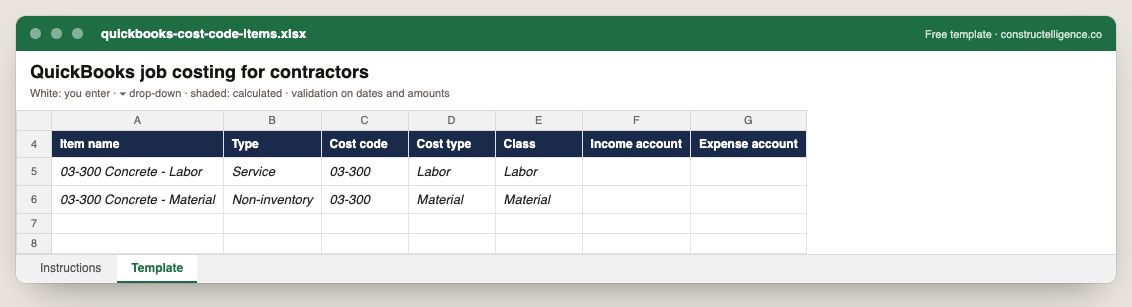
Each cost code set up as a QuickBooks item, with type, cost type, class and the income and expense accounts it posts to.
7 columns: 7 you fill in. In the Excel version, the header row stays frozen with filters on it, and the workbook opens on an Instructions sheet that lists every column below.
Every column, and how it is captured
| Column | Type | What goes in it |
|---|---|---|
| Item name | Text | Free text. |
| Type | Text | Free text. |
| Cost code | Text | Cost code from your cost code list, matching the estimate and the ERP. |
| Cost type | Text | Labor, material, subcontract, equipment or other. |
| Class | Text | Free text. |
| Income account | Text | Free text. |
| Expense account | Text | Free text. |
See it on real-looking numbers
Constructelligence is a construction intelligence platform: it reads your ERP, project and field systems read-only and does this arithmetic every week, for every job. The demo runs it on a sample eight-job portfolio.
Try the demoJoin the private betaFrequently asked questions
Can QuickBooks do job costing for construction?
Yes, with setup: a job or project per contract, cost codes as items, cost types separated by class or item naming, estimates entered as budgets and every timesheet tagged to a job. It reports cost to date and estimates versus actuals well; forecasting, retainage and WIP usually need spreadsheets or add-ons.
What is the best way to track cost codes in QuickBooks?
Create an item for each cost code and use it on every bill, expense and timesheet line, with classes or an item prefix to separate labor, material, subcontract and equipment. Keep the same list in your estimates so budget and actual compare line by line.
Does QuickBooks handle retainage?
Not natively. Contractors typically use a retainage item or negative line on invoices and track the balance by job separately, which is why retainage is often the first thing that pushes a growing contractor to construction-specific software.
When should a contractor move off QuickBooks?
When retainage, committed cost, WIP reporting for a surety, certified or union payroll, or several companies start being managed in spreadsheets around QuickBooks rather than in it — often somewhere between $10M and $50M in revenue.
Can QuickBooks track committed costs for construction?
Not natively — cost appears when bills are entered. Contractors on QuickBooks usually keep a separate commitments register per job and add committed-but-not-invoiced cost when forecasting.
Related guides
More in Construction software & tech
- The construction tech stack: what a contractor needs and how it connects
- The best construction management software in 2026: 12 platforms compared, and how to choose
- Construction estimating software: takeoff and bid tools compared
- Construction scheduling software: Primavera P6, Microsoft Project and the rest
- Construction dashboards and BI: Power BI, Excel or construction intelligence?
- Construction technology trends in 2026: what is actually changing
- Sage 300 CRE reporting: job cost, WIP and dashboards without rebuilding Excel
Free tools for this topic: Construction PDF to Excel converter · Schedule PDF to Excel (P6 & MS Project) · Construction schedule health check
All construction software & tech resources →