


 K
K
 H
H
- There is no single best construction management software — start from the shortlist for your contractor type.
- Enterprise platforms (Procore, Autodesk Forma, Aconex, ProjectSight, CMiC) suit commercial work; Buildertrend, JobTread and Houzz Pro suit residential.
- Decide whether the PM platform or the ERP owns cost.
- Per-user and volume-based pricing favour different companies — compare on your numbers.
- Pilot on a live job with superintendents and test change management end to end.
Quick picks: the best construction management software by contractor type
Start from the work you do. Each pick is the platform most often chosen by that kind of contractor, not a score — the full entries below say who else fits and what to check.
| If you are… | Start your shortlist with | Why |
|---|---|---|
| A commercial general contractor | Procore, Autodesk Forma | Broadest project management, field and financial tools; widest integration choice |
| An owner or a large multi-party program | Oracle Aconex | Strict document control and audit trails across many organisations |
| On Trimble Viewpoint accounting | Trimble ProjectSight | Built to connect to Viewpoint Vista and Spectrum |
| A large contractor wanting one system | CMiC | ERP and project management on one database |
| A specialty contractor's field team | Fieldwire, Raken | Plans, tasks and daily reports that foremen actually use |
| A trade contractor on QuickBooks | Knowify | Bids, job costing and progress billing alongside QuickBooks |
| A home builder or remodeler | Buildertrend, JobTread, Houzz Pro | Selections, client portals, estimates and schedules in one place |
| A small contractor on a budget | Contractor Foreman | Many modules in one low-cost tool |
For a specific trade, the software by trade pages go further — including home builder software and deck builder software.
What it should do
- Documents: current drawings and specs, with revisions tracked.
- RFIs and submittals: logged, routed, answered and searchable.
- Change management: change events priced and tracked to approval — the link to cost that matters most.
- Field: daily logs, photos, punch lists, inspections, from a phone.
- Financials: budgets, commitments and pay apps — or a clean integration to the ERP that does them.
Platforms for commercial contractors and owners
Procore
Enterprise PMThe most widely used construction management platform in North America: project management, quality and safety, and project financials, with an AI layer (Procore Helix) and a large integration marketplace.
- Best for
- Commercial GCs, specialty contractors and owners.
- Check
- How pricing scales with your annual construction volume, and whether its financials or your ERP will own cost.
Autodesk Forma (formerly Autodesk Construction Cloud)
Enterprise PMAutodesk Build and Forma Data Management (formerly Autodesk Docs) cover project management, documents and field work, tied closely to Revit and BIM workflows.
- Best for
- Design-heavy and BIM-led projects; teams already on Autodesk.
- Check
- Which modules you need licensed, and how model data reaches the field.
Oracle Aconex
Document controlA common data environment for large, multi-party projects, with strict document control and correspondence audit trails; part of Oracle’s construction suite with Primavera.
- Best for
- Owners and contractors on large infrastructure and capital programmes.
- Check
- How much of the team will live in it versus only receive transmittals.
Trimble ProjectSight
Enterprise PMProject management within Trimble’s construction portfolio, designed to connect with Trimble’s Viewpoint accounting products.
- Best for
- Contractors on Viewpoint Vista or Spectrum.
- Check
- Depth of the connection to your specific Trimble ERP.
CMiC
ERP + PMA construction ERP with project management, field and document tools on the same database as accounting, aimed at large general contractors and self-performing contractors.
- Best for
- Large contractors that want accounting and project management as one system.
- Check
- Implementation time and internal resources; whether field teams find its mobile tools as easy as a dedicated field app.
Field-first and residential tools
Fieldwire (Hilti)
Field managementPlans, tasks, punch lists and inspections on a phone, built for foremen and superintendents.
- Best for
- Specialty contractors and field teams that need adoption more than breadth.
- Check
- How field data flows back to the office and the ERP.
Raken
Daily reports & fieldDaily reports, time cards, production quantities, photos and safety forms captured from the field.
- Best for
- Self-performing general contractors and specialty contractors that want better daily data.
- Check
- Whether time and quantities can flow to payroll and job cost without re-entry.
Knowify
Trade job managementBidding, job management, job costing and progress billing for trade and specialty contractors, with a QuickBooks integration.
- Best for
- Small and mid-sized trade contractors running QuickBooks.
- Check
- How it handles your billing (AIA-style progress invoices, retainage) and how it syncs with your QuickBooks version.
Buildertrend
Residential PMProject management, client communication, selections and financial tools for home builders and remodelers; acquired CoConstruct in 2021.
- Best for
- Residential builders and remodelers.
- Check
- Whether its financials fit your accounting or duplicate it.
JobTread
Residential & trade PMEstimating, job management and client portals for residential contractors and trades.
- Best for
- Smaller residential firms that want estimating and PM together.
- Check
- Job costing depth as the company grows.
Houzz Pro
Residential & remodelLead management, estimates and proposals, 3D floor plans, project management and invoicing for home building and remodeling businesses.
- Best for
- Remodelers and design-build firms that sell with visuals.
- Check
- Job costing and accounting depth compared with a dedicated builder platform.
Contractor Foreman
SMB PMAn all-in-one project management tool aimed at small and mid-sized contractors.
- Best for
- Budget-conscious small contractors.
- Check
- Which features are in your plan tier.
Side by side
| Platform | Built for | Strongest at | Financials |
|---|---|---|---|
| Procore | Commercial GCs, specialty contractors, owners | Breadth and integrations | Project financials; integrates with ERPs |
| Autodesk Forma | Design-heavy and BIM-led projects | Model and document workflows | Cost management module |
| Oracle Aconex | Owners, large programs | Document control and audit trail | Via Oracle's wider suite |
| Trimble ProjectSight | Viewpoint customers | Connection to Trimble ERP | Through Viewpoint |
| CMiC | Large GCs and self-performers | ERP and PM on one database | Full ERP |
| Fieldwire | Field teams, specialty contractors | Plans, tasks, punch lists | Limited — pair with accounting |
| Raken | Self-performing contractors | Daily reports, time, quantities | Feeds payroll and job cost |
| Knowify | Trade contractors on QuickBooks | Bids to billing for trades | Job costing with QuickBooks |
| Buildertrend | Home builders, remodelers | Selections, client portal, scheduling | Budgets, invoicing, accounting sync |
| JobTread | Residential contractors and trades | Estimating to job management | Budgets, invoicing, accounting sync |
| Houzz Pro | Remodelers, design-build | Leads, proposals, 3D floor plans | Estimates and invoicing |
| Contractor Foreman | Small contractors | Many modules at a low cost | Basic job costing |
Summaries are from each vendor's own public material, checked October 2026. We make Constructelligence, which is not a project management platform and is not ranked here — it reads the PM platform and the accounting system and forecasts each job.
How they price
Two models dominate. Per-user pricing charges for each seat, which punishes giving access to subs, owners and field staff. Volume-based pricing (Procore’s annual construction volume model is the best known) charges on the work you run and includes unlimited users, which suits collaboration but grows with revenue. Use the calculator below with the quotes you receive.
How to choose
- Decide who owns cost: the PM platform or the ERP. Then make sure the other one reads it rather than re-keying it.
- Pilot with the people who will use it most — superintendents and project engineers — on a live job.
- Test change management end to end: change event → pricing → owner approval → budget update → ERP.
- Check exports and the API before signing. Your data should leave as easily as it arrived.
Whatever you choose, it should connect to the rest of the tech stack on shared job numbers and cost codes.
Whichever platform you choose, check how it connects to your accounting system before you sign — which records sync, in which direction, and who approves them. The Procore ERP integration guide walks through one platform's approach in detail, and the software integration guide covers the decisions that apply to any of them.
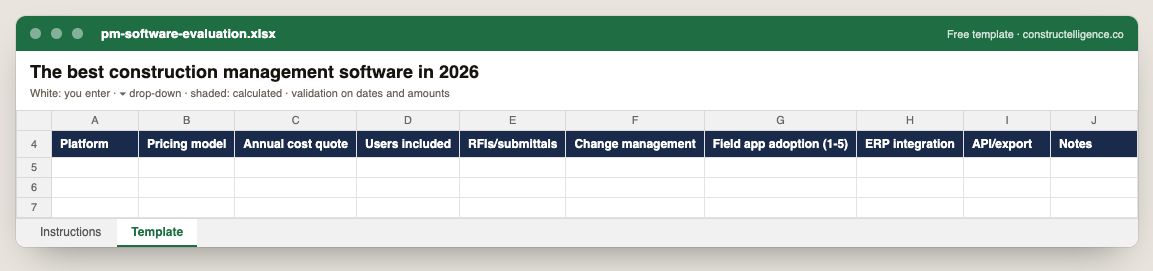
Each platform under evaluation with pricing model, annual quote and users included, scored on RFIs and submittals, change management, field adoption, ERP integration and API/export.
10 columns: 10 you fill in. In the Excel version, 3 columns reject entries of the wrong type (a date column only takes dates, an amount column only numbers), the header row stays frozen with filters on it, and the workbook opens on an Instructions sheet that lists every column below.
Every column, and how it is captured
| Column | Type | What goes in it |
|---|---|---|
| Platform | Text | Free text. |
| Pricing model | Text | Free text. |
| Annual cost quote | Amount ($) | Enter the amount in dollars. |
| Users included | Number | Enter a number. |
| RFIs/submittals | Text | Free text. |
| Change management | Text | Free text. |
| Field app adoption (1-5) | Number | Enter a number. |
| ERP integration | Text | Free text. |
| API/export | Text | Free text. |
| Notes | Text | Anything that explains the row; free text. |
See it on real-looking numbers
Constructelligence is a construction intelligence platform: it reads your ERP, project and field systems read-only and does this arithmetic every week, for every job. The demo runs it on a sample eight-job portfolio.
Try the demoJoin the private betaFrequently asked questions
What is the best construction management software?
For commercial general contractors, Procore and Autodesk Forma are the most common choices, with Oracle Aconex strong on large multi-party projects, Trimble ProjectSight for Viewpoint customers and CMiC for large contractors who want ERP and project management in one system. Home builders and remodelers more often use Buildertrend, JobTread or Houzz Pro; field teams often favour Fieldwire or Raken; trade contractors on QuickBooks often use Knowify. The best fit depends on project type, company size and your accounting system.
What is the best construction management software for small businesses?
Small contractors usually do best with an all-in-one tool that covers estimates, scheduling, change orders and invoicing and syncs with QuickBooks — JobTread, Buildertrend, Knowify, Houzz Pro or Contractor Foreman, depending on whether the work is residential or trade. Pilot two on a live job before choosing.
How much does construction project management software cost?
Pricing is usually either per user or based on annual construction volume with unlimited users. Volume-based pricing suits firms that share access with subs and owners; per-user pricing can be cheaper for a small office team. Always compare quotes on your own user count and volume.
Do I need construction project management software if I have an ERP?
Usually yes. The ERP owns cost and accounting; project management software handles RFIs, submittals, drawings, change events and daily logs. The two should share job numbers and cost codes, and change events should flow to the ERP rather than be re-keyed.
What is the difference between Procore and Autodesk Forma?
Both are enterprise construction platforms. Procore is known for broad project management and financial tools with a large integration marketplace; Autodesk Forma (formerly Autodesk Construction Cloud) is closely tied to Autodesk's design and BIM products. Pilot both on a live job before choosing.
Related guides
More in Construction software & tech
- Construction estimating software: takeoff and bid tools compared
- Construction scheduling software: Primavera P6, Microsoft Project and the rest
- Construction dashboards and BI: Power BI, Excel or construction intelligence?
- Construction technology trends in 2026: what is actually changing
- Sage 300 CRE reporting: job cost, WIP and dashboards without rebuilding Excel
- QuickBooks job costing for contractors: setup, reports and when you outgrow it
Free tools for this topic: Construction PDF to Excel converter · Schedule PDF to Excel (P6 & MS Project) · Construction schedule health check
All construction software & tech resources →