 OC
OC


- Takeoff measures; estimating prices — many teams need both.
- Choose by trade: GC, electrical/mechanical, heavy civil and residential tools differ.
- Estimate in the ERP's cost-code structure so it becomes the budget.
- Feed actual unit costs from finished jobs back into the database.
The main tools
Bluebeam Revu
PDF markup & takeoffPDF markup, measurement and document collaboration used across design and construction; widely used for takeoff and plan review.
- Best for
- Almost everyone — the default PDF tool in many firms.
- Check
- Whether you need a dedicated estimating database on top of it.
On Center On-Screen Takeoff
TakeoffLong-established desktop takeoff software, often paired with On Center’s Quick Bid for estimating.
- Best for
- Commercial subcontractors and GCs with high takeoff volume.
- Check
- Desktop versus cloud needs for your team.
PlanSwift
TakeoffPoint-and-click takeoff with assemblies, popular with subcontractors.
- Best for
- Trade contractors wanting quick takeoff with assemblies.
- Check
- How its output reaches your estimate or ERP.
STACK
Cloud takeoff & estimatingCloud-based takeoff and estimating for subcontractors and GCs.
- Best for
- Teams that want takeoff in the browser, shared across estimators.
- Check
- Assembly libraries for your trade.
ProEst (Autodesk)
Cloud estimatingCloud estimating acquired by Autodesk, connecting estimates with Autodesk’s construction platform.
- Best for
- GCs already on Autodesk Forma.
- Check
- Cost database set-up and how estimates become budgets.
Sage Estimating
EstimatingEstimating with cost databases and assemblies, designed to hand budgets to Sage accounting.
- Best for
- Contractors on Sage 300 CRE.
- Check
- The estimate-to-budget hand-off by cost code.
HCSS HeavyBid
Heavy civil estimatingEstimating built for heavy civil and infrastructure — crews, equipment and production rates.
- Best for
- Heavy civil, highway and utility contractors.
- Check
- Equipment rate set-up and bid-day workflow.
Trimble Accubid
Electrical estimatingEstimating for electrical contractors with labor units and trade databases.
- Best for
- Electrical contractors.
- Check
- Labor unit libraries against your own productivity.
AI takeoff tools (Togal.AI, Beam AI, Kreo) are covered in the AI estimating guide.
Choosing by trade and work type
| You are | Look at first |
|---|---|
| General contractor, commercial | Takeoff + a cloud estimating database that becomes the job budget |
| Electrical or mechanical sub | Trade-specific estimating with labor units |
| Heavy civil | Crew-and-equipment estimating built for production rates |
| Residential | Estimating inside a residential PM tool, or a simple takeoff tool |
The hand-off most teams get wrong
An estimate is only useful after award if it becomes the budget in the same cost-code structure. When the estimate is by assembly and the budget is by cost code, nobody can compare them, and the lesson from every finished job is lost. Set the estimate’s cost codes to match the ERP’s, and transfer the budget electronically rather than retyping it.
Feeding actual cost back into the next bid
The best estimating data a contractor owns is its own finished jobs: what each cost code actually cost per unit, by crew and project type. Pull actual unit costs from job cost after close-out, compare them with the estimate, and update the database — see the cost codes guide. Constructelligence does this comparison across every finished job automatically.
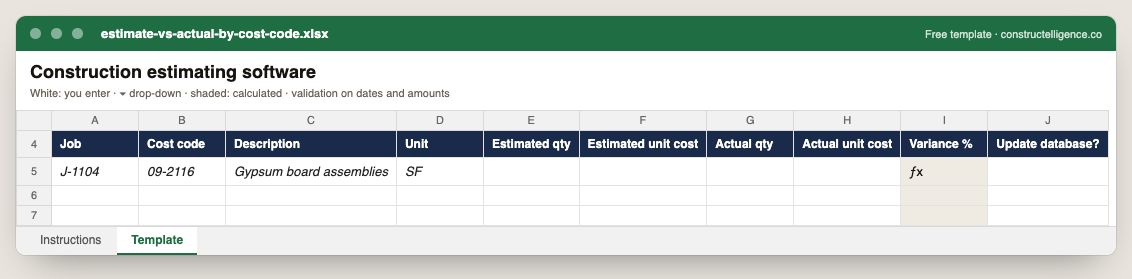
Estimated and actual quantity and unit cost for every cost code on a finished job, the variance calculated, and whether the cost database should change.
10 columns: 8 you fill in, 1 picked from drop-down lists, so every row uses the same values and 1 calculated by formula and filled down 200 rows, so nothing is worked out by hand. In the Excel version, 4 columns reject entries of the wrong type (a date column only takes dates, an amount column only numbers), the header row stays frozen with filters on it, and the workbook opens on an Instructions sheet that lists every column below.
Every column, and how it is captured
| Column | Type | What goes in it |
|---|---|---|
| Job | Text | Job number exactly as in your accounting system (e.g. J-1104), so rows join to job cost. |
| Cost code | Text | Cost code from your cost code list, matching the estimate and the ERP. |
| Description | Text | What the line is, in words the other party will recognise. |
| Unit | Text | Unit of measure (EA, LF, SF, CY, HR, LS). |
| Estimated qty | Number | Enter a number. |
| Estimated unit cost | Amount ($) | Enter the amount in dollars. |
| Actual qty | Number | Enter a number. |
| Actual unit cost | Amount ($) | Enter the amount in dollars. |
| Variance % | Calculated | Calculated: ([Actual unit cost] − [Estimated unit cost]) ÷ [Estimated unit cost] × 100 |
| Update database? | Drop-down | Options: Yes / No. |
See it on real-looking numbers
Constructelligence is a construction intelligence platform: it reads your ERP, project and field systems read-only and does this arithmetic every week, for every job. The demo runs it on a sample eight-job portfolio.
Try the demoJoin the private betaFrequently asked questions
What is the best construction estimating software?
It depends on trade: Bluebeam Revu and On-Screen Takeoff are widely used for takeoff; STACK and ProEst for cloud estimating; Sage Estimating for Sage 300 CRE users; HCSS HeavyBid for heavy civil; Trimble Accubid for electrical. AI takeoff tools such as Togal.AI add automated measurement.
What is the difference between takeoff and estimating software?
Takeoff software measures quantities — counts, lengths, areas — from drawings. Estimating software prices those quantities with labor, material, equipment and markup into a bid. Some products do both.
How do I make estimates more accurate?
Compare every finished job's actual cost with its estimate by cost code, update unit costs and productivity rates from those actuals, and keep the estimate in the same cost-code structure as the budget so the comparison is possible.
Is Bluebeam an estimating tool?
Bluebeam Revu is a PDF markup and collaboration tool with strong measurement features, so it is widely used for takeoff. Most estimating teams pair it with a separate estimating database or spreadsheet for pricing.
Related guides
More in Construction software & tech
- The best construction management software in 2026: 12 platforms compared, and how to choose
- Construction accounting software and ERP: the main systems and how to choose
- Construction scheduling software: Primavera P6, Microsoft Project and the rest
- Construction dashboards and BI: Power BI, Excel or construction intelligence?
- Construction technology trends in 2026: what is actually changing
- Sage 300 CRE reporting: job cost, WIP and dashboards without rebuilding Excel
- QuickBooks job costing for contractors: setup, reports and when you outgrow it
Free tools for this topic: Construction PDF to Excel converter · Schedule PDF to Excel (P6 & MS Project) · Construction schedule health check
All construction software & tech resources →