 T
T- P6 for large or specified work, MS Project for smaller jobs, Asta as a friendlier CPM, linear tools for linear work.
- The DCMA checks tell you if a schedule can be trusted: logic, constraints, float, durations.
- Update weekly from site, not for the owner meeting.
- Link activities to cost so a slip becomes dollars.
The main tools
Oracle Primavera P6
Enterprise CPMThe standard for large and public projects: critical path scheduling, resource loading, baselines and multi-project portfolios.
- Best for
- Large commercial, infrastructure and any contract that specifies P6.
- Check
- Who on the team can actually maintain it — P6 rewards training.
Microsoft Project
CPMWidely available critical path scheduling, familiar to many PMs.
- Best for
- Small and mid-sized projects and owners who accept MPP files.
- Check
- Whether owners on your work require P6 XER submissions instead.
Asta Powerproject
CPMConstruction-focused critical path scheduling, popular in the UK and growing elsewhere, with a visual approach to linked bar charts.
- Best for
- Contractors who want P6-level logic with a friendlier interface.
- Check
- Import and export with owners’ P6 files.
Smartsheet
Work managementSpreadsheet-style work management with Gantt views, used for lookaheads and simple programmes.
- Best for
- Lookaheads, preconstruction trackers and small jobs.
- Check
- It is not a CPM engine — keep contract schedules elsewhere.
Linear scheduling (e.g. TILOS)
Time-locationTime–location charts for linear work — roads, rail, pipelines, tunnels — where location matters as much as sequence.
- Best for
- Linear infrastructure projects.
- Check
- How the linear view reconciles with the contract CPM schedule.
What a healthy schedule looks like
The US Defense Contract Management Agency’s 14-point assessment is the most widely used checklist. The core tests:
| Check | Threshold | Why |
|---|---|---|
| Missing logic | ≤ 5% of activities | An activity with no predecessor or successor cannot push anything |
| Hard constraints | ≤ 5% | Constraints hold dates in place so slip cannot show |
| High float (> 44 days) | ≤ 5% | Usually a sign of missing logic |
| Negative float | 0% | The schedule already cannot meet a date |
| Long durations (> 44 days) | ≤ 5% | Too coarse to status weekly |
| Leads (negative lags) | 0% | Hide overlap assumptions |
The free schedule health check runs these on a P6, MS Project or Excel export, and the schedule PDF converter turns a PDF schedule into rows first.
Updating: where schedules go wrong
Most schedules are accurate on the day of the baseline and fiction by month three. Update weekly with actual starts, finishes and remaining durations from site; re-run the critical path; and record why dates moved. A schedule updated for the owner meeting rather than for the work cannot warn anyone — and neither can any AI scheduling tool reading it.
Connecting time to cost
A three-week slip is a number of dollars: extended general conditions, overtime to recover, liquidated damages. Cost-load the schedule or link its activities to cost codes, and a slip becomes a forecast change rather than a date on a chart. See earned value management for how schedule performance and cost performance combine.
Getting a schedule out for analysis
Schedule reviews, claims and dashboards all start with an export. What to ask for, by tool:
| Tool | Native export | Keeps the logic? |
|---|---|---|
| Primavera P6 | XER (P6's own exchange file), or XML | Yes — activities, relationships, calendars, constraints |
| Microsoft Project | MPP, or XML | Yes |
| Either, as PDF | A printed Gantt chart | No — dates only, no relationships |
Always ask for the native or XML file with the baseline included; a PDF can show what the dates are but not why. When only a PDF exists, the schedule PDF to Excel converter recovers the activity table, and the schedule health check runs the standard logic checks on it.
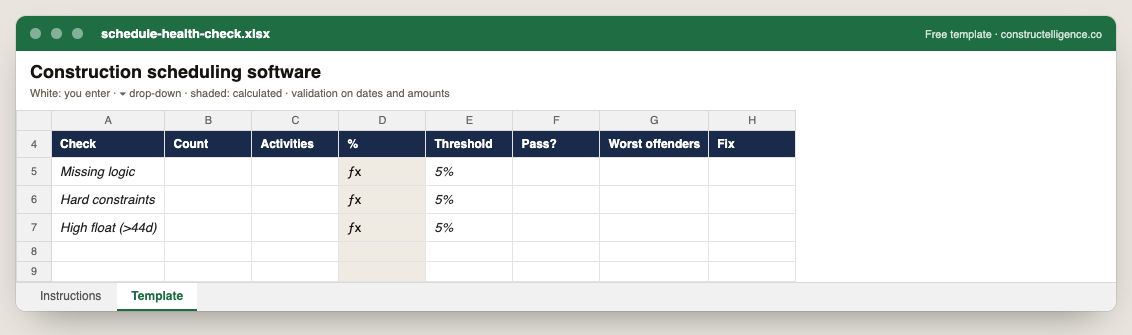
Each schedule check with its count, the activities affected, the share calculated against the threshold, pass or fail, the worst offenders and the fix.
8 columns: 6 you fill in, 1 picked from drop-down lists, so every row uses the same values and 1 calculated by formula and filled down 200 rows, so nothing is worked out by hand. In the Excel version, 1 column reject entries of the wrong type (a date column only takes dates, an amount column only numbers), the header row stays frozen with filters on it, and the workbook opens on an Instructions sheet that lists every column below.
Every column, and how it is captured
| Column | Type | What goes in it |
|---|---|---|
| Check | Text | Free text. |
| Count | Number | Enter a number. |
| Activities | Text | Free text. |
| % | Calculated | Calculated: [Count] ÷ [Activities] × 100 |
| Threshold | Text | Free text. |
| Pass? | Drop-down | Options: Yes / No. |
| Worst offenders | Text | Free text. |
| Fix | Text | Free text. |
See it on real-looking numbers
Constructelligence is a construction intelligence platform: it reads your ERP, project and field systems read-only and does this arithmetic every week, for every job. The demo runs it on a sample eight-job portfolio.
Try the demoJoin the private betaFrequently asked questions
What is the best construction scheduling software?
Oracle Primavera P6 for large and public projects or where the contract requires it; Microsoft Project for small and mid-sized work; Asta Powerproject for a construction-focused alternative; linear scheduling tools for roads, rail and pipelines. Smartsheet suits lookaheads but is not a CPM engine.
What is the difference between P6 and Microsoft Project?
Both do critical path scheduling. P6 is built for large, multi-project and resource-loaded programmes and is often required by public owners; Microsoft Project is simpler, widely available and suits smaller projects. Many owners require P6 XER files for submissions.
What is the DCMA 14-point assessment?
A widely used set of schedule quality checks from the US Defense Contract Management Agency — including missing logic, hard constraints, high float, negative float, long durations and leads — each with a threshold, typically 5% of activities.
How often should a construction schedule be updated?
Weekly on active projects, with actual dates and remaining durations from site. Monthly updates are common contractually but too slow to warn anyone about a slip in time to recover it.
What is an XER file?
Primavera P6's native export format. It carries the schedule's activities, relationships, calendars, constraints and resources, so another P6 user or an analysis tool can rebuild the full schedule logic from it.
Can you convert a P6 schedule to Excel?
Yes. P6 can export activity data to a spreadsheet directly, and an XER can be read by analysis tools. If you only have a PDF of the schedule, a PDF-to-Excel converter can recover the activity table, but not the relationships.
Related guides
More in Construction software & tech
- The best construction management software in 2026: 12 platforms compared, and how to choose
- Construction accounting software and ERP: the main systems and how to choose
- Construction estimating software: takeoff and bid tools compared
- Construction dashboards and BI: Power BI, Excel or construction intelligence?
- Construction technology trends in 2026: what is actually changing
- Sage 300 CRE reporting: job cost, WIP and dashboards without rebuilding Excel
- QuickBooks job costing for contractors: setup, reports and when you outgrow it
Free tools for this topic: Construction PDF to Excel converter · Schedule PDF to Excel (P6 & MS Project) · Construction schedule health check
All construction software & tech resources →