- Job and cost code on every line.
- Regular and overtime separately.
- Split a day when the work changed codes.
- Approve before payroll.
What a construction timesheet needs
- Job and cost code on every line — the link between payroll and job cost.
- Regular and overtime hours separately, with the multiplier, so labor cost is right.
- One row per worker per day per code — split a day when the work changed.
- Approval by the foreman before payroll.
Labor cost here is base wage only. Payroll taxes, insurance and benefits add a burden on top — the labor burden calculator works it out.
A filled-in example
Two days for one carpenter on Maple Street Medical Office:
| Date | Worker | Job | Cost code | Reg | OT | Rate | Labor cost |
|---|---|---|---|---|---|---|---|
| Mon Oct 5 | D. Ruiz | J-1131 | 06-1000 Framing | 8 | 0 | $42 | $336 |
| Tue Oct 6 | D. Ruiz | J-1131 | 06-1000 Framing | 6 | 0 | $42 | $252 |
| Tue Oct 6 | D. Ruiz | J-1131 | 06-1600 Sheathing | 2 | 2 | $42 | $210 |
Tuesday is split across two cost codes, and the overtime lands on sheathing at 1.5×: 2 × $42 + 2 × $42 × 1.5 = $210.
How to fill it in
- One row per worker, per day, per job and cost code — split a day across codes when the work changed.
- Enter regular and overtime hours separately; total hours and labor cost calculate.
- Have the foreman approve the week before it goes to payroll.
- Filter by job and cost code to compare hours with the estimate — the labor productivity guide shows how.
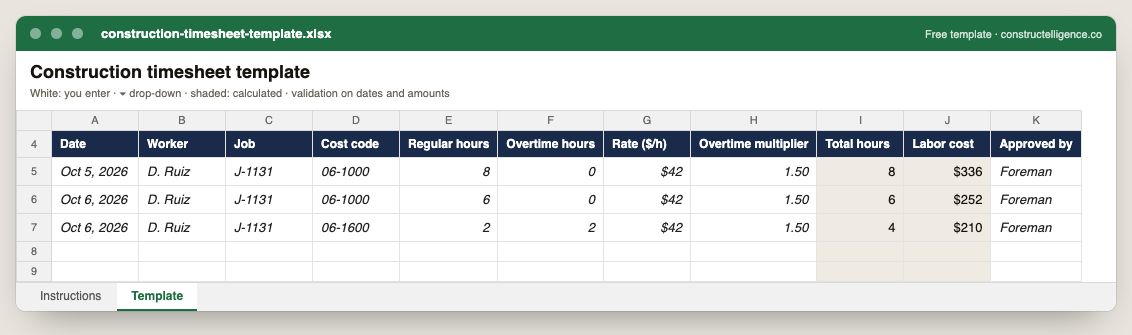
Everything payroll and job costing both need from one timesheet: the worker, the date, the job and cost code the hours belong to, regular and overtime hours, the rate and the labor cost — so the same entry pays the worker and costs the job.
11 columns: 9 you fill in and 2 calculated by formula and filled down 200 rows, so nothing is worked out by hand. In the Excel version, 5 columns reject entries of the wrong type (a date column only takes dates, an amount column only numbers), the header row stays frozen with filters on it, and the workbook opens on an Instructions sheet that lists every column below.
Every column, and how it is captured
| Column | Type | What goes in it |
|---|---|---|
| Date | Date | Date of the entry. |
| Worker | Text | Name or employee number. |
| Job | Text | Job number the hours are charged to. |
| Cost code | Text | Cost code the work was on — the link to labor productivity. |
| Regular hours | Number | Straight-time hours. |
| Overtime hours | Number | Hours at the overtime rate. |
| Rate ($/h) | Amount ($) | Base hourly rate. |
| Overtime multiplier | Number | 1.5 for time-and-a-half, 2 for double time. |
| Total hours | Calculated | Calculated: [Regular hours] + [Overtime hours] |
| Labor cost | Calculated | Calculated: [Regular hours] × [Rate ($ ÷ h)] + [Overtime hours] × [Rate ($ ÷ h)] × [Overtime multiplier] |
| Approved by | Text | Foreman or superintendent who approved the hours. |
See it on real-looking numbers
Constructelligence is a construction intelligence platform: it reads your ERP, project and field systems read-only and does this arithmetic every week, for every job. The demo runs it on a sample eight-job portfolio.
Try the demoJoin the private betaFrequently asked questions
What should a construction timesheet include?
Worker, date, job, cost code, regular and overtime hours, the rate, and approval — so the hours can be paid and charged to the right job and cost code.
How do you calculate overtime on a timesheet?
Overtime hours × base rate × the overtime multiplier, usually 1.5 for time-and-a-half. Federal law requires overtime over 40 hours in a work week for non-exempt employees; some states also have daily overtime rules.
Why put cost codes on timesheets?
Without them, labor cost reaches the job as one number. With them, you can compare actual hours with the estimate by activity and see which work is running over.
Do certified payroll jobs need a different timesheet?
Prevailing wage jobs need the worker's classification and the rates and fringes for that classification recorded too, and certified payroll reports filed on the required form.
Related guides
More in Templates & forms
- Free construction templates for Excel and Google Sheets
- Construction scope of work template: what to include, a filled-in example and a free download
- Construction schedule template: activities, workday finish dates and a free Excel download
- Punch list template: the fields that get items closed, an example and a free Excel download
- Construction estimate template: labor, material, equipment and subs by cost code — free Excel
- Construction change order form: what it must show, a priced example and a free template
- Construction budget template: budget, committed, actual and forecast by cost code — free Excel
- Construction bid template: base bid, alternates, unit prices and exclusions — free Excel
- RFI template: how to write a construction RFI, an example and a free form and log
- Construction proposal template: scope, price, exclusions and payment schedule — free download
- Submittal log template: track every submittal from spec to approval — free Excel