ChatGPT for construction: 30 prompts for contractors
General AI assistants — ChatGPT, Claude, Microsoft 365 Copilot, Gemini — are the construction AI most people actually use. They are very good at drafting and summarising, and they know nothing about your jobs unless you tell them. These 30 prompts are written for contractors: copy one, fill in the brackets, and review what comes back before it goes anywhere.
Updated · 9 minute read
Key takeaways
General assistants are best at drafting and summarising — RFIs, letters, minutes, scopes.
Use a business plan; never paste pricing, full contracts or personal data into a consumer account.
Give it the facts; check every number, code and clause it returns.
It cannot see your ERP or schedule — connected tools answer questions across jobs.
Five rules before you start
Use a business plan whose terms say your data is not used for training.
Never paste bid pricing, full contracts, personal data (SSNs, wage rates by name) or anything under NDA into a consumer account.
Give it the facts. It does not know your job, your contract or your codes. Paste the relevant paragraph, not the whole file.
It can be confidently wrong. Check any code reference, number or clause against the source.
You sign it. Anything sent to an owner, architect or sub is yours — read it first.
The five rules as a loop. The assistant drafts; the facts going in and the checks coming out are yours.
Project management and correspondence
1. Draft an RFI to the architect. Issue: [describe]. Drawings: [sheet refs]. Spec: [section]. Ask one clear question, propose a solution, and state the schedule impact if not answered by [date].
2. Turn these rough site notes into meeting minutes with attendees, decisions, action items (owner, due date) and open issues: [paste notes]
3. Write a firm but professional letter to [sub] about [late manpower / quality issue], referencing section [x] of their subcontract, and requesting a recovery plan by [date].
4. Summarise this email thread in five bullets: what was asked, what was agreed, what is still open, and who owes what: [paste]
5. Write a weekly owner update for [project]: progress [..], next week [..], risks [..], decisions needed [..]. Plain English, under 250 words.
6. Draft a notice of delay under a contract that requires notice within [x] days. Event: [..]. Date it began: [..]. Keep it factual and reserve our rights to time and cost.
CalculatorTime back from drafting with AI
Change orders and scope
7. Write a change order request narrative for [change]. Include the reason, the scope added or deleted, the cost breakdown [paste], schedule impact and the contract clause it falls under.
8. Compare these two scope descriptions and list everything in the second that is not in the first: [paste both]
9. Write a subcontract scope of work for [trade] on [project type]. Include inclusions, exclusions, clean-up, submittals, and coordination responsibilities.
10. List the questions I should ask before pricing this change: [describe].
11. Rewrite this scope so it is unambiguous about who supplies, installs and tests [item]: [paste]
12. Turn this list of field changes into a change order log with columns: CO no., description, date identified, status, amount requested: [paste]
Estimating and cost
13. Here is my estimate summary [paste]. List likely missing scope items for a [building type] and the questions to ask the design team.
14. Explain the difference between markup and margin and convert a 15% markup to margin. Show the formula.
15. Build a spreadsheet layout for a bid leveling sheet comparing [n] sub quotes for [trade], with columns for exclusions and adjustments.
16. Here are cost-to-date and percent complete by cost code [paste]. Calculate CPI and the forecast at completion for each and flag any below 0.95.
17. Write the assumptions and exclusions section for a proposal on [project].
18. Explain earned value to a project manager in five sentences with one example.
Safety and field
19. Write a 5-minute toolbox talk on [ladder safety / heat illness / trenching] for a [trade] crew, with three questions to ask the crew at the end.
20. Create a job hazard analysis for [task]: steps, hazards, controls, PPE.
21. Turn this incident description into a factual incident report with timeline, root cause questions and corrective actions: [paste]
22. Write a daily report from these notes: weather, manpower by trade, work performed, deliveries, visitors, issues: [paste]
23. Make a pre-pour checklist for a [slab on grade / elevated deck].
24. Translate this safety notice into Spanish, keeping it simple and direct: [paste]
Office, finance and hiring
25. Explain over-billing and under-billing on a WIP schedule to a new project manager, with one worked example.
26. Draft a polite but firm collection email for pay application #[n] on [project], [x] days past due, referencing the prompt payment terms.
27. Write a job description for an assistant project manager at a [size] [type] contractor.
28. Create a closeout checklist for [project type] including warranties, O&M manuals, as-builts, attic stock and lien waivers.
29. Summarise this spec section into the ten requirements a foreman needs to know: [paste]
30. I am evaluating [construction AI tool]. Write ten questions to ask the vendor about data security, accuracy and integration.
Where a general assistant stops
A chatbot works on what you paste. It cannot see your ERP, your schedule or your document folders, so it cannot tell you which jobs are going over or what changed this week — and anything it calculates is only as good as the numbers you gave it. For answers across all your jobs, from the live data, you need tools that connect to those systems: the construction AI tools list covers them, and the Constructelligence demo shows questions answered from ERP data with the rows behind each answer.
Checklist
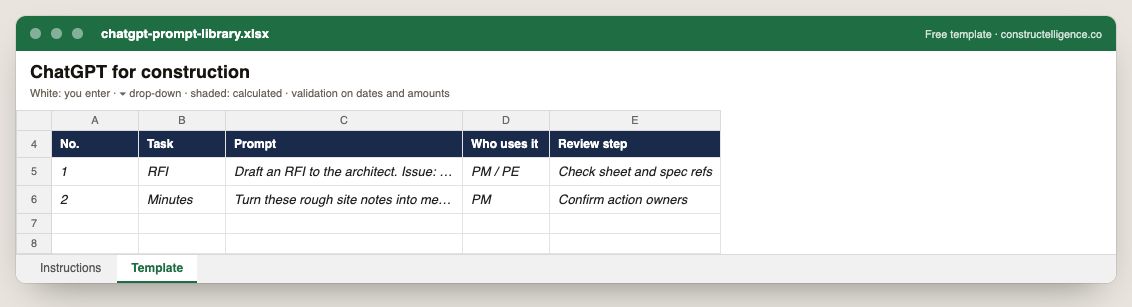
The chatgpt prompt library as it opens in Excel: example rows in italics, calculated columns shaded.
Free template · ChatGPT prompt library (Excel & CSV)An Excel workbook with drop-downs, validation and formulas built in — or the same columns as a CSV for Google Sheets and Numbers.
A numbered prompt library: the task, the exact prompt, who uses it and the human review step before anything goes out.
5 columns: 5 you fill in. In the Excel version, the header row stays frozen with filters on it, and the workbook opens on an Instructions sheet that lists every column below.
Every column, and how it is captured
Column
Type
What goes in it
No.
Text
Free text.
Task
Text
Free text.
Prompt
Text
Free text.
Who uses it
Text
Free text.
Review step
Text
Free text.
See it on real-looking numbers
Constructelligence is a construction intelligence platform: it reads your ERP, project and field systems read-only and does this arithmetic every week, for every job. The demo runs it on a sample eight-job portfolio.
For drafting and summarising: RFIs, letters, change order narratives, scopes of work, meeting minutes, daily reports, toolbox talks, owner updates and job descriptions. Give it the facts, review every output, and keep sensitive pricing and contracts out of consumer accounts.
Is ChatGPT accurate for construction?
It writes well but can be confidently wrong about code requirements, contract terms and numbers. Check any reference or figure against the source document before relying on it.
What should you not put into ChatGPT at a construction company?
Bid pricing, full contracts, personal data such as Social Security numbers or named wage rates, and anything under NDA — unless your company uses a business plan whose terms exclude your data from training and allow that use.
Can ChatGPT read construction drawings?
Current assistants can describe an uploaded image or PDF and read text on it, but they are not reliable for takeoff or code review. Dedicated AI takeoff tools are built for measurement from drawings.
CI
Written by the Constructelligence teamConstruction finance and software. Worked examples use the sample demo portfolio; formulas are standard practice. Reviewed September 2026.