- AI takeoff detects, counts and measures from drawings; estimators still own the number.
- Strong on clean floor plans and repeated symbols; weak on scans, revisions and spec-only items.
- Test on three past bids and weight missed items heavily.
- The return is more bids per estimator — track hit rate and margin too.
How AI takeoff works
- Read the sheet. Vector PDFs are read directly; scanned sheets go through OCR and image recognition first — expect lower accuracy on scans.
- Find the things. Computer vision detects rooms, walls, doors, fixtures, symbols and linear runs, and classifies them against a legend.
- Measure. Areas, lengths and counts are computed at the sheet scale.
- Hand over. Quantities go to the estimator to review, then to a cost library or estimating system for pricing.
Some products are software you run; others are services that return a reviewed takeoff. Both still need an estimator to own the number.
What it gets right, and what it misses
| Usually good | Usually weak |
|---|---|
| Room areas and perimeters on clean floor plans | Scanned or hand-marked sheets |
| Counts of repeated symbols — fixtures, devices, doors | Items defined in specs, not drawn |
| Linear runs with consistent linework | Revisions: superseded sheets still in the set |
| Speed on large repetitive sets | Scope gaps between trades and assemblies it has not seen |
How to test accuracy on your own drawings
- Pick three finished bids with a trusted manual takeoff — one clean, one messy, one with revisions.
- Run each through the tool without telling it the answers.
- Compare line by line on your ten largest quantities. Record the % difference and anything missed entirely.
- Time the review, not the tool. The saving is manual time minus tool time minus review time.
- Re-run one set after a revision and check what changed.
A missed item is worse than a 3% measurement error — it is scope you did not price. Weight misses heavily.
A worked example: from takeoff to a levelled bid
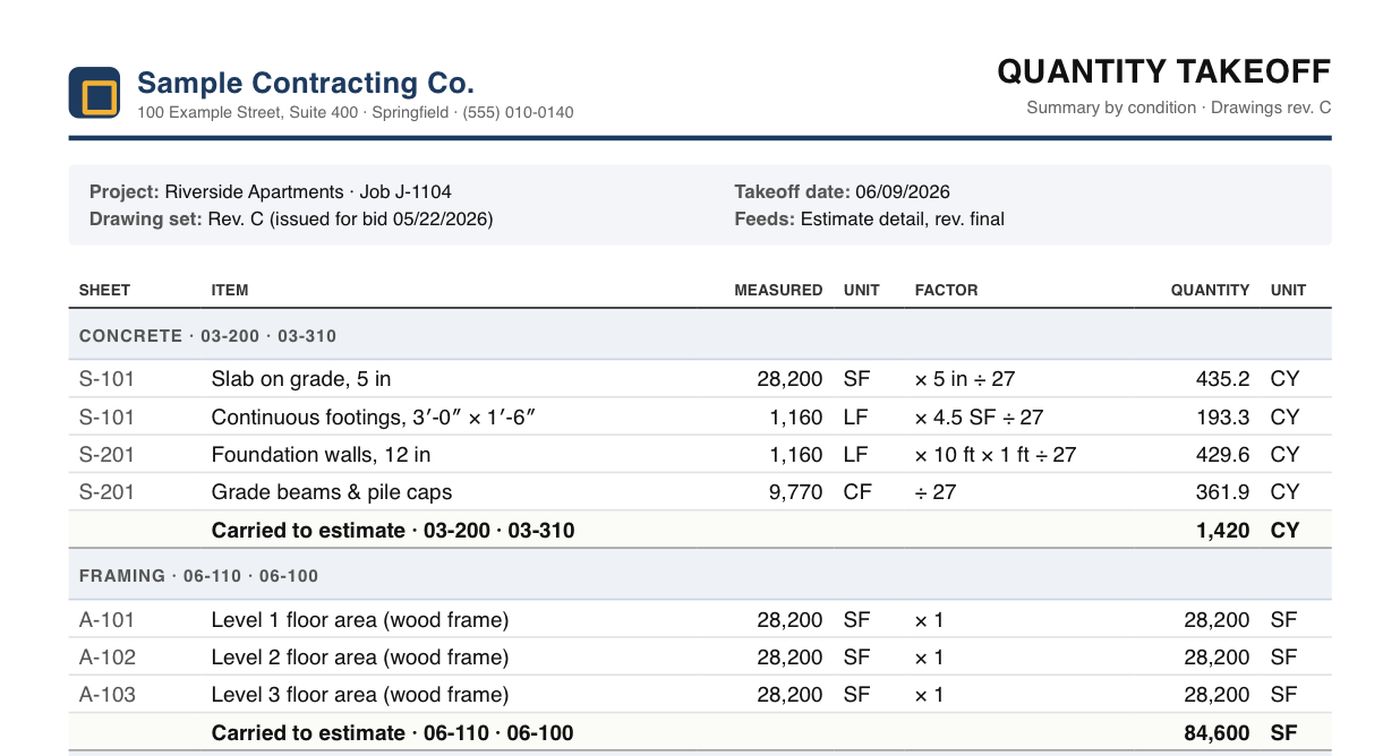
One sample job, Riverside Apartments, followed from drawings to estimate. Every figure is invented and they all tie together; open the PDFs to see the real-looking paperwork.
- Takeoff. Level 2 (sheet A-102): 1,240 LF of partitions × 9 ft × 2 faces, 676 LF of exterior wall and 3,700 SF of ceilings = 32,104 SF of drywall. Three levels carry 96,200 SF to the estimate. Sample quantity takeoff (PDF)
- Estimate. 96,200 SF goes on line 09-250 Finishes crew at $4.83/SF. Sample estimate (PDF)
- Price from history. On past jobs that crew actually cost $5.27/SF, 9% more than the rate used. On Level 2 alone that is $169K, not $155K. This check is where a faster takeoff pays off.
- Level the subcontractor bids. Three electrical bids: $312,400, $348,900 and $296,800 as submitted. Plugs for excluded scope (fire alarm, temporary power, permits) put them at $335,104, $348,900 and $349,600, so the lowest price as submitted is not the lowest once every bid covers the same scope. The same bidder also missed an addendum. Sample bid tabulation (PDF)
Both PDFs also work in the free construction PDF to Excel converter. Drop them in to get the quantities or the bid tab back as a spreadsheet.
Turning faster takeoff into more bids
The return from AI takeoff is rarely fewer estimators. It is more bids per estimator and more time spent on pricing, subcontractor coverage and risk — the parts that decide whether you win at a margin. Track hit rate and margin at award alongside bid count, or you will bid more and win worse.
The loop closes after award: compare what the estimate said with what the job cost, by cost code. The cost codes guide shows how to use that feedback, and Constructelligence does it across every finished job.
Run an accuracy test before you trust it
Test an AI takeoff tool on a finished job you have already measured by hand, item by item, before it touches a live bid. Decide the tolerance per item before you look at the results — counts and areas deserve tighter limits than linear runs through congested ceilings.
| Item | Manual takeoff | AI takeoff | Difference | Your tolerance |
|---|---|---|---|---|
| Gypsum board (SF) | 48,200 | 47,100 | −2.3% | ±3% |
| Doors (EA) | 214 | 209 | −2.3% | ±1% |
| 3/4 in EMT (LF) | 6,850 | 7,420 | +8.3% | ±5% |
Here the board area passes, the door count fails (five missing doors is five missing hardware sets), and the conduit fails high. Look at which items fail and why — hidden pages, symbols the model did not know, scale on a detail sheet — and keep the manual check for those item types. Carry the checked quantities into cost codes the way the rest of the estimate is built, so an AI line and a manual line compare in the cost forecast later.
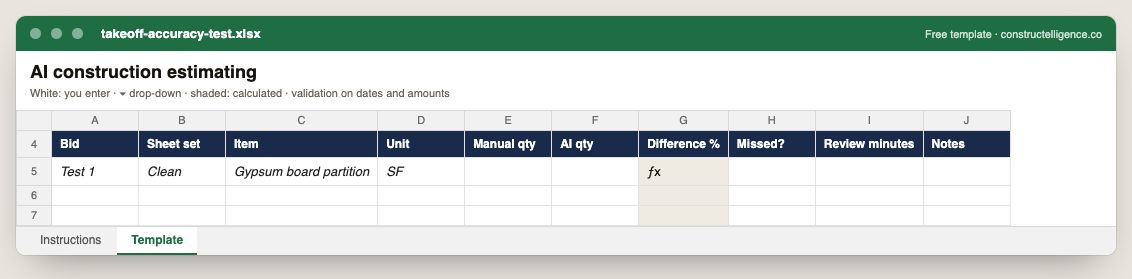
A line-by-line comparison of manual and AI takeoff on the same sheets: item, unit, both quantities, the difference calculated, items missed and review time.
10 columns: 8 you fill in, 1 picked from drop-down lists, so every row uses the same values and 1 calculated by formula and filled down 200 rows, so nothing is worked out by hand. In the Excel version, 3 columns reject entries of the wrong type (a date column only takes dates, an amount column only numbers), the header row stays frozen with filters on it, and the workbook opens on an Instructions sheet that lists every column below.
Every column, and how it is captured
| Column | Type | What goes in it |
|---|---|---|
| Bid | Text | Free text. |
| Sheet set | Text | Free text. |
| Item | Text | Line number, so the row can be referred to. |
| Unit | Text | Unit of measure (EA, LF, SF, CY, HR, LS). |
| Manual qty | Number | Enter a number. |
| AI qty | Number | Enter a number. |
| Difference % | Calculated | Calculated: ([AI qty] − [Manual qty]) ÷ [Manual qty] × 100 |
| Missed? | Drop-down | Options: Yes / No. |
| Review minutes | Number | Enter a number. |
| Notes | Text | Anything that explains the row; free text. |
See it on real-looking numbers
Constructelligence is a construction intelligence platform: it reads your ERP, project and field systems read-only and does this arithmetic every week, for every job. The demo runs it on a sample eight-job portfolio.
Try the demoJoin the private betaFrequently asked questions
Can AI do construction estimating?
AI can do most of the quantity takeoff — detecting, counting and measuring from drawings — and speed up pricing against your cost library. Pricing judgment, means and methods, subcontractor coverage and risk still need an estimator, who should review every AI takeoff.
How accurate is AI takeoff?
On clean vector floor plans, area and count takeoff is often close to manual. Accuracy drops on scanned sheets, hand markups, revisions and items defined in specs rather than drawn. Test on your own past bids before relying on any vendor's figure.
What is the best AI takeoff software?
Togal.AI, Beam AI and Kreo are widely used, and Autodesk Forma includes automated symbol detection. The right one depends on your trade, whether you want software or a delivered service, and accuracy on your own drawings.
Does AI takeoff work with scanned PDFs?
Most tools accept them, but accuracy is lower because the lines must be recognised from an image first. Ask for vector PDFs from the design team where you can.
How accurate is AI construction takeoff?
It varies by item type, drawing quality and tool. The reliable way to know is to test it on finished jobs you have already measured, item by item, against tolerances you set in advance.
Related guides
More in AI in construction
- Construction AI tools: what they do and how to choose one
- AI for construction scheduling and project management
- AI for construction safety and progress tracking
- AI for construction documents: contracts, specs, submittals and RFIs
- ChatGPT for construction: 30 prompts for contractors
Free tools for this topic: Construction PDF to Excel converter · Schedule PDF to Excel (P6 & MS Project) · Construction schedule health check
All ai in construction resources →