- AI reads contracts, specs, submittals and RFIs and finds the relevant part fast.
- Check payment, LDs, indemnity, notice, termination, consequential damages and warranty first.
- Every answer must cite its source — then someone opens it.
- Business plans only, no training on your data, permissions that match your files.
What AI document tools do
| Task | What AI does | Example tools |
|---|---|---|
| Contract review | Finds and summarises risk clauses and obligations | Document Crunch |
| Spec to submittal log | Reads the spec book and lists required submittals | Autodesk Forma AutoSpecs |
| Questions over documents | Answers with a citation to the drawing, spec or RFI | Trunk Tools, Procore Assist |
| Submittal checking | Compares a submittal with the spec section | Trunk Tools |
| Filing and matching | Recognises the document, files it to the job and checks its figures against the ledger | Constructelligence |
The contract clauses to check first
- Payment: pay-when-paid or pay-if-paid, retainage rate and release, payment timing.
- Liquidated damages: rate per day, caps, and whether they flow down to subs.
- Indemnity: broad-form indemnity and duty to defend.
- Changes: notice periods for claims and change orders — miss them and you may lose the claim.
- Termination for convenience and what you are paid if it happens.
- Consequential damages waiver — present, mutual, or missing.
- Warranty length and start date.
- No-damages-for-delay clauses.
AI finds these in seconds; a person who knows the job decides whether they are acceptable. For anything material, that person includes your attorney.
Why citations are non-negotiable
Language models can produce fluent answers that are wrong. The control is simple: every answer must cite the page, clause or sheet it came from, and someone must open the citation before relying on it. A document tool that answers without a citation is a drafting tool, not a review tool.
How to test a document tool
- Take three signed contracts where you know the answers.
- Ask the same ten questions of each — the clauses above.
- Score answers as right, wrong, or right-but-uncited.
- Include one trick question whose answer is “the contract does not say”. A good tool says so.
Keeping documents secure
- Business plans only, with written terms that your documents are not used to train shared models.
- Know where files are processed and stored, and for how long.
- Prefer tools that read from SharePoint, Dropbox or your platform in place rather than copying everything out.
- Match permissions: a tool should not show a user a document they could not open themselves.
Check every extracted document the same way
Extraction is only useful once it is checked against something you already trust. For each document type, decide which fields must match another record:
- Invoices — three-way match: the purchase order or subcontract, the receiving record or delivery ticket, and the invoice. Quantity and price must agree within a tolerance.
- Pay applications — G = D + E + F on every line, retainage at the contract rate, and the scheduled values matching the contract plus approved changes (see the G702/G703 guide).
- Lien waivers — claimant, through date and amount matching the payment being released; conditional versus unconditional as required.
- Change orders — amount and status matching the change order log.
Route anything that fails, or that the tool read with low confidence, to a person — and track how often each field fails, which tells you where the tool needs better templates.
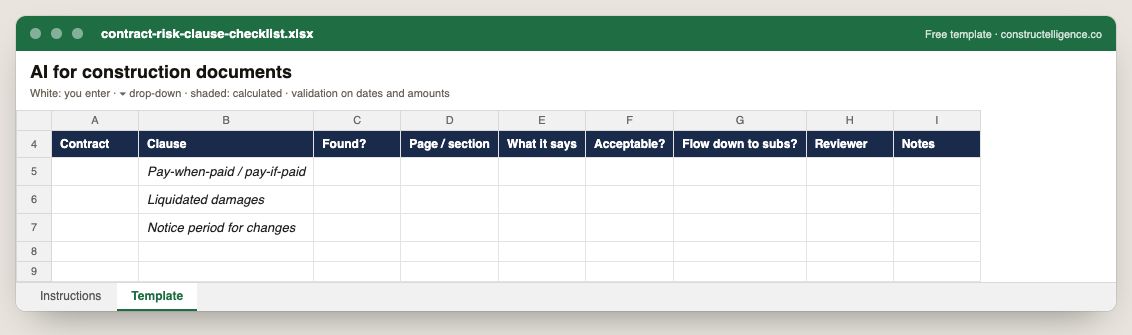
Each risk clause looked for in a contract, whether it was found and where, what it says, whether it is acceptable, whether it flows down to subs, and who reviewed it.
9 columns: 6 you fill in and 3 picked from drop-down lists, so every row uses the same values. In the Excel version, the header row stays frozen with filters on it, and the workbook opens on an Instructions sheet that lists every column below.
Every column, and how it is captured
| Column | Type | What goes in it |
|---|---|---|
| Contract | Text | Contract value including approved change orders. |
| Clause | Text | Free text. |
| Found? | Drop-down | Options: Yes / No. |
| Page / section | Text | Free text. |
| What it says | Text | Free text. |
| Acceptable? | Drop-down | Options: Yes / No. |
| Flow down to subs? | Drop-down | Options: Yes / No. |
| Reviewer | Text | Free text. |
| Notes | Text | Anything that explains the row; free text. |
See it on real-looking numbers
Constructelligence is a construction intelligence platform: it reads your ERP, project and field systems read-only and does this arithmetic every week, for every job. The demo runs it on a sample eight-job portfolio.
Try the demoJoin the private betaFrequently asked questions
Can AI review construction contracts?
Yes. Tools such as Document Crunch find and summarise key clauses — payment terms, liquidated damages, indemnity, notice periods, termination — so risk surfaces before signing. A person who knows the job, and an attorney for material terms, should still review the result.
What is the best AI for construction documents?
It depends on the task: Document Crunch for contract review, Trunk Tools for questions and checks across drawings, specs and submittals, and the assistants inside Procore and Autodesk Forma if your documents already live there.
Can AI create a submittal log?
Yes. Autodesk Forma's AutoSpecs and similar tools read the specification book and list the required submittals by section, which a project engineer then reviews and adjusts.
Is it safe to use AI on construction contracts?
On business plans with written no-training terms, known data location, and permissions that match your document system. Avoid pasting contracts into consumer AI accounts.
What is three-way matching in construction accounts payable?
Checking that the purchase order or subcontract, the receiving record (delivery ticket or approved progress) and the vendor's invoice agree on quantity and price before the invoice is approved for payment.
Related guides
More in AI in construction
- AI in construction: what works today and where to start
- Construction AI tools: what they do and how to choose one
- AI construction estimating: how AI takeoff works and how to test it
- AI for construction scheduling and project management
- AI for construction safety and progress tracking
Free tools for this topic: Construction PDF to Excel converter · Schedule PDF to Excel (P6 & MS Project) · Construction schedule health check
All ai in construction resources →