- Scheduling AI is generative sequencing, risk forecasting, or platform assistants.
- One finish date hides the odds — ask for P50 and P80.
- It needs real logic, a baseline and weekly progress.
- A slip matters in dollars: tie the schedule to cost.
Three kinds of scheduling AI
| Kind | What it does | Example |
|---|---|---|
| Generative scheduling | Builds and compares many possible sequences from scope, crews and constraints | ALICE Technologies |
| Schedule risk forecasting | Predicts the likely outcome of your schedule from patterns in past projects | nPlan |
| Platform assistants | Answer questions and flag risk over project records | Procore Helix, Autodesk Forma Construction IQ |
All three sit on top of the same thing: a schedule with real logic and weekly progress.
From a single date to a probability
A deterministic schedule gives one finish date. Reality is a range, because every activity on the critical path can slip. Even simple arithmetic shows why single dates mislead: with ten critical activities that each have a 15% chance of slipping, the chance that none slips is 0.85¹⁰ ≈ 20%. The calculator below runs that on your numbers.
Risk forecasting tools replace the guessed 15% with probabilities learned from past schedules, and report a P50 and P80 finish instead of one date — the question an owner actually needs answered.
What it needs from your schedule
- Real logic. Activities linked with predecessors, not hard constraints holding dates in place.
- Weekly progress. Actual starts, finishes and remaining durations updated on site, not before the owner meeting.
- A kept baseline. So slip can be measured against something.
- Cost loading, if you want money. A slip only becomes dollars when the schedule is tied to cost — extended general conditions, overtime to recover, liquidated damages.
Check a schedule before you buy anything with the free schedule health check.
AI in project management platforms
Procore and Autodesk Forma both now include assistants that answer questions over RFIs, submittals, specs and issues, and risk scoring over quality and safety records. For most contractors that is the fastest way to use AI in project management — the records are already there. The limit is the same as ever: they see the platform, not the ERP. Whether the delay is costing you money lives in job cost, which is where cost forecasting comes in.
How to judge a schedule forecast
- Back-test it: run it on a finished project as of an early week and compare with how it actually ended.
- Ask which activities drive the risk. A date without drivers cannot be acted on.
- Check it moves when progress moves. A forecast that ignores weekly updates is not forecasting.
- Tie it to cost. A three-week slip is a number of dollars — make the tool, or your team, say how many.
Check the schedule before any AI reads it
Every AI scheduling feature — risk scoring, delay prediction, generated look-aheads — reads the schedule's logic. If the logic is broken, the predictions are confidently wrong. Run the standard quality checks first:
- Activities with no predecessor or no successor (open ends).
- Negative lags and heavy use of hard constraints.
- In-progress activities longer than about two months.
- Float of many weeks on activities that are obviously sequential.
The critical path method guide shows what float means and how a delay moves the finish, and the free schedule health check runs these checks on an exported schedule. A clean network is worth more to an AI tool than any amount of history.
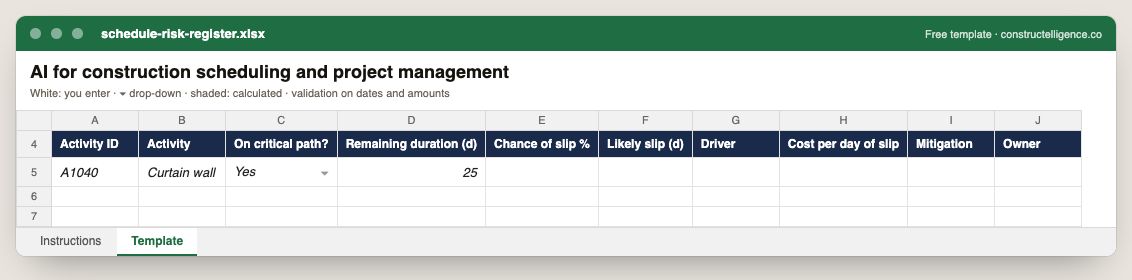
Each schedule risk with its activity, whether it is critical, remaining duration, chance and likely size of the slip, its driver, the cost per day, the mitigation and its owner.
10 columns: 9 you fill in and 1 picked from drop-down lists, so every row uses the same values. In the Excel version, 4 columns reject entries of the wrong type (a date column only takes dates, an amount column only numbers), the header row stays frozen with filters on it, and the workbook opens on an Instructions sheet that lists every column below.
Every column, and how it is captured
| Column | Type | What goes in it |
|---|---|---|
| Activity ID | Text | Free text. |
| Activity | Text | The schedule activity or scope of work. |
| On critical path? | Drop-down | Options: Yes / No. |
| Remaining duration (d) | Number | Enter a number. |
| Chance of slip % | Percent | Enter a percentage, 0–100. |
| Likely slip (d) | Number | Enter a number. |
| Driver | Text | Free text. |
| Cost per day of slip | Amount ($) | Enter the amount in dollars. |
| Mitigation | Text | Free text. |
| Owner | Text | The person responsible for the row. |
See it on real-looking numbers
Constructelligence is a construction intelligence platform: it reads your ERP, project and field systems read-only and does this arithmetic every week, for every job. The demo runs it on a sample eight-job portfolio.
Try the demoJoin the private betaFrequently asked questions
Can AI create a construction schedule?
Generative scheduling tools such as ALICE Technologies can build and compare many possible sequences from your scope, crews and constraints. A scheduler still sets the strategy, checks the logic and owns the baseline.
How does AI predict construction delays?
Schedule risk tools learn from past project schedules how activities like yours actually performed, then estimate the probability of finishing by each date — usually reported as P50 and P80 — and highlight the activities carrying the most risk.
What data does AI scheduling need?
A schedule with real predecessor logic, a baseline, and progress updated weekly from site. Without those, any AI forecast is working from dates that do not reflect the job.
Does Procore have AI?
Yes. Procore Helix is Procore's AI layer, including Procore Assist for questions over project records and Agent Builder for no-code AI agents. Autodesk Forma (formerly Autodesk Construction Cloud) offers Construction IQ, AutoSpecs and an assistant.
Why do AI schedule predictions go wrong?
Most often because the schedule's logic is incomplete — open ends, negative lags, hard constraints — so the float and critical path the tool reads are not real. Fix the logic before judging the predictions.
Related guides
More in AI in construction
- Construction AI tools: what they do and how to choose one
- AI construction estimating: how AI takeoff works and how to test it
- AI for construction safety and progress tracking
- AI for construction documents: contracts, specs, submittals and RFIs
- ChatGPT for construction: 30 prompts for contractors
Free tools for this topic: Construction PDF to Excel converter · Schedule PDF to Excel (P6 & MS Project) · Construction schedule health check
All ai in construction resources →