- Safety AI flags PPE, zones, proximity and hazards from video or photos.
- Alert fatigue decides success — measure false positives in the pilot.
- Progress AI compares site captures with the model or plans, element by element.
- Measured progress fixes earned value and makes pay applications defensible.
What safety AI detects
- PPE: missing hard hats, vests, harnesses and eye protection.
- Zones: people inside exclusion zones, near open edges, under suspended loads.
- Plant–people proximity: workers close to moving equipment.
- Housekeeping and hazards: obstructed egress, unprotected openings, from photos taken during the day.
Two approaches: live video on fixed cameras (vendors such as viAct) and photo analysis over the pictures crews already take, scored for risk (Newmetrix, now part of Oracle Construction Intelligence Cloud).
Alert fatigue decides whether it works
A false-positive rate that looks fine in a demo becomes noise across a real site. Twenty cameras producing fifteen alerts a day each is 300 alerts — if 70% are false, someone spends hours a day dismissing them, and the real ones get missed. Use the calculator below with the vendor’s own figures from your pilot, then decide who reviews, how fast, and what counts as closed.
How AI progress tracking works
- Capture: a 360° camera on a hardhat or pole walked weekly, a lidar scanner, or a drone.
- Locate: images are placed on the plans or the BIM model automatically.
- Compare: computer vision checks each element or area against the model — framed, boarded, taped, installed.
- Report: percent complete by area, trade and schedule activity, and where work is out of sequence.
OpenSpace, Buildots, Doxel and DroneDeploy all work this way with different capture hardware; see the tools list.
Where progress meets cost
Measured percent complete is the missing input in most cost forecasts. When percent complete is guessed — or worse, taken from cost — the forecast is circular and the job always looks on budget. Feed measured progress into earned value and the cost performance index becomes real: work installed against money spent. It also makes the pay application defensible, because billed percent complete matches what the camera saw.
Running a pilot
- One site, one trade or area, four to six weeks.
- Name who captures, who reviews alerts and who acts, before day one.
- Count alerts, false positives and time spent reviewing every week.
- For progress: compare the tool’s percent complete with your PM’s and your pay application.
Measure whether it is working
Lagging safety rates move slowly and are noisy on one job, so judge a safety AI tool on leading indicators you can count within weeks:
- Observations raised per week, and how many a person confirmed as real (false-alert rate).
- Share of confirmed observations closed within seven days.
- Repeat findings — the same hazard in the same area after it was closed.
- Time from observation to the foreman seeing it.
Keep a baseline from before the pilot, compare the same crews and areas, and report the rates on the 200,000-hour basis alongside (see construction safety metrics). A tool that raises many alerts nobody closes has made the site noisier, not safer.
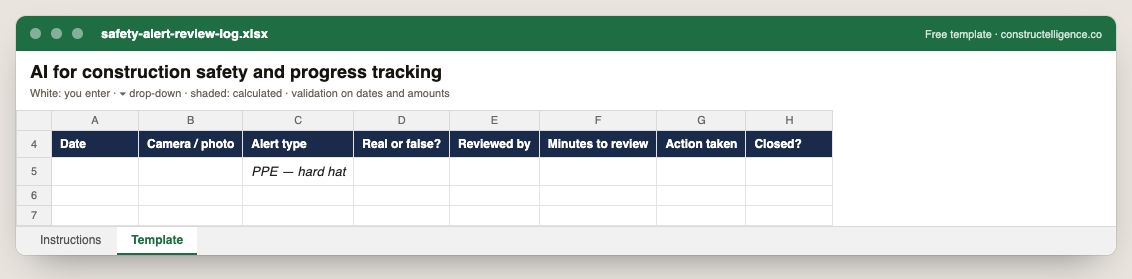
Every AI or camera safety alert with its source, type, whether it was real, who reviewed it and how long it took, the action taken and whether it is closed.
8 columns: 6 you fill in and 2 picked from drop-down lists, so every row uses the same values. In the Excel version, 2 columns reject entries of the wrong type (a date column only takes dates, an amount column only numbers), the header row stays frozen with filters on it, and the workbook opens on an Instructions sheet that lists every column below.
Every column, and how it is captured
| Column | Type | What goes in it |
|---|---|---|
| Date | Date | Date of the entry. |
| Camera / photo | Text | Free text. |
| Alert type | Text | Free text. |
| Real or false? | Drop-down | Options: Yes / No. |
| Reviewed by | Text | Free text. |
| Minutes to review | Number | Enter a number. |
| Action taken | Text | Free text. |
| Closed? | Drop-down | Options: Yes / No. |
See it on real-looking numbers
Constructelligence is a construction intelligence platform: it reads your ERP, project and field systems read-only and does this arithmetic every week, for every job. The demo runs it on a sample eight-job portfolio.
Try the demoJoin the private betaFrequently asked questions
How is AI used in construction safety?
Computer vision analyses site camera video and jobsite photos to flag missing PPE, people in exclusion zones, workers near moving equipment and hazards such as unprotected openings. It works when someone is assigned to review and act on each alert.
What is AI construction progress tracking?
Site captures from 360° cameras, lidar or drones are placed on the plans or BIM model and compared element by element, so the tool reports what is installed, percent complete by area and activity, and work that is behind or out of sequence.
What are the best AI progress tracking tools?
OpenSpace, Buildots, Doxel and DroneDeploy are widely used. They differ in capture method — hardhat 360° cameras, lidar, drones — and in whether they compare against a BIM model, plans or the schedule.
Does AI site monitoring raise privacy concerns?
It can. Tell workers what is captured and why, focus analysis on conditions and PPE rather than identifying individuals where possible, agree retention periods, and check local law and any union agreements.
How do you know if a construction safety AI tool is working?
Track leading indicators over the pilot against a baseline: confirmed observations, false alerts, the share closed within a week and repeat findings — then check whether recordable rates follow over a longer period.
Related guides
More in AI in construction
- Construction AI tools: what they do and how to choose one
- AI construction estimating: how AI takeoff works and how to test it
- AI for construction scheduling and project management
- AI for construction documents: contracts, specs, submittals and RFIs
- ChatGPT for construction: 30 prompts for contractors
Free tools for this topic: Construction PDF to Excel converter · Schedule PDF to Excel (P6 & MS Project) · Construction schedule health check
All ai in construction resources →