- Break the next three weeks of the CPM schedule into crew-level tasks by area.
- A task is only ready when every constraint is cleared — pull it if not.
- Measure PPC weekly and chart the reasons for misses.
- Three weeks of disagreement means update the master schedule.
What goes on a look-ahead
Take every activity from the CPM schedule that starts or is in progress in the next three weeks, and break it into tasks a crew can finish in a few days — by area, floor or grid line. An activity is in the window if it starts on or before the window's last day and finishes on or after its first.
- Task at crew level ("Hang board, L3 east"), not activity level ("Drywall").
- Crew and trade responsible, and the area.
- Dates within the window.
- Constraints still open: RFIs, submittals, material deliveries, inspections, access, predecessor work.
Clearing constraints before the week starts
A task is ready only when every constraint is cleared. The look-ahead's real job is surfacing the ones that are not, two to three weeks out — while there is still time to fix them:
| Constraint | Owner | Clear by |
|---|---|---|
| RFI on door hardware at stair 2 | Architect | End of week 1 |
| Drywall delivery, L3 | Drywall sub | Mon week 2 |
| Above-ceiling inspection, L2 | GC super | Wed week 2 |
Tasks with an open constraint the week before are either cleared or pulled from the plan — scheduling work that cannot happen is how look-aheads lose credibility. Open RFIs and submittals feed straight in from the logs; unpriced changes are a constraint too.
Measuring it: percent plan complete
At the end of each week, compare what was committed with what was finished:
A crew that committed to 40 tasks and completed 31 has a PPC of 77.5%. Record a reason for each miss — material, labor, prerequisite work, design, weather, inspection — and chart the reasons, not just the percentage. The same reason recurring across weeks is the problem to fix; a single bad week is noise.
PPC measures reliability of the plan, not progress on the job: pair it with the schedule performance index or the critical path to see whether reliable weeks are also the right weeks.
Running the weekly meeting
- Review last week's PPC and the reasons for misses (10 minutes).
- Walk the next three weeks by area; each foreman confirms or changes their tasks.
- Go through open constraints oldest first; every one gets an owner and a date.
- Check anything on the critical path first — a slip there moves the finish.
- Publish the updated look-ahead the same day.
Keep it to one page per trade. When the look-ahead and the master schedule disagree for three weeks running, update the master schedule — that is the signal the plan has changed.
A constraint log that actually clears constraints
A task is ready only when nothing stands in its way. Sorting constraints into the same categories every week makes the log readable and shows where the job keeps getting stuck:
| Category | Typical constraint | Usual owner |
|---|---|---|
| Design | Open RFI, missing detail | Architect / engineer via the PM |
| Submittals | Shop drawings not approved | Sub, then design team |
| Materials | Not delivered, not released | Sub or purchasing |
| Labor & equipment | Crew or lift not available | Sub foreman / superintendent |
| Prior work | Preceding trade not finished | Superintendent |
| Permits & inspections | Inspection not passed | Superintendent |
| Access & space | Area not available, laydown | Superintendent |
Count misses by category over a month. If "submittals" keeps topping the list, the fix is upstream in the submittal log, not on site.
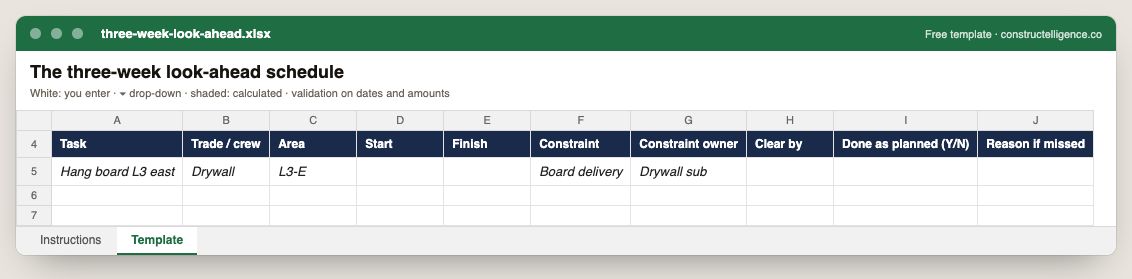
Each task in the next three weeks with trade, area, dates, the constraint that could stop it, who clears it by when, and whether it was done as planned and why not.
10 columns: 9 you fill in and 1 picked from drop-down lists, so every row uses the same values. In the Excel version, 2 columns reject entries of the wrong type (a date column only takes dates, an amount column only numbers), the header row stays frozen with filters on it, and the workbook opens on an Instructions sheet that lists every column below.
Every column, and how it is captured
| Column | Type | What goes in it |
|---|---|---|
| Task | Text | Free text. |
| Trade / crew | Text | Free text. |
| Area | Text | Free text. |
| Start | Date | Enter the date. |
| Finish | Date | Enter the date. |
| Constraint | Text | Free text. |
| Constraint owner | Text | Free text. |
| Clear by | Text | Free text. |
| Done as planned (Y/N) | Drop-down | Options: Y / N. |
| Reason if missed | Text | Free text. |
See it on real-looking numbers
Constructelligence is a construction intelligence platform: it reads your ERP, project and field systems read-only and does this arithmetic every week, for every job. The demo runs it on a sample eight-job portfolio.
Try the demoJoin the private betaFrequently asked questions
What is a three-week look-ahead schedule?
A short-interval schedule covering the next three weeks of work, broken into crew-level tasks with their responsible trade, area, dates and open constraints. It is updated weekly from the master CPM schedule and used to plan and coordinate the field.
How do you calculate percent plan complete (PPC)?
Divide the number of tasks completed as planned in a week by the number of tasks committed for that week. For example, 31 completed out of 40 planned is 77.5%.
What is the difference between a look-ahead and the master schedule?
The master schedule models the whole job with activity logic and the critical path; the look-ahead is a detailed, crew-level plan for the next few weeks that checks constraints and commitments. The look-ahead is built from the master schedule, not instead of it.
What counts as a constraint on a look-ahead?
Anything that must be true before a task can start: an answered RFI, an approved submittal, delivered material, a passed inspection, available crew, access to the area, or finished predecessor work.
How far ahead should a look-ahead schedule go?
Three weeks is the common window — far enough to clear most constraints, near enough to plan at crew level. Longer-lead items such as long-lead materials and submittals need their own tracking further out.
Who should attend the look-ahead meeting?
The superintendent and each trade's foreman who will do the work, with the project manager for constraints that need design, submittal or purchasing action. The people committing to tasks should be the ones in the room.