- Takeoff measures counts, lengths, areas and volumes; estimating prices them.
- Choose by trade: drywall, electrical, civil and roofing need different tools.
- Assemblies and revision overlay save more time than the measuring itself.
- Test on a past bid of your own: time, accuracy, export and a revision.
Quick picks: the best takeoff software by trade and team
Start from what you measure. Each pick is a starting shortlist for that kind of contractor, not a score — the full entries below say who else fits and what to check.
| If you are… | Start your shortlist with | Why |
|---|---|---|
| A commercial sub or GC with a high takeoff volume | On Center On-Screen Takeoff | Long-established desktop takeoff organised by conditions |
| A trade contractor who wants assemblies | PlanSwift | Point-and-click takeoff with waste built into assemblies |
| A team that wants takeoff in the browser | STACK | Shared plans and quantities with nothing to install |
| A GC on model-based projects | Autodesk Takeoff | Quantities from 2D sheets and the 3D design model |
| Sitework and excavation | AGTEK | Cut and fill from design and existing surfaces |
| An electrical contractor | Trimble Accubid | Device and run takeoff priced from labor units |
| Interiors, flooring, drywall or painting | Togal.AI | AI first-pass areas and lengths, checked by an estimator |
| A firm already on Bluebeam | Bluebeam Revu | Length, area and count tools in the PDF tool you already use |
What takeoff software does
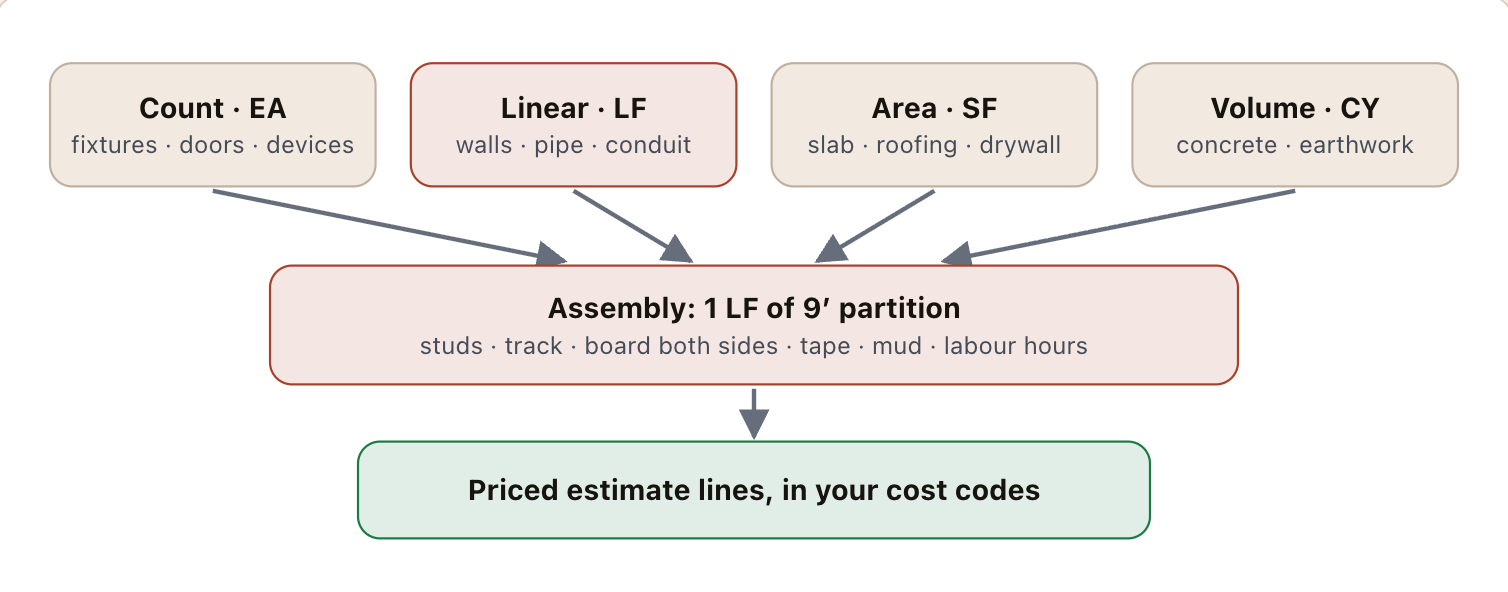
Every takeoff tool does the same four things. They differ in how fast, how accurately and how well the result reaches the estimate:
| Measurement | Unit | Typical items |
|---|---|---|
| Count | EA | Light fixtures, receptacles, plumbing fixtures, doors, diffusers, bollards, signs |
| Linear | LF | Walls, conduit and pipe runs, curb, trench, base, railing, trim |
| Area | SF / SY / SQ | Slab, flooring, roofing, drywall and paint (wall length × height, less openings), paving |
| Volume | CY | Concrete (area × depth), excavation and fill, aggregate base |
Two features matter more than the measuring itself. Conditions or assemblies attach what an item is made of to the measurement: one linear foot of a 9′ two-layer partition becomes studs, track, board both sides, tape, mud and labor hours. And revisions: when the next drawing set arrives, a good tool overlays it on the old one and shows what changed, so you re-measure the clouded area rather than the whole sheet.
The main takeoff tools

Bluebeam Revu
PDF markup with length, area, volume and count measurement tools; markups roll up in a list that can be exported or linked to Excel.
- Best for
- Firms that already use Bluebeam for drawings and want takeoff in the same tool.
- Check
- Whether the markups list is enough, or you need assemblies and a cost database on top.
On Center On-Screen Takeoff
Long-established desktop takeoff organised by conditions, often paired with On Center’s Quick Bid for pricing.
- Best for
- Commercial subcontractors and GCs with high takeoff volume.
- Check
- Desktop installs and sharing across estimators versus a cloud tool.

PlanSwift
Point-and-click takeoff with assemblies, widely used by trade contractors.
- Best for
- Trade contractors who want quick takeoff with assemblies.
- Check
- How its output reaches your estimate or ERP.

STACK
Browser-based takeoff and estimating, so estimators share plans and quantities without installing software.
- Best for
- Subcontractors and GCs who want takeoff in the browser.
- Check
- Assembly libraries for your trade, and export to your estimating format.
Autodesk Takeoff
Takeoff from 2D sheets and from 3D models inside Autodesk’s construction platform, so quantities can come from the design model.
- Best for
- GCs already working in Autodesk’s platform, especially on model-based projects.
- Check
- How complete the design model is — model takeoff is only as good as the model.
AGTEK
Earthwork and site takeoff from design and existing surfaces — cut and fill, materials and haul quantities.
- Best for
- Sitework, excavation and heavy civil contractors.
- Check
- Surface-building time on your typical plan sets.
Trimble Accubid
Electrical estimating with labor-unit databases and takeoff of devices and runs.
- Best for
- Electrical contractors pricing from labor units.
- Check
- Labor units against your own crews’ productivity.

Togal.AI
Detects, measures and labels spaces and features on floor plans automatically as a first pass.
- Best for
- Area-driven trades: interiors, flooring, drywall, painting.
- Check
- Accuracy on your own drawing sets, especially revised and scanned sheets.
More AI takeoff tools — Beam AI, Kreo — and how to judge them are in the AI estimating guide. Pricing the quantities is covered in the estimating software guide.
Takeoff by trade: what to look for
| Trade | What you measure most | What to look for in a tool |
|---|---|---|
| Drywall, framing & interiors | Wall lengths by partition type, heights, ceilings, openings | Partition-type assemblies that turn LF into board, studs and hours; automatic deduction of openings; multiple layers and heights |
| Concrete | Slab areas, footing and wall lengths, thicknesses | Volume from area × depth with waste; separate pours and placements; rebar by assembly |
| Electrical | Device and fixture counts, conduit and wire runs | Fast counting across many sheets, symbol search, labor units by device |
| Plumbing & mechanical | Fixture counts, pipe and duct runs by size | Runs by size and material, fittings per run, labor units |
| Sitework, civil & utility | Cut and fill, trench, pipe, paving, curb | Surfaces and volumes, not just 2D areas; linear runs with depth |
| Roofing | Roof area by pitch, edges, penetrations | Pitch factors, squares with waste, or aerial measurement for re-roof |
| Specialty (countertops, stucco, signage) | Areas and counts on a handful of sheets | Simple area and count tools; a PDF tool with measurement is often enough |
| General contractor | Everything, at a coarser level, plus checking sub scopes | Speed across trades, revision overlay, and a hand-off to the estimate by cost code |
For the trade-level software beyond takeoff, see drywall, concrete, electrical and excavation contractor software.
Desktop, cloud or AI takeoff
| Type | Strength | Weakness |
|---|---|---|
| Desktop | Fast on big plan sets, mature condition libraries, works offline | Installed per machine; sharing a takeoff between estimators is harder |
| Cloud | Nothing to install, shared plans and quantities, works from anywhere | Depends on the connection; check large-file performance |
| AI-assisted | A first pass of areas, rooms and counts in minutes | Every quantity still needs checking; accuracy varies with drawing quality |
| Model-based (BIM) | Quantities straight from the design model | Only as complete as the model; most bid sets are still 2D |
Most estimating teams end up with a PDF tool everyone has, plus one dedicated takeoff tool for the estimators. The question is not which type is best but which removes the most hours from your bids.
How to test takeoff software before you buy
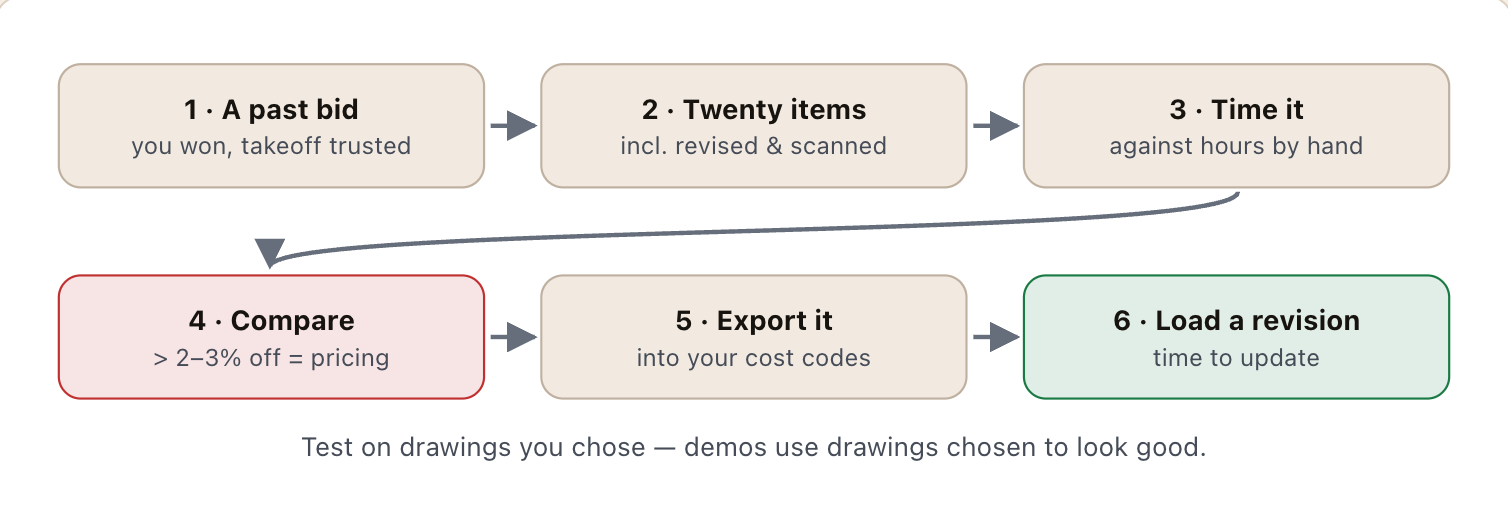
Demos use drawings chosen to look good. Test on yours:
- Pick a past bid you won, with a takeoff you trust and, ideally, actual installed quantities from the job.
- Choose 20 items across counts, lengths and areas — including the awkward ones: revised sheets, scanned pages, details at a different scale.
- Time it. Minutes to complete the takeoff in the tool, including setting scale and checking — against the hours it took by hand.
- Compare quantities item by item. More than 2–3% off on a major item is a pricing problem, not a rounding one.
- Export it. Check the quantities land in your estimate in your cost codes without retyping.
- Load a revision. See how long it takes to update the takeoff when the next drawing set arrives.
The template on this page records the test, and the calculator shows what the time saved is worth.
From takeoff to estimate to budget
A takeoff is only worth the hours it saves if the quantities reach the estimate — and, after award, the job budget — without being retyped. Name conditions to match your cost codes, keep units consistent (LF, SF, EA, CY), and export to the estimate rather than copying numbers. Then, when the job is finished, compare installed quantities and unit costs with the takeoff: that comparison is how the next takeoff and the next bid get better.
How this list was put together
- Who is in it. Tools that contractors in the US commonly run for this job, chosen to cover each size of firm and type of work — not every product on the market.
- What each entry says. Descriptions follow each vendor's own product documentation and public pages; the worked examples are illustrative, not customer case studies.
- No scores. Products are grouped by fit rather than ranked, because the right choice depends on trade, size and the systems you already run.
- Disclosure. We build Constructelligence, a forecasting layer that reads these systems rather than replacing them. It is not listed or ranked here.
- Kept current. The date at the top of the page is the last review. Vendors rename and merge products often — tell us if an entry is out of date.
A side-by-side trial of takeoff tools on one of your own past bids: each item and unit, your trusted quantity against the tool’s with the difference calculated, minutes by hand and in the tool, and whether the export reached the estimate cleanly.
10 columns: 8 you fill in, 1 picked from drop-down lists, so every row uses the same values and 1 calculated by formula and filled down 200 rows, so nothing is worked out by hand. In the Excel version, 4 columns reject entries of the wrong type (a date column only takes dates, an amount column only numbers), the header row stays frozen with filters on it, and the workbook opens on an Instructions sheet that lists every column below.
Every column, and how it is captured
| Column | Type | What goes in it |
|---|---|---|
| Tool | Text | Free text. |
| Item | Text | Line number, so the row can be referred to. |
| Unit | Text | Unit of measure (EA, LF, SF, CY, HR, LS). |
| Our takeoff qty | Number | Enter a number. |
| Tool qty | Number | Enter a number. |
| Difference % | Calculated | Calculated: IF([Our takeoff qty]=0, blank, ([Tool qty] − [Our takeoff qty]) ÷ [Our takeoff qty] × 100) |
| Minutes by hand | Number | Enter a number. |
| Minutes in tool | Number | Enter a number. |
| Exported cleanly? | Drop-down | Options: Yes / No. |
| Notes | Text | Anything that explains the row; free text. |
See it on real-looking numbers
Constructelligence is a construction intelligence platform: it reads your ERP, project and field systems read-only and does this arithmetic every week, for every job. The demo runs it on a sample eight-job portfolio.
Try the demoJoin the private betaFrequently asked questions
What is the best construction takeoff software?
It depends on trade and volume. Bluebeam Revu is the most common PDF tool used for takeoff; On-Screen Takeoff and PlanSwift are long-established desktop tools; STACK is a widely used cloud tool; Autodesk Takeoff measures from 2D sheets and 3D models; AGTEK is built for earthwork; Accubid suits electrical; Togal.AI adds an AI first pass. Test two on one of your own past bids before buying.
What is the difference between takeoff and estimating software?
Takeoff software measures quantities — counts, lengths, areas, volumes — from drawings. Estimating software prices those quantities with labor, material, equipment and markup into a bid. Some products do both; many teams use one tool for each.
Can AI do a construction takeoff?
AI tools can produce a first pass of areas, rooms and counts in minutes, which helps most on area-driven trades. Every quantity still needs checking by an estimator, and accuracy depends on drawing quality, so test on your own revised and scanned sheets.
Is Bluebeam good enough for takeoff?
For many trades, yes: Revu measures length, area, volume and counts and exports the totals. Teams that bid a lot usually add a dedicated takeoff or estimating tool for assemblies, labor units and a cost database.
What is a digital takeoff?
A quantity takeoff done on electronic drawings (PDF or model) instead of paper prints: the estimator sets the scale and measures on screen, and the software totals the quantities and keeps them linked to the drawing.
What takeoff software do civil and utility contractors use?
Earthwork and site work need surfaces and volumes, not just 2D areas, so civil and utility contractors usually run a dedicated earthwork tool — AGTEK or Trimble Business Center — for cut, fill and trench quantities, then price them in a heavy civil estimating system such as HCSS HeavyBid or B2W Estimate. Pipe, curb and paving runs can be measured in a general takeoff tool.
What takeoff software do mechanical and plumbing contractors use?
Mechanical and plumbing estimators measure pipe and duct runs by size and material and count fittings and fixtures, so they favour trade estimating systems with labor units built in, such as Trimble’s mechanical estimating line (formerly QuoteSoft) or Accubid for MEP, often with Bluebeam or On-Screen Takeoff for the measuring.
How long does it take to learn takeoff software?
Basic measuring is learned in a day or two. Building conditions or assemblies for your trade, and a library of them, is the part that takes weeks and pays back over every later bid.
Related guides
More in Construction software & tech
- Construction intelligence: what it means, how it works and what to buy
- The construction tech stack: what a contractor needs and how it connects
- The best construction management software in 2026: 12 platforms compared, and how to choose
- Construction accounting software and ERP: the main systems and how to choose
- Construction scheduling software: Primavera P6, Microsoft Project and the rest
- Construction dashboards and BI: Power BI, Excel or construction intelligence?
- Construction technology trends in 2026: what is actually changing
- Sage 300 CRE reporting: job cost, WIP and dashboards without rebuilding Excel
- QuickBooks job costing for contractors: setup, reports and when you outgrow it
Free tools for this topic: Construction PDF to Excel converter · Schedule PDF to Excel (P6 & MS Project) · Construction schedule health check
All construction software & tech resources →