- Five numbers per code: budget, changes, committed, actual, cost to complete.
- Forecast = actual + cost to complete.
- Committed cost shows overruns before invoices do.
- Review variances monthly and feed the forecast into the WIP.
The columns that turn a budget into a forecast
Forecast at completion = actual to date + cost to complete
Variance = revised budget − forecast at completion
- Committed — subcontracts and purchase orders issued but not yet invoiced. A code can look fine on actual cost while its commitments already exceed the budget; see committed cost.
- Cost to complete — the one column that needs judgement. Everything else is arithmetic. It is where job cost forecasting happens.
A filled-in example
Five cost codes on Maple Street Medical Office at the end of September:
| Cost code | Revised budget | Committed | Actual | To complete | Forecast | Variance |
|---|---|---|---|---|---|---|
| 03-3000 Concrete | $214,000 | $196,000 | $151,000 | $71,500 | $222,500 | −$8,500 |
| 05-1200 Steel | $388,000 | $379,000 | $122,000 | $257,000 | $379,000 | $9,000 |
| 09-2116 Drywall | $612,000 | $598,000 | $64,000 | $548,000 | $612,000 | $0 |
| 22-0000 Plumbing | $195,400 | $195,400 | $111,800 | $83,600 | $195,400 | $0 |
| 01-5000 General conditions | $262,000 | $40,000 | $118,000 | $162,000 | $280,000 | −$18,000 |
Concrete is going over, and actual cost alone would not show it yet — $151,000 spent of $214,000 looks healthy. General conditions is over because the schedule slipped a week. Both variances are visible in September, not at close-out.
A monthly budget review in four steps
- Update committed and actual from accounting, after month-end close.
- Ask each project manager for cost to complete on every code — in units and hours where possible, not just dollars.
- Sort by variance; explain every negative variance over a threshold you set (say $5,000 or 2%).
- Carry the forecast into the WIP schedule, where it decides revenue recognised and over- or under-billing.
How to fill it in
- Enter each cost code from the estimate with its original budget.
- Add approved change orders to Approved changes as they are signed.
- Each month, update Committed and Actual to date from accounting.
- Estimate Cost to complete for every code — that one judgement drives the forecast.
- Sort by Variance: the negative ones are where the job is going over.
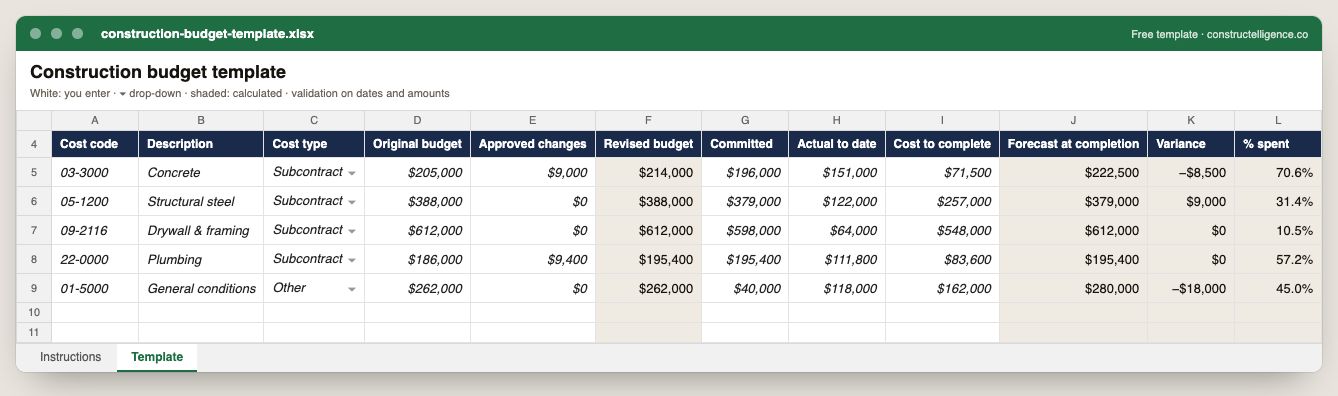
Everything a job budget needs to forecast rather than just record: each cost code's original budget and approved changes, what is committed and what is spent, the estimate to complete — with the revised budget, forecast at completion, variance and percent spent calculated.
12 columns: 7 you fill in, 1 picked from drop-down lists, so every row uses the same values and 4 calculated by formula and filled down 200 rows, so nothing is worked out by hand. In the Excel version, 5 columns reject entries of the wrong type (a date column only takes dates, an amount column only numbers), the header row stays frozen with filters on it, and the workbook opens on an Instructions sheet that lists every column below.
Every column, and how it is captured
| Column | Type | What goes in it |
|---|---|---|
| Cost code | Text | Cost code from your cost code list, matching the estimate and the ERP. |
| Description | Text | What the line is, in words the other party will recognise. |
| Cost type | Drop-down | Labor, material, subcontract, equipment or other. Options: Labor / Material / Equipment / Subcontract / Other. |
| Original budget | Amount ($) | The budget at award, from the estimate. |
| Approved changes | Amount ($) | Budget added or removed by approved change orders. |
| Revised budget | Calculated | Calculated: [Original budget] + [Approved changes] |
| Committed | Amount ($) | Subcontracts and purchase orders issued, whether invoiced or not. |
| Actual to date | Amount ($) | Cost posted to the code in accounting. |
| Cost to complete | Amount ($) | What is still to be spent to finish the code — an estimate, updated monthly. |
| Forecast at completion | Calculated | Calculated: [Actual to date] + [Cost to complete] |
| Variance | Calculated | Calculated: [Revised budget] − [Forecast at completion] |
| % spent | Calculated | Calculated — actual to date as a share of the revised budget (= IF([Revised budget]=0, blank, [Actual to date] ÷ [Revised budget])) |
See it on real-looking numbers
Constructelligence is a construction intelligence platform: it reads your ERP, project and field systems read-only and does this arithmetic every week, for every job. The demo runs it on a sample eight-job portfolio.
Try the demoJoin the private betaFrequently asked questions
How do you create a construction budget?
Start from the estimate, organised by cost code and cost type. Add approved change orders as they are signed. Each month, record committed cost and actual cost to date, estimate the cost to complete each code, and forecast the cost at completion.
What is the difference between budget and forecast in construction?
The budget is what the job was expected to cost, adjusted for approved changes. The forecast is what it is now expected to cost — actual to date plus estimated cost to complete. The difference is the variance.
What is committed cost in a construction budget?
Cost the company is contractually committed to through subcontracts and purchase orders but has not yet been invoiced for. Including it shows overruns before the invoices arrive.
How often should a construction budget be updated?
Monthly at minimum, after the accounting close, with cost to complete re-estimated by the project manager — weekly on jobs that are at risk.
Related guides
More in Templates & forms
- Free construction templates for Excel and Google Sheets
- Construction scope of work template: what to include, a filled-in example and a free download
- Construction schedule template: activities, workday finish dates and a free Excel download
- Punch list template: the fields that get items closed, an example and a free Excel download
- Construction estimate template: labor, material, equipment and subs by cost code — free Excel
- Construction change order form: what it must show, a priced example and a free template
- Construction daily report template: what to record every day, an example and a free download
- Construction bid template: base bid, alternates, unit prices and exclusions — free Excel
- RFI template: how to write a construction RFI, an example and a free form and log
- Construction proposal template: scope, price, exclusions and payment schedule — free download
- Construction timesheet template: hours by job and cost code, overtime and labor cost — free Excel
- Submittal log template: track every submittal from spec to approval — free Excel