
 AG

- Heavy civil and utility work is bid and paid by pay item — track installed quantity against bid quantity on every item, weekly.
- Cost per unit decides the margin: crew-day cost ÷ units installed per day.
- A quantity overrun changes revenue as well as cost; a differing site condition needs written notice before the work.
- Certified payroll, DBE participation and the DOT's change process are part of the job, not paperwork after it.
Where civil and utility contractor jobs make and lose money
- Production rate. Feet of pipe, tons of asphalt or cubic yards per crew-day against the bid. A crew-day costs the same at 85 feet as at 120.
- Quantities. Unit-price work is paid on measured quantities — an item that underruns its bid quantity loses the overhead it was carrying; an overrun beyond the contract's limit can be repriced.
- Site conditions. Rock, groundwater, unmarked utilities. A differing site condition needs written notice within the contract's deadline, before the work is covered.
- Public-work compliance. Certified payroll, prevailing wage classifications and DBE participation — late or wrong, they hold up pay estimates.
Mostly earthwork and site grading? The excavation and sitework software page covers production by cubic yard and equipment costing in more depth.
Key terms: Cost code · Productivity factor · Change order (CO) · Estimate at completion (EAC)
A worked example
2,400 linear feet of 8-inch water main bid at $142 per foot. The crew and equipment cost $4,150 a day, the bid assumed 120 feet a day, and pipe and fittings run $58 a foot. Rock shows up and the crew is laying 85 feet a day:
If the contract has a rock excavation pay item, the measured rock is revenue — but only if someone records it daily. If it does not, it is a differing site condition, and the notice clock started the day the bucket hit it.
The civil and utility contractor software stack
Most contractors in this trade run four or five systems. The names below are common examples, not a ranking.
HCSS HeavyBidB2WHCSS HeavyJobRakentelematics from equipment makersFoundationSage 300 CRESage Intacct ConstructionFrom bid item to pay estimate
On unit-price work the same pay item runs through every system, and the money is lost wherever it changes name:
- Bid — each pay item estimated with its crew, equipment, production rate and material, and a unit price.
- Cost codes — one code per pay item (or a short list under it), so cost and quantity land on the same line.
- Field — the foreman records hours, equipment and installed quantity per pay item each day.
- Pay estimate — measured quantities agreed with the inspector, item by item, with certified payroll attached.
- Forecast — cost per unit to date × quantity remaining, per item, against the bid.
The common gap is between steps 3 and 4: quantity installed but not yet agreed with the inspector, which is work done and not yet billed. Track it as its own number — it is the unbilled revenue on a civil job.
A starter cost code list for civil and utility contractors
On unit-price work the cleanest structure is one cost code per pay item, so cost and quantity meet on the same line — with cost types for labor, equipment, material and subcontract under each.
| Code | Covers | Unit | What to watch |
|---|---|---|---|
0201 | Clearing & grubbing | AC | Cost per acre against the bid |
0203 | Unclassified excavation | CY | Cubic yards per crew-day |
0204 | Rock excavation (if a pay item) | CY | Measured daily — it is revenue |
0610 | Water main, 8 in. | LF | Feet per crew-day, cost per foot |
0620 | Sanitary sewer, 10 in. | LF | Feet per day, depth and dewatering |
0630 | Storm drain & structures | LF / EA | Structures set per day |
0401 | Asphalt base & surface | TON | Tons per day, yield |
0101 | Mobilization & traffic control | LS / DAY | Days against the schedule |
Illustrative numbering — use your accounting system’s own format. What matters is that the estimate, the field and the job cost use the same list. The cost codes guide covers structure, cost types and how many codes is too many.
The numbers worth tracking weekly
Five numbers, each with its formula and the reading that should start a conversation. Most can be pulled from the job cost and timecards you already have.
| Number | How to calculate it | Warning sign | How often |
|---|---|---|---|
| Cost per unit, per pay item | cost to date on the item ÷ quantity installed | Above the bid unit cost on a large item | Weekly |
| Units per crew-day | quantity installed ÷ crew-days worked | Below the bid rate two weeks running | Daily |
| Quantity against bid quantity | installed + remaining ÷ bid quantity | Heading past the contract's overrun or underrun threshold | Weekly |
| Installed, not yet billed | installed quantity − quantity on pay estimates, × unit price | Growing month to month | Each pay estimate |
| Equipment utilization | hours charged to jobs ÷ hours available | Owned machines idle while rentals run | Weekly |
What to run as a civil and utility contractor business grows
The right stack depends on size more than on brand. Three stages, what each usually runs, and the sign that it is time to move up:
- 1Small utility contractor — a few crews
Spreadsheets or a simple estimating tool, QuickBooks or a construction accounting package, quantities on paper tickets
Time to move up when public work arrives with certified payroll and pay-item billing - 2Growing — DOT and municipal work
Heavy civil estimating (HCSS HeavyBid or B2W), field time and quantities by pay item (HCSS HeavyJob), a construction ERP with certified payroll (Foundation, Sage 300 CRE)
Time to move up when owners require CPM schedules and the pay estimate takes days to assemble - 3Established heavy civil contractor
Estimating and field platforms joined to the ERP (Viewpoint Vista), survey and quantity tools (Trimble Business Center), Primavera P6, with cost per unit forecast weekly per item
How to choose civil and utility contractor software
Five questions to ask any vendor before a trial — each is about whether the software fits how this trade actually makes money.
- Can estimating work by pay item, with crews, equipment and production rates under each one?
- Can the field record installed quantity per pay item daily, not just hours?
- Does it produce the owner's pay estimate from measured quantities, and flag overruns against bid quantity?
- Does payroll handle certified payroll, prevailing wage classifications and DBE tracking?
- Can owned equipment be charged to pay items at internal rates, including idle time?
Then trial it on a finished job where you already know the answer. The construction tech stack guide covers how the pieces connect.
Where Constructelligence fits
Constructelligence sits on top of the accounting system you already run — Sage 300 CRE and QuickBooks Desktop are live today, with more ERPs and project platforms in build — and forecasts every job weekly by cost code, so a pay item running over its bid cost per unit shows up in the week it starts. It reads read-only, runs in Constructelligence Cloud (or on your own server on the Private tier) and replaces none of the tools above. See it in the demo.
Software for other trades
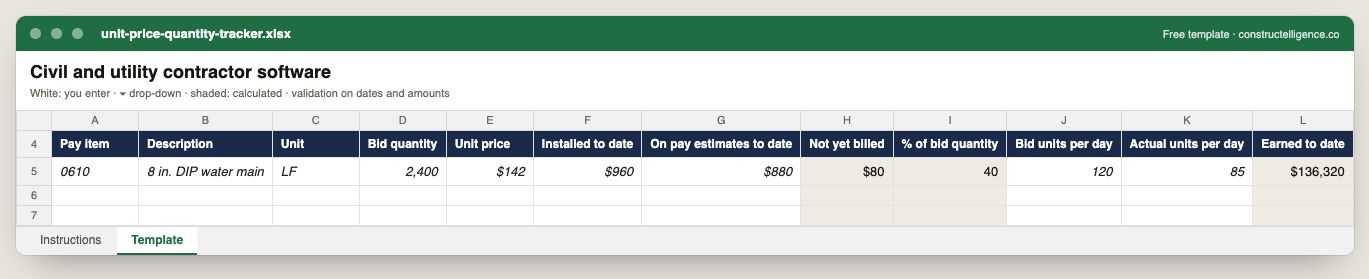
Each pay item's bid quantity and unit price, installed and billed quantities with the unbilled balance and percent of bid quantity calculated, bid against actual units per day, and earned revenue.
12 columns: 9 you fill in and 3 calculated by formula and filled down 200 rows, so nothing is worked out by hand. In the Excel version, 7 columns reject entries of the wrong type (a date column only takes dates, an amount column only numbers), the header row stays frozen with filters on it, and the workbook opens on an Instructions sheet that lists every column below.
Every column, and how it is captured
| Column | Type | What goes in it |
|---|---|---|
| Pay item | Number | Enter a number. |
| Description | Text | What the line is, in words the other party will recognise. |
| Unit | Text | Unit of measure (EA, LF, SF, CY, HR, LS). |
| Bid quantity | Number | Enter a number. |
| Unit price | Amount ($) | Enter the amount in dollars. |
| Installed to date | Amount ($) | Enter the amount in dollars. |
| On pay estimates to date | Amount ($) | Enter the amount in dollars. |
| Not yet billed | Calculated | Calculated: [Installed to date] − [On pay estimates to date] |
| % of bid quantity | Calculated | Calculated: [Installed to date] ÷ [Bid quantity] × 100 |
| Bid units per day | Number | Enter a number. |
| Actual units per day | Number | Enter a number. |
| Earned to date | Calculated | Calculated: [Installed to date] × [Unit price] |
See it on real-looking numbers
Constructelligence is a construction intelligence platform: it reads your ERP, project and field systems read-only and does this arithmetic every week, for every job. The demo runs it on a sample eight-job portfolio.
Try the demoJoin the private betaFrequently asked questions
What software do heavy civil contractors use?
Most combine heavy civil estimating (HCSS HeavyBid or B2W are common examples) with field software that records time, equipment and installed quantities by pay item (such as HCSS HeavyJob), survey and quantity tools such as Trimble Business Center or AGTEK, a scheduler for owner-required CPM schedules, and a construction ERP — Viewpoint Vista, Foundation or Sage 300 CRE — for payroll, certified payroll and job cost.
What is the best software for utility contractors?
The one that records installed feet of pipe or conduit per pay item from the field every day and carries it to the pay estimate and job cost without retyping. Utility contractors running many small jobs often value fast field entry over a large ERP; contractors on DOT and municipal work need certified payroll and pay-item billing built in.
How do unit-price contracts handle quantity overruns?
The owner pays the bid unit price for the measured quantity installed. Many public contracts allow either party to ask for a new unit price when an item's quantity moves beyond a set percentage of the bid quantity — often 25% — so track installed against bid quantity on every item and raise it before the item is finished.
What is a pay item on a civil contract?
One line of the bid schedule — a quantity, a unit and a unit price, such as 2,400 LF of 8-inch ductile iron pipe at $142 per foot. On unit-price work the owner pays for the measured quantity actually installed, so tracking installed quantity per pay item is how the contractor gets paid.
How is heavy civil software different from excavation software?
They overlap — both estimate by crew, equipment and production rate. Heavy civil and utility contractors lean harder on bid-item tracking against measured quantities, DOT pay estimates, certified payroll and DBE reporting, and on linear work such as pipe, conduit and paving.
Related guides
More in Software by trade
- Construction software by trade
- General contractor software: what to run, what to track, and where jobs lose money
- Electrical contractor software: what to run, what to track, and where jobs lose money
- Plumbing software: what plumbing contractors run, what to track, and where jobs lose money
- HVAC and mechanical contractor software: what to run, what to track, and where jobs lose money
- Concrete contractor software: what to run, what to track, and where jobs lose money
- Roofing contractor software: what to run, what to track, and where jobs lose money
- Drywall and interiors contractor software: what to run, what to track, and where jobs lose money
- Home builder software: what to run, what to track, and where jobs lose money
- Remodeling contractor software: kitchen and bath project management, selections and job costing
- Deck builder software: project management, pricing and where deck jobs lose money
- Flooring contractor software: estimating, moisture, waste and job costing per square foot
- Painting contractor software: estimating, production rates and job costing
Free tools for this topic: Construction markup vs margin calculator · Fully burdened labor rate calculator for construction · Contractor overhead recovery and break-even calculator
All software by trade resources →