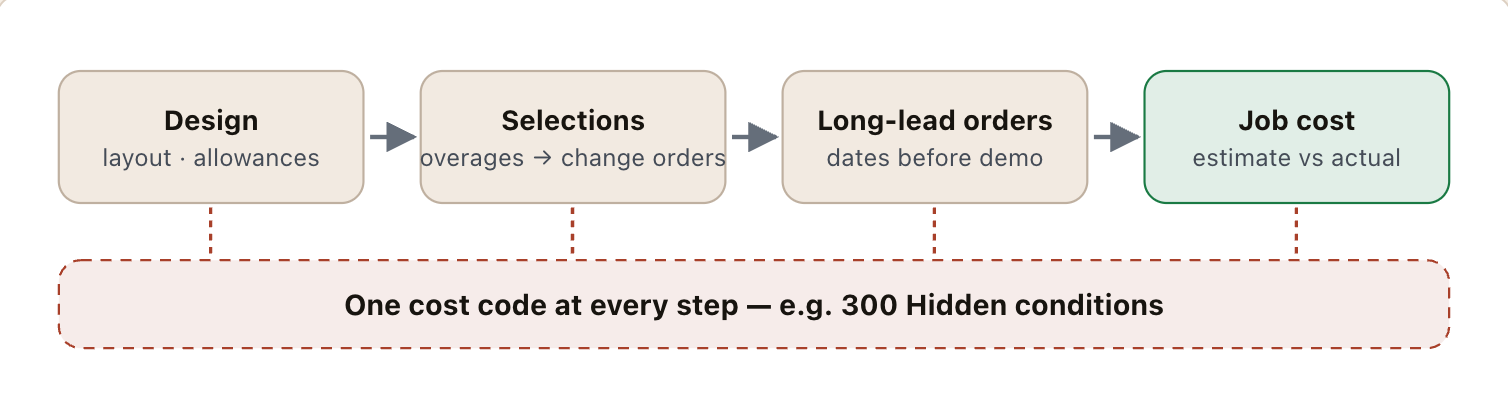
- Remodeling margin is lost behind the walls, in selections and in the weeks between demo and the cabinet delivery.
- Carry a priced contingency for hidden conditions and bill what it does not cover as a signed change order.
- Order long-lead items — cabinets, windows, custom tops — off a signed selection, before demolition.
- Countertops are templated after the cabinets are set; schedule the template, fabrication and install as their own steps.
Where remodeling contractor jobs make and lose money
- Hidden conditions. Rot, old wiring, out-of-level floors and undersized drains appear on demo day. Without a contingency or unit price in the contract, each one is unpaid work.
- Selections. Tile, fixtures, hardware and appliances chosen late or over allowance. An overage not signed before the order is margin given away — see change order management.
- Lead times. Semi-custom cabinets and custom countertops set the critical path. A kitchen gutted before the cabinets are confirmed sits idle while the client lives without one.
- Pricing. Remodeling overhead is high — design time, sales, showroom — so margin targets of 30% or more are common. Markup and margin are easy to confuse; a 25% markup is a 20% margin.
Key terms: Allowance · Change order (CO) · Fade · Estimate at completion (EAC)
A worked example
A $68,000 kitchen remodel priced for a 32% gross margin: cabinets $14,200, countertops $6,800, other material $7,400, labor 290 hours at $58 an hour, subcontractors (electrical, plumbing) $9,100:
The job was sold $11,882 under the price its own costs called for — the common remodeling mistake of pricing from a cost-plus-markup habit (roughly 25% markup, which is only a 20% margin). Then one hidden condition took another 2.5 points.
The remodeling contractor software stack
Most contractors in this trade run four or five systems. The names below are common examples, not a ranking.
 Buildertrend
 JobTreadHouzz Pro
Kitchen and bath remodels, step by step
The order of a kitchen or bath job is fixed by lead times, not by the crew's availability. Projects that start demolition before the long-lead items are confirmed are the ones that stall with the client's kitchen in pieces:
- Design & estimate — measurements, layout, the cabinet line, and a priced estimate with allowances named.
- Contract & selections — signed scope, hidden-condition terms, deposit; selections finished and overages signed.
- Order long-lead items — cabinets (often several weeks for semi-custom), windows, special-order fixtures. Get confirmed delivery dates.
- Permit & schedule — demolition dated back from the cabinet delivery, not forward from today.
- Demo & rough-in — photograph every opened wall; price hidden conditions before the work continues.
- Cabinets set, then countertop template — the fabricator templates on installed cabinets; fabrication and install follow, typically one to two weeks later.
- Finishes, punch & close-out — backsplash, fixtures, punch list, final invoice, and estimated against actual by category.
Countertop fabricators and cabinet installers are often subcontractors; put their dates on the same schedule as your crew's, because the template date depends on the cabinets being set and level.
A starter cost code list for remodeling contractors
Remodelers do not need full CSI divisions — a list that separates the work with different labor rates and lead times is enough.
| Code | Covers | Unit | What to watch |
|---|---|---|---|
100 | Design & permits | job | Design hours per job |
200 | Demolition & protection | room | Hours per room |
300 | Hidden conditions | EA | Contingency used vs carried |
400 | Rough plumbing & electrical | job | Sub price vs estimate |
500 | Cabinets & install | LF | Lead time, hours per linear foot |
600 | Countertops | SF | Template-to-install days |
700 | Tile & finishes | SF | Hours per square foot |
800 | Fixtures & appliances — allowances | item | Selection against allowance |
Illustrative numbering — use your accounting system’s own format. What matters is that the estimate, the field and the job cost use the same list. The cost codes guide covers structure, cost types and how many codes is too many.
The numbers worth tracking weekly
Five numbers, each with its formula and the reading that should start a conversation. Most can be pulled from the job cost and timecards you already have.
| Number | How to calculate it | Warning sign | How often |
|---|---|---|---|
| Gross margin per job | (contract + change orders − actual cost) ÷ (contract + change orders) | Two finished jobs under target | Each job |
| Change orders priced before the work | signed-before-work COs ÷ all COs | Under 90% | Each job |
| Demo to completion | days from demolition to substantial completion, by room type | Rising while crews stay busy | Each job |
| Long-lead items ordered before demo | items with a confirmed date at demolition ÷ all long-lead items | Any job starting below 100% | Each job |
| Close rate on designs | signed ÷ designs presented, by lead source | Design hours rising while close rate falls | Monthly |
What to run as a remodeling contractor business grows
The right stack depends on size more than on brand. Three stages, what each usually runs, and the sign that it is time to move up:
- 1Owner-operator — one crew
Estimates in a spreadsheet or Jobber, QuickBooks, photos on a phone
Time to move up when selections and change orders tracked in texts - 2Growing — a designer and two or three crews
A residential platform (Buildertrend, JobTread, Houzz Pro) with a client portal, a design tool, CompanyCam
Time to move up when more jobs in flight than the owner can track by memory - 3Established design-build remodeler
Design tool feeding the estimate, the platform for every job, job cost by category reviewed monthly, a showroom CRM
How to choose remodeling contractor software
Five questions to ask any vendor before a trial — each is about whether the software fits how this trade actually makes money.
- Can the client make selections and approve overages in a portal before anything is ordered?
- Does a signed change order update the contract, the budget and the next invoice in one step?
- Can long-lead items be tracked from selection to order to delivery against the schedule?
- Can crews record hours and photos per job — including the day a wall is opened?
- Does it show estimated against actual cost by category on every finished job?
Then trial it on a finished job where you already know the answer. The construction tech stack guide covers how the pieces connect.
Where Constructelligence fits
Constructelligence sits on top of the accounting system you already run — Sage 300 CRE and QuickBooks Desktop are live today, with more ERPs and project platforms in build — and forecasts every job weekly by cost code, so a remodel running over its estimate shows up in the week it starts. It reads read-only, runs in Constructelligence Cloud (or on your own server on the Private tier) and replaces none of the tools above. See it in the demo.
Software for other trades
12 columns: 11 you fill in and 1 calculated by formula and filled down 200 rows, so nothing is worked out by hand. In the Excel version, 5 columns reject entries of the wrong type (a date column only takes dates, an amount column only numbers), the header row stays frozen with filters on it, and the workbook opens on an Instructions sheet that lists every column below.
Every column, and how it is captured
| Column | Type | What goes in it |
|---|---|---|
| Job | Text | Job number exactly as in your accounting system (e.g. J-1104), so rows join to job cost. |
| Client | Text | Free text. |
| Room | Text | Free text. |
| Contract | Amount ($) | Contract value including approved change orders. |
| Change orders | Number | Enter a number. |
| Est. cost | Amount ($) | Enter the amount in dollars. |
| Actual cost | Amount ($) | Enter the amount in dollars. |
| Margin % | Calculated | Calculated: ([Contract] + [Change orders] − [Actual cost]) ÷ ([Contract] + [Change orders]) × 100 |
| Long-lead item | Text | Free text. |
| Ordered | Text | Free text. |
| Expected delivery | Text | Free text. |
| Demo date | Date | Enter the date. |
See it on real-looking numbers
Constructelligence is a construction intelligence platform: it reads your ERP, project and field systems read-only and does this arithmetic every week, for every job. The demo runs it on a sample eight-job portfolio.
Try the demoJoin the private betaFrequently asked questions
What is the best software for kitchen and bath remodelers?
Most kitchen and bath remodelers combine a design tool such as 2020 Design Live or Chief Architect with a residential project management platform such as Buildertrend, JobTread or Houzz Pro for estimates, selections, change orders, schedules and client communication, and QuickBooks for accounting. The deciding test is whether a client's selection becomes a priced, signed line before the order is placed.
What countertop software do remodelers use?
Remodelers who buy tops from a fabricator usually just track the template, fabrication and install dates in their project management platform. Fabrication shops run their own quoting and shop scheduling — Moraware's CounterGo and Systemize are common examples — alongside slab layout and digital templating tools.
Do remodelers need different software from home builders?
They overlap — both need selections, allowances and change orders — but remodelers run many short jobs with clients living in the house, so fast estimates, hidden-condition change orders and client communication matter more than construction draws or community-level scheduling.
What is the difference between markup and margin for remodelers?
Markup is added to cost; margin is the share of the price that is profit. A 25% markup gives a 20% margin, and a 50% markup gives a 33% margin. Remodelers who need a 30%+ gross margin to cover overhead often under-price by confusing the two — the markup vs margin calculator converts them.
How should remodelers handle hidden conditions?
Name them in the contract — rot, out-of-plumb framing, old wiring, asbestos or lead — with either a priced contingency or a unit price for the likely ones, and a signed change order before any work beyond it. Photograph the condition the day the wall is opened.
Related guides
More in Software by trade
- Construction software by trade
- General contractor software: what to run, what to track, and where jobs lose money
- Electrical contractor software: what to run, what to track, and where jobs lose money
- Plumbing software: what plumbing contractors run, what to track, and where jobs lose money
- HVAC and mechanical contractor software: what to run, what to track, and where jobs lose money
- Concrete contractor software: what to run, what to track, and where jobs lose money
- Roofing contractor software: what to run, what to track, and where jobs lose money
- Excavation and sitework contractor software: what to run, what to track, and where jobs lose money
- Drywall and interiors contractor software: what to run, what to track, and where jobs lose money
- Deck builder software: project management, pricing and where deck jobs lose money
- Civil and utility contractor software: heavy civil estimating, pay items, quantities and job cost
- Flooring contractor software: estimating, moisture, waste and job costing per square foot
- Painting contractor software: estimating, production rates and job costing
Free tools for this topic: Construction markup vs margin calculator · Fully burdened labor rate calculator for construction · Contractor overhead recovery and break-even calculator
All software by trade resources →