- Durations in workdays; finish = WORKDAY(start, duration − 1).
- Every activity follows something — logic is what makes a schedule useful.
- Update progress weekly from the field, not from cost.
- Milestones are what the owner reads: report their movement the week it happens.
What a construction schedule needs
- Activities small enough to be reported on weekly — a few days to a few weeks each.
- Durations in workdays, not calendar days, so weekends do not shorten the work.
- Logic — what each activity follows. Without it a schedule is a list of dates that cannot show what a delay does to the finish.
- Milestones — the dates the contract and the owner care about: dry-in, substantial completion.
- Progress — percent complete and status, updated at the same time every week.
For logic beyond a simple chain — several predecessors, lags, float — see the critical path method guide, and the scheduling software guide for when to move to P6 or Project.
A filled-in example
The first six activities for Maple Street Medical Office:
| ID | Activity | Workdays | After | Start | Finish | Status |
|---|---|---|---|---|---|---|
| A100 | Mobilize & layout | 3 | — | Mon Nov 2 | Wed Nov 4 | Complete |
| A110 | Excavate & pour footings | 12 | A100 | Thu Nov 5 | Fri Nov 20 | In progress (60%) |
| A120 | Steel erection | 15 | A110 | Mon Nov 23 | Fri Dec 11 | Not started |
| A130 | Roofing | 8 | A120 | Mon Dec 14 | Wed Dec 23 | Not started |
| A140 | MEP rough-in, floor 1 | 20 | A120 | Mon Dec 14 | Fri Jan 8 | Not started |
| M1 | Dry-in (milestone) | 1 | A130 | Thu Dec 24 | Thu Dec 24 | Not started |
Steel erection runs through Thanksgiving week. WORKDAY only skips weekends unless you give it a holiday list — add one (a range of dates as WORKDAY's third argument) before trusting December dates.
Updating it every week
- Same day every week: update % complete and status from the superintendent, not from cost.
- For anything that started late or is running long, change its Start or Duration — then move its successors' starts to the day after its new finish.
- Read the milestones: if dry-in moved, the owner should hear it from you this week.
- Filter out Complete and sort by Finish: the next three weeks is your look-ahead.
How to fill it in
- Enter activities in order of work, with an ID, phase, trade and duration in workdays.
- Give every activity except the first a predecessor ID, and set its Start to the workday after that predecessor's Finish.
- Finish dates calculate from Start and Duration, skipping weekends (add holidays in WORKDAY if you need them).
- Each week, update % complete and Status; Days late counts workdays past Finish for anything not complete.
- Filter Status ≠ Complete and sort by Finish for the look-ahead.
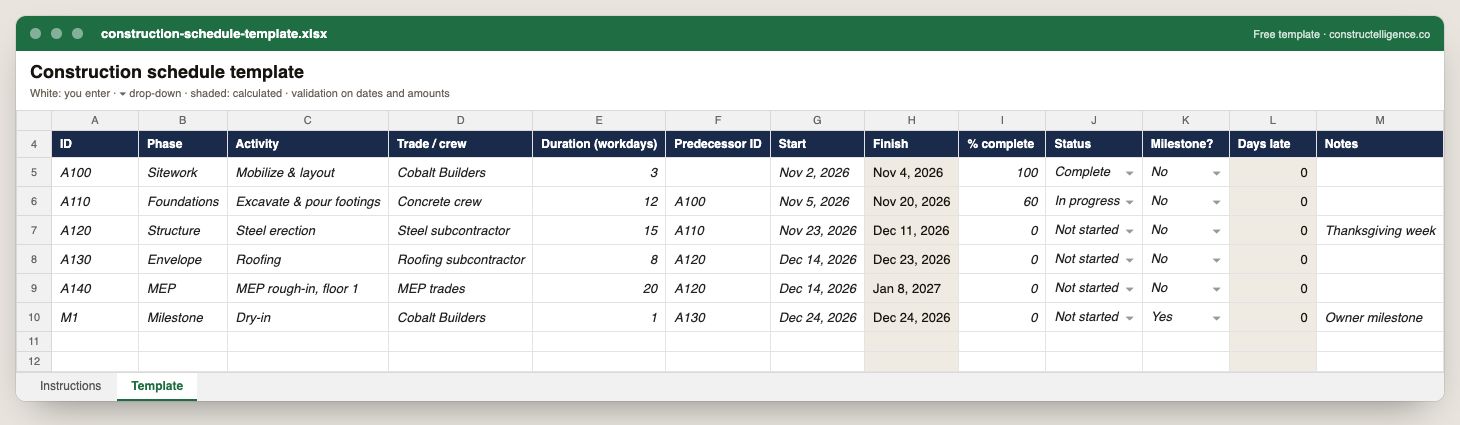
The data a construction schedule needs to be updated weekly and read at a glance: each activity's phase, trade, duration, the activity it follows, its dates, progress, status and whether it is a milestone — with finish dates and days late calculated, so nobody does date arithmetic by hand.
13 columns: 9 you fill in, 2 picked from drop-down lists, so every row uses the same values and 2 calculated by formula and filled down 200 rows, so nothing is worked out by hand. In the Excel version, 3 columns reject entries of the wrong type (a date column only takes dates, an amount column only numbers), the header row stays frozen with filters on it, and the workbook opens on an Instructions sheet that lists every column below.
Every column, and how it is captured
| Column | Type | What goes in it |
|---|---|---|
| ID | Text | Activity ID (A100, A110…) — predecessors refer to it. |
| Phase | Text | Phase of the work (e.g. underground, rough-in, trim). |
| Activity | Text | The schedule activity or scope of work. |
| Trade / crew | Text | Who performs the activity. |
| Duration (workdays) | Number | Working days the activity takes; weekends are skipped by the finish formula. |
| Predecessor ID | Text | The ID of the activity that has to finish before this one starts. |
| Start | Date | Planned start — or, once started, the actual start. Use the predecessor's finish + 1 workday. |
| Finish | Calculated | Calculated — start plus duration in workdays, skipping weekends (= IF([Start]=blank, blank, WORKDAY([Start], [Duration (workdays)] − 1))) |
| % complete | Percent | Physical percent complete, 0–100, from the field — not cost spent. |
| Status | Drop-down | Where the item stands; pick from the list so the log can be filtered and counted. Options: Not started / In progress / Complete / On hold. |
| Milestone? | Drop-down | Yes for dates the owner or contract cares about (dry-in, substantial completion). Options: Yes / No. |
| Days late | Calculated | Calculated — workdays past the finish date for any activity not complete (= IF(OR([Finish]=blank, [Status]="Complete"), 0, MAX(0, NETWORKDAYS([Finish], TODAY()) − 1))) |
| Notes | Text | Anything that explains the row; free text. |
See it on real-looking numbers
Constructelligence is a construction intelligence platform: it reads your ERP, project and field systems read-only and does this arithmetic every week, for every job. The demo runs it on a sample eight-job portfolio.
Try the demoJoin the private betaFrequently asked questions
How do I make a construction schedule in Excel?
List activities with an ID, duration in workdays and the activity each follows. Enter each start date as the workday after its predecessor's finish and calculate finish with =WORKDAY(start, duration − 1). Add percent complete and status columns and update them weekly.
What is the difference between a construction schedule and a Gantt chart?
The schedule is the data — activities, durations, logic and dates. A Gantt chart is one way of drawing it, as bars on a timeline. Most scheduling software shows both.
When should I use scheduling software instead of a spreadsheet?
When activities have several predecessors, when you need the critical path and float calculated, or when the owner's contract requires a CPM schedule in P6 or Microsoft Project format.
How often should a construction schedule be updated?
Weekly on an active job, on the same day, with progress from the field — and the critical path and milestones re-checked each time.
Related guides
More in Templates & forms
- Free construction templates for Excel and Google Sheets
- Construction scope of work template: what to include, a filled-in example and a free download
- Punch list template: the fields that get items closed, an example and a free Excel download
- Construction estimate template: labor, material, equipment and subs by cost code — free Excel
- Construction change order form: what it must show, a priced example and a free template
- Construction daily report template: what to record every day, an example and a free download
- Construction budget template: budget, committed, actual and forecast by cost code — free Excel
- Construction bid template: base bid, alternates, unit prices and exclusions — free Excel
- RFI template: how to write a construction RFI, an example and a free form and log
- Construction proposal template: scope, price, exclusions and payment schedule — free download
- Construction timesheet template: hours by job and cost code, overtime and labor cost — free Excel
- Submittal log template: track every submittal from spec to approval — free Excel