

- A builder's margin is set at contract and lost in allowances, selections and the schedule.
- Price every selection over its allowance as a signed change order before it is ordered.
- Track each house's cost to complete against the lender's draw schedule, not just the bank balance.
- Cost per house by phase is what makes the next bid sharper.
Where home builder jobs make and lose money
- Allowances and selections. An overage not priced and signed before the order is placed is margin given away. See change order management.
- Schedule. Every extra week on a house is carrying cost — interest on the construction loan, insurance, supervision — and pushes the next start.
- Draws and cash. Lenders release money in stages after inspection. A house that needs more cash than the next draw provides is financed by the builder's own working capital.
- Trade cost by phase. Foundation, framing, mechanicals, drywall, finishes — compared with the budget house by house, so the next estimate learns from this one.
Key terms: Allowance · Construction draw · Change order (CO) · Fade · Estimate at completion (EAC)
A worked example
A $612,000 spec-to-contract home: lot $140,000, hard cost $338,000, soft cost $52,000. The buyer picks flooring at $19,600 against a $14,000 allowance:
One unbilled selection costs almost a point of margin. Most houses have a dozen allowances.
The home builder software stack
Most contractors in this trade run four or five systems. The names below are common examples, not a ranking.
BuildertrendJobTreadHouzz ProCustom, spec and production builders need different things
| Builder | The hard part | What the software has to do well |
|---|---|---|
| Custom | One buyer, many decisions, a long selection process | Buyer portal, selections and allowances, change orders with e-signature, daily logs with photos |
| Spec | Your own money in the house until it sells | Tight budgets by phase, schedule speed, carrying cost per week |
| Production | Dozens of houses on the same plans at once | Purchase orders by plan and option, trade scheduling across a community, variance purchase orders tracked |
| Remodeler | Unknown conditions behind every wall | Fast estimates, change orders mid-job, progress invoices |
A builder doing all of these — custom homes and a few specs — needs the custom builder's selections tools and the spec builder's budget discipline in the same system, or at least on the same job numbers.
The numbers worth tracking weekly
- Margin per house: contract price against forecast cost
- Allowance overages priced and unsigned
- Days behind schedule per house
- Cost to complete against undrawn loan balance
- Cost per square foot by phase, house to house
How to choose home builder software
Five questions to ask any vendor before a trial — each is about whether the software fits how this trade actually makes money.
- Can buyers make selections in a portal, with the overage priced as a change order before anything is ordered?
- Does each house carry a budget by phase that rolls up to the community or the whole company?
- Can it produce the lender's draw request from the schedule of completion?
- Does the job cost reach your accounting without being typed twice?
- Can warranty requests be logged against the house after closing?
Then trial it on a finished job where you already know the answer. The construction tech stack guide covers how the pieces connect.
Where Constructelligence fits
Constructelligence sits on top of the accounting system you already run — Sage 300 CRE and QuickBooks Desktop are connected today, with Viewpoint, Sage Intacct and others in build — and forecasts every job weekly by cost code, so a house running over its budget shows up in the week it starts. It reads read-only, installs on your own infrastructure and replaces none of the tools above. See it in the demo.
Software for other trades
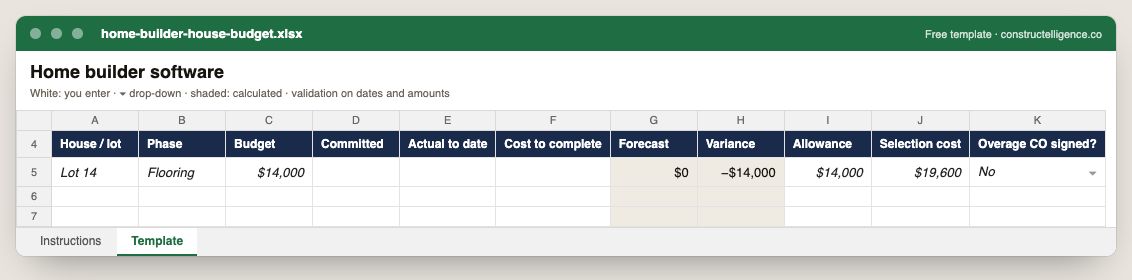
Each house's budget by phase with committed, actual and cost to complete, forecast and variance calculated, and every allowance against its selection with the overage change order tracked.
11 columns: 8 you fill in, 1 picked from drop-down lists, so every row uses the same values and 2 calculated by formula and filled down 200 rows, so nothing is worked out by hand. In the Excel version, 6 columns reject entries of the wrong type (a date column only takes dates, an amount column only numbers), the header row stays frozen with filters on it, and the workbook opens on an Instructions sheet that lists every column below.
Every column, and how it is captured
| Column | Type | What goes in it |
|---|---|---|
| House / lot | Text | Free text. |
| Phase | Text | Phase of the work (e.g. underground, rough-in, trim). |
| Budget | Amount ($) | The budget for the line, from the estimate plus approved changes. |
| Committed | Amount ($) | Enter the amount in dollars. |
| Actual to date | Amount ($) | Enter the amount in dollars. |
| Cost to complete | Amount ($) | Enter the amount in dollars. |
| Forecast | Calculated | Calculated: [Actual to date] + [Cost to complete] |
| Variance | Calculated | Calculated: [Forecast] − [Budget] |
| Allowance | Amount ($) | Enter the amount in dollars. |
| Selection cost | Amount ($) | Enter the amount in dollars. |
| Overage CO signed? | Drop-down | Options: Yes / No. |
See it on real-looking numbers
Constructelligence is a construction intelligence platform: it reads your ERP, project and field systems read-only and does this arithmetic every week, for every job. The demo runs it on a sample eight-job portfolio.
Try the demoJoin the private betaFrequently asked questions
What software do home builders use?
Most combine a residential project management platform such as Buildertrend, JobTread or Houzz Pro for schedules, selections and client communication with accounting such as QuickBooks, Sage 100 Contractor or a builder-specific system like MarkSystems. Production builders add supply-chain and purchasing tools such as Hyphen BuildPro.
What is the best software for custom home builders?
One that handles selections, allowances and change orders with the buyer in a portal, a schedule the trades can see, and job costing by phase that reaches your accounting. Trial it on a house you have already finished and see whether it tells you where the margin went.
Do small builders need construction software or is QuickBooks enough?
QuickBooks with job costing set up by house and phase works for a builder doing a handful of homes a year. Selections, scheduling and buyer communication are what usually push builders to add a project management platform as they grow.
What is an allowance in home building?
A budget amount in the contract for an item the buyer has not chosen yet — flooring, lighting, cabinets, appliances. If the buyer's selection costs more than the allowance, the difference (usually with markup) is billed as a change order; if less, it is credited.
How do construction loan draws work for builders?
The lender releases the loan in draws tied to stages of completion — foundation, framing, dry-in, finishes — usually after an inspection. A builder needs cost to complete per house to know each draw will cover the bills due before the next one.
Related guides
More in Software by trade
- Construction software by trade
- General contractor software: what to run, what to track, and where jobs lose money
- Electrical contractor software: what to run, what to track, and where jobs lose money
- Plumbing software: what plumbing contractors run, what to track, and where jobs lose money
- HVAC and mechanical contractor software: what to run, what to track, and where jobs lose money
- Concrete contractor software: what to run, what to track, and where jobs lose money
- Roofing contractor software: what to run, what to track, and where jobs lose money
- Excavation and sitework contractor software: what to run, what to track, and where jobs lose money
- Drywall and interiors contractor software: what to run, what to track, and where jobs lose money
- Deck builder software: project management, pricing and where deck jobs lose money
Free tools for this topic: Construction markup vs margin calculator · Construction labor burden calculator · Contractor overhead recovery and break-even calculator
All software by trade resources →