

 OC
OC



- Interiors live on labor per square foot for each activity.
- Record square footage installed weekly — frame, hang, tape, finish.
- Log damage by others with photos and price it before the repair.
- Confirm level of finish in writing; it changes labor sharply.
Where drywall and interiors contractor jobs make and lose money
- Labor per square foot. By activity — frame, hang, tape, finish — against the estimate.
- Changes and damage. Rework caused by others, billed back or absorbed.
- Material handling. Stocking and waste on tight sites.
- Level of finish. Level 4 versus Level 5 changes labor sharply.
Key terms: Change order (CO) · Productivity factor · Cost code · Retainage
A worked example
A crew hung 18,000 square feet in 410 hours at a $68 loaded rate; the estimate carried $1.45 of labor per square foot:
Ten cents a square foot is easy to dismiss in one week and a real number across 200,000 square feet.
The drywall and interiors contractor software stack
Most contractors in this trade run four or five systems. The names below are common examples, not a ranking.
STACKPlanSwiftTogal.AIOCOn CentereSUBProcoreFieldwireFoundationSage 300 CREThe numbers worth tracking weekly
- Labor per square foot by activity
- Square footage installed against planned
- Change orders and back-charges
- Forecast at completion
- Over/under billing
How to choose drywall and interiors contractor software
Five questions to ask any vendor before a trial — each is about whether the software fits how this trade actually makes money.
- Does takeoff separate framing, board, taping and finish so each can be tracked?
- Can crews record square footage installed by activity each week?
- Can damage by other trades be logged with photos and priced as a back-charge?
- Does it handle level-of-finish changes as priced change orders?
- Does job cost forecast labor at completion, not only report it?
Then trial it on a finished job where you already know the answer. The construction tech stack guide covers how the pieces connect.
Where Constructelligence fits
Constructelligence sits on top of the accounting system you already run — Sage 300 CRE and QuickBooks Desktop are connected today, with Viewpoint, Sage Intacct and others in build — and forecasts every job weekly by cost code, so labor per square foot drifting above the estimate shows up in the week it starts. It reads read-only, installs on your own infrastructure and replaces none of the tools above. See it in the demo.
Software for other trades
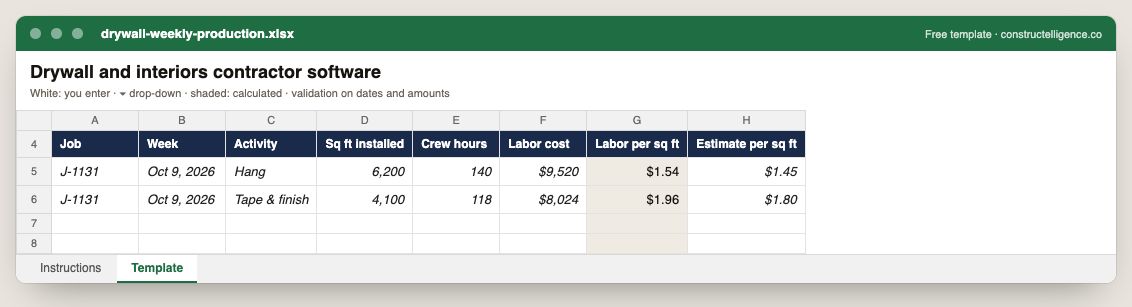
Weekly production by activity: square feet installed, crew hours and labor cost, with labor per square foot calculated against the estimate.
8 columns: 7 you fill in and 1 calculated by formula and filled down 200 rows, so nothing is worked out by hand. In the Excel version, 5 columns reject entries of the wrong type (a date column only takes dates, an amount column only numbers), the header row stays frozen with filters on it, and the workbook opens on an Instructions sheet that lists every column below.
Every column, and how it is captured
| Column | Type | What goes in it |
|---|---|---|
| Job | Text | Job number exactly as in your accounting system (e.g. J-1104), so rows join to job cost. |
| Week | Date | Week-ending date. |
| Activity | Text | The schedule activity or scope of work. |
| Sq ft installed | Number | Enter a number. |
| Crew hours | Number | Enter a number. |
| Labor cost | Amount ($) | Enter the amount in dollars. |
| Labor per sq ft | Calculated | Calculated: [Labor cost] ÷ [Sq ft installed] |
| Estimate per sq ft | Amount ($) | Enter the amount in dollars. |
See it on real-looking numbers
Constructelligence is a construction intelligence platform: it reads your ERP, project and field systems read-only and does this arithmetic every week, for every job. The demo runs it on a sample eight-job portfolio.
Try the demoJoin the private betaFrequently asked questions
What software do drywall contractors use?
Takeoff and estimating (such as STACK, PlanSwift, Togal.AI or On Center), trade project management (such as eSUB, Procore or Fieldwire) and accounting with job costing such as QuickBooks, Foundation or Sage 300 CRE.
How do drywall contractors track productivity?
Square feet installed per labor hour for each activity — framing, hanging, taping and finishing — recorded weekly and compared with the rates in the estimate.
How do interiors contractors handle damage by other trades?
Photograph and log it the day it is found, price the repair, and submit it as a back-charge or change order before doing the work.
What does Level 4 versus Level 5 finish mean?
Level 4 is the common finish for walls that will be painted with flat paint; Level 5 adds a skim coat over the whole surface for critical lighting or gloss finishes, and takes considerably more labor.
How do drywall contractors handle back-charges?
Document damage by other trades with photos and dates, price the repair, and submit it to the GC before doing the work, referencing the subcontract's back-charge terms.
Related guides
More in Software by trade
- Construction software by trade
- General contractor software: what to run, what to track, and where jobs lose money
- Electrical contractor software: what to run, what to track, and where jobs lose money
- Plumbing software: what plumbing contractors run, what to track, and where jobs lose money
- HVAC and mechanical contractor software: what to run, what to track, and where jobs lose money
- Concrete contractor software: what to run, what to track, and where jobs lose money
- Roofing contractor software: what to run, what to track, and where jobs lose money
- Excavation and sitework contractor software: what to run, what to track, and where jobs lose money
- Home builder software: what to run, what to track, and where jobs lose money
- Deck builder software: project management, pricing and where deck jobs lose money
Free tools for this topic: Construction markup vs margin calculator · Construction labor burden calculator · Contractor overhead recovery and break-even calculator
All software by trade resources →