
 J
J- Deck jobs are won on the estimate and lost on labor hours and material price moves.
- Price from square feet, railing linear feet and stairs — then check hours per 100 sq ft on every finished job.
- Take a deposit that covers the material order; lumber and composite are bought before day one.
- Track each job's actual hours against the estimate the week it finishes, not at year-end.
Where deck builder jobs make and lose money
- Labor hours. The estimate assumes hours per 100 square feet; footings, stairs, picture framing and tricky access add hours that a per-square-foot price hides.
- Material price moves. Framing lumber and composite prices move between the quote and the order. Quote validity dates and a deposit that funds the order protect the margin.
- Change orders on site. "Can you add a step down to the patio?" is a priced, signed change order — or free work.
- Callbacks. Popped boards, loose rail posts and drainage issues are warranty cost; log them by crew and product.
Key terms: Change order (CO) · Productivity factor · Estimate at completion (EAC) · Fade
A worked example
A 400 sq ft composite deck with 60 linear feet of railing. Material runs $18 a square foot, railing $45 a foot, the crew installs at 14 hours per 100 sq ft at $55 an hour, and the company prices for a 35% gross margin:
If the crew actually takes 20 hours per 100 sq ft, labor becomes $4,400 and the margin on the same price drops to 28.4% — on a job that still looks busy and profitable.
The deck builder software stack
Most contractors in this trade run four or five systems. The names below are common examples, not a ranking.
JobTreadBuildertrendHouzz ProJJobberDeck builder project management, job by job
A deck job has the same seven steps every time. Good deck builder project management means each step lives in one place and hands its data to the next, instead of being retyped from a notebook into a spreadsheet into an invoice:
- Lead — source, address, photos of the site, the customer's budget.
- Site visit & design — measurements, height off grade, access, the material line.
- Estimate — square feet, railing feet, stairs, footings, demolition, at your own hours per 100 sq ft. Send it with a valid-until date.
- Contract & deposit — signed scope, payment schedule, and a deposit that funds the material order.
- Permit & schedule — permit submitted, crew and delivery dates booked, the customer told.
- Build — daily photos, hours by crew, change orders signed on site, inspections passed.
- Close-out — final walkthrough, final invoice, review request, and estimated against actual hours.
The last step is the one most deck builders skip, and the one that makes next season's estimates right. The construction invoice template covers deposit, progress and final invoices.
The numbers worth tracking weekly
- Estimated against actual hours, every finished deck
- Gross margin per job, not per month
- Backlog in crew-weeks
- Close rate by lead source
- Callbacks per 10 decks, by crew
How to choose deck builder software
Five questions to ask any vendor before a trial — each is about whether the software fits how this trade actually makes money.
- Can an estimate be built from square feet, railing feet and stairs, using your own hours per 100 sq ft?
- Does the signed estimate become the job — schedule, material order and invoice — without re-entry?
- Can the customer approve a change and pay a deposit from their phone?
- Can crews log hours and photos per job from the site?
- Does it show estimated against actual hours on every finished deck?
Then trial it on a finished job where you already know the answer. The construction tech stack guide covers how the pieces connect.
Where Constructelligence fits
Constructelligence sits on top of the accounting system you already run — Sage 300 CRE and QuickBooks Desktop are connected today, with Viewpoint, Sage Intacct and others in build — and forecasts every job weekly by cost code, so a crew running over its estimated hours shows up in the week it starts. It reads read-only, installs on your own infrastructure and replaces none of the tools above. See it in the demo.
Software for other trades
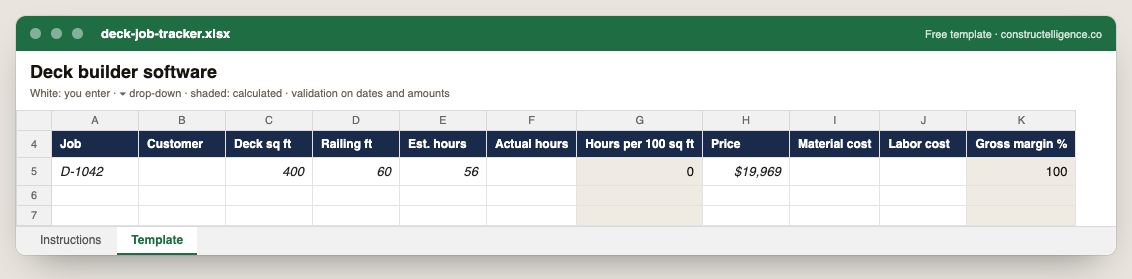
Each deck job's size, railing, estimated and actual hours, hours per 100 sq ft, price, material and labor cost, and gross margin calculated.
11 columns: 9 you fill in and 2 calculated by formula and filled down 200 rows, so nothing is worked out by hand. In the Excel version, 7 columns reject entries of the wrong type (a date column only takes dates, an amount column only numbers), the header row stays frozen with filters on it, and the workbook opens on an Instructions sheet that lists every column below.
Every column, and how it is captured
| Column | Type | What goes in it |
|---|---|---|
| Job | Text | Job number exactly as in your accounting system (e.g. J-1104), so rows join to job cost. |
| Customer | Text | Free text. |
| Deck sq ft | Number | Enter a number. |
| Railing ft | Number | Enter a number. |
| Est. hours | Number | Enter a number. |
| Actual hours | Number | Hours charged to the line from timecards. |
| Hours per 100 sq ft | Calculated | Calculated: [Actual hours] ÷ [Deck sq ft] × 100 |
| Price | Amount ($) | Enter the amount in dollars. |
| Material cost | Amount ($) | Enter the amount in dollars. |
| Labor cost | Amount ($) | Enter the amount in dollars. |
| Gross margin % | Calculated | Calculated: ([Price] − [Material cost] − [Labor cost]) ÷ [Price] × 100 |
See it on real-looking numbers
Constructelligence is a construction intelligence platform: it reads your ERP, project and field systems read-only and does this arithmetic every week, for every job. The demo runs it on a sample eight-job portfolio.
Try the demoJoin the private betaFrequently asked questions
What is the best project management software for deck builders?
For most deck builders, a residential contractor platform such as JobTread, Buildertrend, Houzz Pro or Jobber — something that takes a job from lead to estimate, schedule, change orders and invoice on a phone. Larger deck and outdoor-living companies add a design tool and photo documentation such as CompanyCam. The best fit is the one your crews will actually use on site.
What software do deck builders use for design?
General design tools such as Chief Architect or SketchUp, and the free deck planners that decking manufacturers publish for their own products. The design should feed the estimate's square footage, railing and stair counts.
How do deck builders track job profitability?
Record crew hours and material per job, compare them with the estimate when the deck is finished, and track hours per 100 square feet over time. That number, by deck type, is what makes the next estimate accurate.
How do deck builders price a deck?
From the square footage, the decking material, railing linear feet, stairs and any footings or demolition, plus labor hours per 100 square feet from past jobs, overhead and a target margin. Pricing per square foot alone hides railing and stairs, which carry a lot of the labor.
What deposit should a deck builder take?
Enough to cover the material order, since decking, framing lumber and railing are bought before the crew arrives. Local law can cap home-improvement deposits, so check your state's rules before setting a percentage.
Related guides
More in Software by trade
- Construction software by trade
- General contractor software: what to run, what to track, and where jobs lose money
- Electrical contractor software: what to run, what to track, and where jobs lose money
- Plumbing software: what plumbing contractors run, what to track, and where jobs lose money
- HVAC and mechanical contractor software: what to run, what to track, and where jobs lose money
- Concrete contractor software: what to run, what to track, and where jobs lose money
- Roofing contractor software: what to run, what to track, and where jobs lose money
- Excavation and sitework contractor software: what to run, what to track, and where jobs lose money
- Drywall and interiors contractor software: what to run, what to track, and where jobs lose money
- Home builder software: what to run, what to track, and where jobs lose money
Free tools for this topic: Construction markup vs margin calculator · Construction labor burden calculator · Contractor overhead recovery and break-even calculator
All software by trade resources →