


- Roofing CRMs track sales well; margin lives in job cost.
- Measure cost per square — labor, material, disposal — on every job.
- Log tear-off surprises and supplements the day they happen.
- Review margin per job weekly, not only at the end of the season.
Where roofing contractor jobs make and lose money
- Labor per square. Crew hours per roofing square (100 sq ft) against the estimate.
- Tear-off and decking. Hidden rot and extra layers found on day one.
- Material waste. Ordered squares against installed.
- Supplements. Insurance supplements approved — or not — after the work.
Measuring first? The free roofing calculator turns a footprint and pitch into roof area, squares with waste, bundles and underlayment.
Key terms: Cost code · Change order (CO) · Fade
A worked example
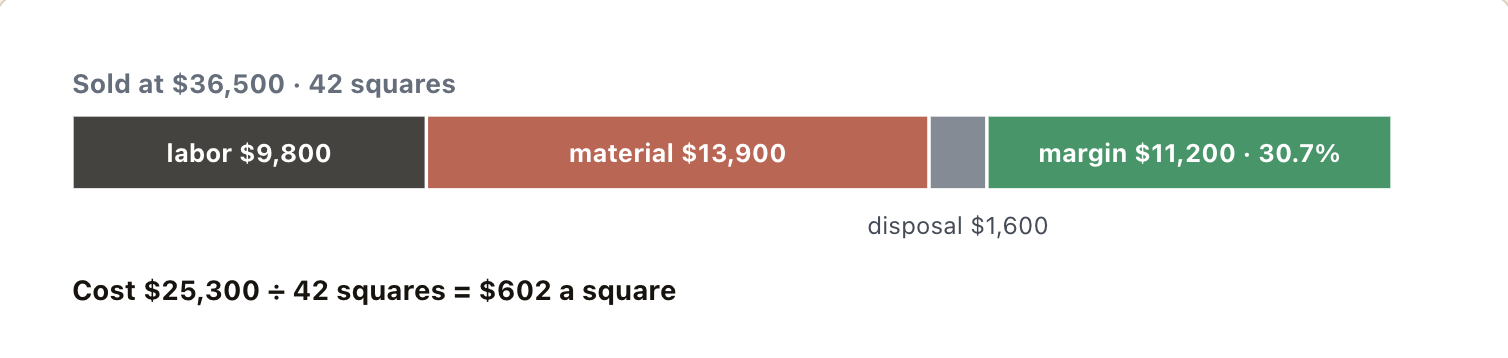
A 42-square re-roof sold at $36,500. Labor came to $9,800, material $13,900, and disposal and other costs $1,600:
Track the same figures on every job and the crews, suppliers and roof types that erode margin become visible within weeks.
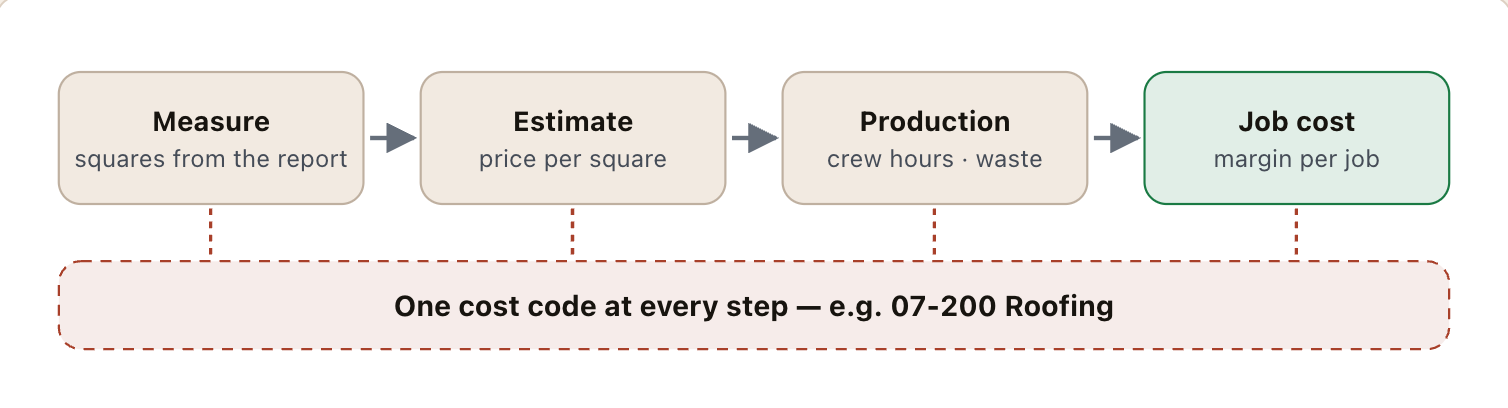
The roofing contractor software stack
Most contractors in this trade run four or five systems. The names below are common examples, not a ranking.
AccuLynxJobNimbusRoofrEagleViewother aerial measurement reportsA starter cost code list for roofing contractors
Division 07 for roofing and sheet metal. Residential roofers often keep it to a handful of codes — what matters is that tear-off, decking and supplements are never folded into the roof itself.
| Code | Covers | Unit | What to watch |
|---|---|---|---|
07-010 | Tear-off & disposal | SQ | Extra layers found |
07-020 | Decking replacement | sheets | Sheets replaced against allowance |
07-100 | Underlayment & ice barrier | SQ | Material per square |
07-200 | Roofing — shingles, panels or membrane | SQ | Crew hours per square |
07-300 | Flashing & sheet metal | LF | Hours per linear foot |
07-400 | Roof insulation (low slope) | SF | Material against takeoff |
07-500 | Gutters & downspouts | LF | Subcontract or crew |
07-900 | Insurance supplements | $ | Requested, approved, collected |
Illustrative numbering — use your accounting system’s own format. What matters is that the estimate, the field and the job cost use the same list. The cost codes guide covers structure, cost types and how many codes is too many.
The numbers worth tracking weekly
Five numbers, each with its formula and the reading that should start a conversation. Most can be pulled from the job cost and timecards you already have.
| Number | How to calculate it | Warning sign | How often |
|---|---|---|---|
| Gross margin per job | (price + supplements − all job cost) ÷ price | Below the target on two jobs running for one crew | Each job |
| Crew hours per square | crew hours ÷ squares installed | Above the estimate by roof type | Each job |
| Material waste | (squares ordered − squares installed) ÷ squares installed | Above the waste factor in the estimate | Each job |
| Supplements pending | supplement dollars requested and not yet approved, by age | Older than 30 days | Weekly |
| Cash collected | collected ÷ invoiced, last 30 days | Falling while sales rise | Weekly |
What to run as a roofing contractor business grows
The right stack depends on size more than on brand. Three stages, what each usually runs, and the sign that it is time to move up:
- 1Residential retail and storm work
A roofing CRM (AccuLynx, JobNimbus, Roofr), aerial measurement reports and QuickBooks
Time to move up when close rate is known; margin per job is not - 2Growing — several crews
The CRM for sales and production, job costing in QuickBooks by job and crew, supplements tracked to cash
Time to move up when commercial work with a schedule of values and retainage - 3Commercial roofing
Construction accounting (Sage) with schedule-of-values billing and retainage, alongside the CRM for residential
How to choose roofing contractor software
Five questions to ask any vendor before a trial — each is about whether the software fits how this trade actually makes money.
- Does the CRM's job carry through to job costing, or does accounting start over?
- Can crews record hours and squares installed per job?
- Are insurance supplements tracked from request to payment?
- Does it show margin per job, not just sales and close rate?
- Can material orders be compared with squares actually installed?
Then trial it on a finished job where you already know the answer. The construction tech stack guide covers how the pieces connect.
Where Constructelligence fits
Constructelligence sits on top of the accounting system you already run — Sage 300 CRE and QuickBooks Desktop are live today, with more ERPs and project platforms in build — and forecasts every job weekly by cost code, so a job's margin eroding on labor or waste shows up in the week it starts. It reads read-only, runs in Constructelligence Cloud (or on your own server on the Private tier) and replaces none of the tools above. See it in the demo.
Software for other trades
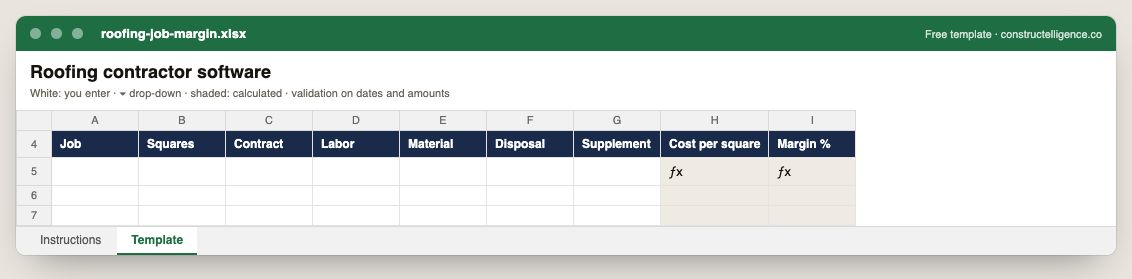
Each roofing job's squares, contract, labor, material, disposal and supplements, with cost per square and margin calculated.
9 columns: 7 you fill in and 2 calculated by formula and filled down 200 rows, so nothing is worked out by hand. In the Excel version, 6 columns reject entries of the wrong type (a date column only takes dates, an amount column only numbers), the header row stays frozen with filters on it, and the workbook opens on an Instructions sheet that lists every column below.
Every column, and how it is captured
| Column | Type | What goes in it |
|---|---|---|
| Job | Text | Job number exactly as in your accounting system (e.g. J-1104), so rows join to job cost. |
| Squares | Number | Enter a number. |
| Contract | Amount ($) | Contract value including approved change orders. |
| Labor | Amount ($) | Enter the amount in dollars. |
| Material | Amount ($) | Enter the amount in dollars. |
| Disposal | Amount ($) | Enter the amount in dollars. |
| Supplement | Amount ($) | Enter the amount in dollars. |
| Cost per square | Calculated | Calculated: ([Labor] + [Material] + [Disposal]) ÷ [Squares] |
| Margin % | Calculated | Calculated: ([Contract] + [Supplement] − [Labor] − [Material] − [Disposal]) ÷ ([Contract] + [Supplement]) × 100 |
See it on real-looking numbers
Constructelligence is a construction intelligence platform: it reads your ERP, project and field systems read-only and does this arithmetic every week, for every job. The demo runs it on a sample eight-job portfolio.
Try the demoJoin the private betaFrequently asked questions
What software do roofing contractors use?
A roofing CRM for leads, estimates and production (such as AccuLynx, JobNimbus or Roofr), aerial measurement reports (such as EagleView), and accounting software such as QuickBooks for job costing.
How do roofing contractors calculate cost per square?
Add labor, material, disposal and equipment for the job and divide by the squares installed (one square is 100 square feet). Compare it with the estimate's cost per square for every job.
How can a roofing company improve job profitability?
Track crew hours and material per square on every job, record tear-off surprises and supplements, and review margin per job weekly rather than only at the end of the season.
What is a roofing square?
One hundred square feet of roof area. Roofers price, order material and measure crew productivity per square.
Can a roofing CRM do job costing?
Most roofing CRMs track estimates, production and some job costs; many contractors still need accounting software for labor, overhead and true margin per job.
Related guides
More in Software by trade
- Construction software by trade
- General contractor software: what to run, what to track, and where jobs lose money
- Electrical contractor software: what to run, what to track, and where jobs lose money
- Plumbing software: what plumbing contractors run, what to track, and where jobs lose money
- HVAC and mechanical contractor software: what to run, what to track, and where jobs lose money
- Concrete contractor software: what to run, what to track, and where jobs lose money
- Excavation and sitework contractor software: what to run, what to track, and where jobs lose money
- Drywall and interiors contractor software: what to run, what to track, and where jobs lose money
- Home builder software: what to run, what to track, and where jobs lose money
- Remodeling contractor software: kitchen and bath project management, selections and job costing
- Deck builder software: project management, pricing and where deck jobs lose money
- Civil and utility contractor software: heavy civil estimating, pay items, quantities and job cost
- Flooring contractor software: estimating, moisture, waste and job costing per square foot
- Painting contractor software: estimating, production rates and job costing
- Kitchen and bath remodeler project management software: design, selections, change orders and job costing
- Countertop installer software: quoting, templating, slab yield and job costing
- Plastering contractor software: estimating, production rates and job costing
- Elevator contractor software: installation, modernization, service and job costing
Free tools for this topic: Construction markup vs margin calculator · Fully burdened labor rate calculator for construction · Contractor overhead recovery and break-even calculator
All software by trade resources →