
 J



- Painting is a labor business — production rate per coat decides the margin.
- Measure square feet painted per labor hour by surface, every week, against the estimate's rate.
- Price surface prep, access and number of coats explicitly; they are where the hours go.
- Separate residential repaint, commercial new construction and maintenance work — they make money differently.
Where painting contractor jobs make and lose money
- Production rate. Square feet per hour per coat, by surface. Ten percent slower across a job is most of its profit.
- Prep. Patching, sanding, caulking and masking are hours that a price per square foot hides.
- Access. Lifts, scaffolds and high ceilings slow production and add equipment cost.
- Coats and colors. A third coat for deep colors or poor coverage is a change order — or free work.
- Other trades. Touch-up after damage by others is a back-charge if it is logged and priced.
Key terms: Productivity factor · Change order (CO) · Cost code · Retainage
A worked example
A commercial repaint: 42,000 sq ft of walls, two coats. The estimate assumed 175 sq ft per hour per coat at a $48 loaded rate, and paint covering 350 sq ft a gallon per coat at $38 a gallon:
Fifteen percent slower production is invisible on a timesheet and costs more than a third of the paint budget. Tracked weekly by area, it shows up while there is still a building left to paint.
The painting contractor software stack
Most contractors in this trade run four or five systems. The names below are common examples, not a ranking.
STACKPlanSwiftHousecall ProProcoreFoundationSage 300 CREA starter cost code list for painting contractors
Painting cost codes separate the surfaces and activities that run at different production rates, with MasterFormat 09 91 (Painting) as the prefix.
| Code | Covers | Unit | What to watch |
|---|---|---|---|
09-9100 | Prep — patch, sand, caulk, mask | SF | Prep hours against the estimate |
09-9123 | Interior walls | SF | Sq ft per hour per coat |
09-9124 | Interior ceilings | SF | Sq ft per hour, access |
09-9125 | Doors & frames | EA | Hours per opening |
09-9113 | Exterior | SF | Weather days, lifts |
09-9600 | High-performance coatings | SF | Mil thickness, cure time |
01-5400 | Lifts & scaffolding | DAY | Rental days against plan |
Illustrative numbering — use your accounting system’s own format. What matters is that the estimate, the field and the job cost use the same list. The cost codes guide covers structure, cost types and how many codes is too many.
The numbers worth tracking weekly
Five numbers, each with its formula and the reading that should start a conversation. Most can be pulled from the job cost and timecards you already have.
| Number | How to calculate it | Warning sign | How often |
|---|---|---|---|
| Production rate | square feet × coats ÷ hours, by surface | Below the estimate's rate on the current job | Weekly |
| Labor share of contract | labor cost ÷ contract value | Rising above the estimate's share | Weekly |
| Gallons against estimate | gallons used ÷ gallons estimated | More than 10% over — coverage or extra coats | Each job |
| Change orders signed before the work | signed-before COs ÷ all COs | Extra coats or prep done on a handshake | Each job |
| Gross margin per job | (contract + change orders − cost) ÷ (contract + change orders) | Two jobs in a row under target | Each job |
What to run as a painting contractor business grows
The right stack depends on size more than on brand. Three stages, what each usually runs, and the sign that it is time to move up:
- 1Owner-operator — residential repaint
Quotes from a painting estimator or Jobber, deposits and invoices on a phone, QuickBooks
Time to move up when jobs are priced by feel and never compared with the hours - 2Growing — several crews, some commercial
A painting estimating tool (PaintScout) or takeoff (STACK, PlanSwift), a field service CRM (Jobber, Housecall Pro), hours by job and area
Time to move up when gC work brings schedules of values, retainage and certified payroll - 3Established commercial painting contractor
Takeoff feeding the estimate, construction accounting with job cost by area and surface (Foundation, Sage 300 CRE), production rates reviewed weekly
How to choose painting contractor software
Five questions to ask any vendor before a trial — each is about whether the software fits how this trade actually makes money.
- Can an estimate be built from surfaces, coats and your own production rates — not just a price per square foot?
- Can crews record hours by area and surface so production can be measured?
- Does it handle residential repaint (fast quotes, deposits) and commercial work (schedules of values, retainage) if you do both?
- Can change orders for extra coats, prep or access be priced and signed on site?
- Does job cost show labor against the estimate weekly, not only at the end?
Then trial it on a finished job where you already know the answer. The construction tech stack guide covers how the pieces connect.
Where Constructelligence fits
Constructelligence sits on top of the accounting system you already run — Sage 300 CRE and QuickBooks Desktop are live today, with more ERPs and project platforms in build — and forecasts every job weekly by cost code, so a crew painting slower than the estimate's production rate shows up in the week it starts. It reads read-only, runs in Constructelligence Cloud (or on your own server on the Private tier) and replaces none of the tools above. See it in the demo.
Software for other trades
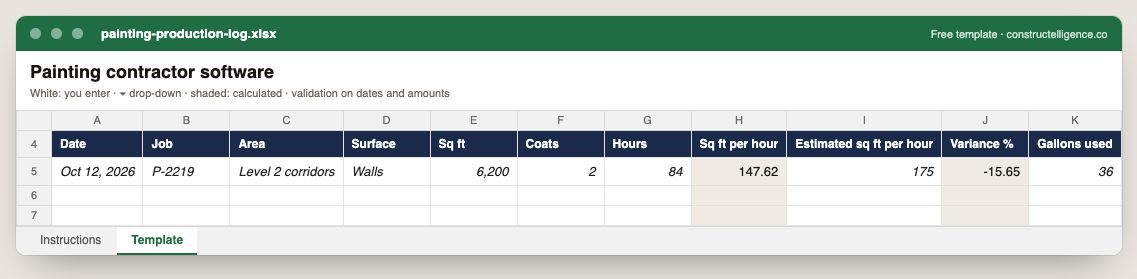
Daily painting production by job, area and surface: square feet, coats and hours, with square feet per hour calculated against the estimate's rate, and gallons used.
11 columns: 9 you fill in and 2 calculated by formula and filled down 200 rows, so nothing is worked out by hand. In the Excel version, 6 columns reject entries of the wrong type (a date column only takes dates, an amount column only numbers), the header row stays frozen with filters on it, and the workbook opens on an Instructions sheet that lists every column below.
Every column, and how it is captured
| Column | Type | What goes in it |
|---|---|---|
| Date | Date | Date of the entry. |
| Job | Text | Job number exactly as in your accounting system (e.g. J-1104), so rows join to job cost. |
| Area | Text | Free text. |
| Surface | Text | Free text. |
| Sq ft | Number | Enter a number. |
| Coats | Number | Enter a number. |
| Hours | Number | Enter a number. |
| Sq ft per hour | Calculated | Calculated: [Sq ft] × [Coats] ÷ [Hours] |
| Estimated sq ft per hour | Number | Enter a number. |
| Variance % | Calculated | Calculated: ([Sq ft per hour] − [Estimated sq ft per hour]) ÷ [Estimated sq ft per hour] × 100 |
| Gallons used | Number | Enter a number. |
See it on real-looking numbers
Constructelligence is a construction intelligence platform: it reads your ERP, project and field systems read-only and does this arithmetic every week, for every job. The demo runs it on a sample eight-job portfolio.
Try the demoJoin the private betaFrequently asked questions
What is the best software for painting contractors?
Residential repaint companies usually combine a painting estimating tool (PaintScout is a common example) with a field service CRM such as Jobber or Housecall Pro for scheduling, deposits and invoices, plus QuickBooks. Commercial painting contractors working for GCs need takeoff (STACK or PlanSwift), job cost by area and surface, and accounting that handles schedules of values and retainage — Foundation or Sage 300 CRE are examples.
How do commercial painters estimate a job?
Take off the surfaces — walls, ceilings, doors and frames, trim — by area, apply the number of coats and your production rate for each surface, add prep, access equipment and paint by coverage, then overhead and margin. The production rates should come from your own finished jobs.
How do painting contractors track job profitability?
Record hours by job, area and surface each day, compare square feet per hour with the estimate's rate weekly, and close every job with estimated against actual hours and gallons. That history is what makes the next estimate's production rates right.
How do painting contractors calculate production rates?
Square feet painted per labor hour, per coat, by surface — walls, ceilings, doors and frames, exterior siding — from your own finished jobs. Divide the coat area by hours worked on that surface, and use that rate, not a book rate, in the next estimate.
How much does a gallon of paint cover?
Manufacturers' data sheets commonly state around 350 to 400 square feet per gallon per coat on smooth, primed surfaces; rough, porous or unprimed surfaces take more. Use the data sheet for the product and your own job history.
Related guides
More in Software by trade
- Construction software by trade
- General contractor software: what to run, what to track, and where jobs lose money
- Electrical contractor software: what to run, what to track, and where jobs lose money
- Plumbing software: what plumbing contractors run, what to track, and where jobs lose money
- HVAC and mechanical contractor software: what to run, what to track, and where jobs lose money
- Concrete contractor software: what to run, what to track, and where jobs lose money
- Roofing contractor software: what to run, what to track, and where jobs lose money
- Excavation and sitework contractor software: what to run, what to track, and where jobs lose money
- Home builder software: what to run, what to track, and where jobs lose money
- Remodeling contractor software: kitchen and bath project management, selections and job costing
- Deck builder software: project management, pricing and where deck jobs lose money
- Civil and utility contractor software: heavy civil estimating, pay items, quantities and job cost
- Flooring contractor software: estimating, moisture, waste and job costing per square foot
Free tools for this topic: Construction markup vs margin calculator · Fully burdened labor rate calculator for construction · Contractor overhead recovery and break-even calculator
All software by trade resources →