- Code every line to the cost code it will be tracked against.
- Build labor from hours per unit — the assumption you can check.
- Markup on cost is not margin on price.
- Compare actual hours per unit with the estimate on every finished job.
How a line of an estimate is built
Labor cost = labor hours × loaded rate
Material cost = quantity × unit cost
Total cost = labor + material + equipment + subcontract
Price = total cost × (1 + markup)
Two choices make the estimate useful after award. Code every line to the cost code it will be tracked against, using the same list as job costing (see cost codes). And keep labor as hours, not just dollars — hours per unit is the number you can check against timecards and improve.
A filled-in example
Four lines from the Maple Street Medical Office estimate:
| Cost code | Item | Qty | Labor h | Labor $ | Material $ | Other $ | Total cost | Markup | Price |
|---|---|---|---|---|---|---|---|---|---|
| 09-2116 | Gypsum partitions | 14,200 SF | 639 | $43,452 | $19,170 | — | $62,622 | 15% | $72,015 |
| 03-3000 | Slab on grade 4" | 120 CY | 144 | $9,792 | $19,800 | $2,400 | $31,992 | 15% | $36,791 |
| 26-0500 | Electrical (sub) | 1 LS | — | — | — | $248,000 | $248,000 | 10% | $272,800 |
| 01-5000 | Temporary facilities | 1 LS | — | — | — | $8,500 | $8,500 | 15% | $9,775 |
The partitions line carries 0.045 hours per square foot at $68 an hour. If the crew actually runs at 0.052, the line loses $6,760 — more than half its markup — and the estimate is the only place that assumption is written down.
Markup is not margin
A 15% markup on cost is a 13% margin on price: $62,622 × 1.15 = $72,015, and $9,393 ÷ $72,015 = 13.0%. If the company needs a 15% gross margin, the markup has to be 17.6%. The markup vs margin calculator converts either way.
How to fill it in
- One row per item of work, coded to the cost code it will be tracked against.
- Enter quantity and unit from the takeoff.
- Enter labor hours per unit and the loaded rate, material unit cost, and any equipment or subcontract amount.
- Set markup per line (or the same on every line); price calculates.
- After award, keep the sheet — compare actual hours and cost by cost code with it when the job finishes.
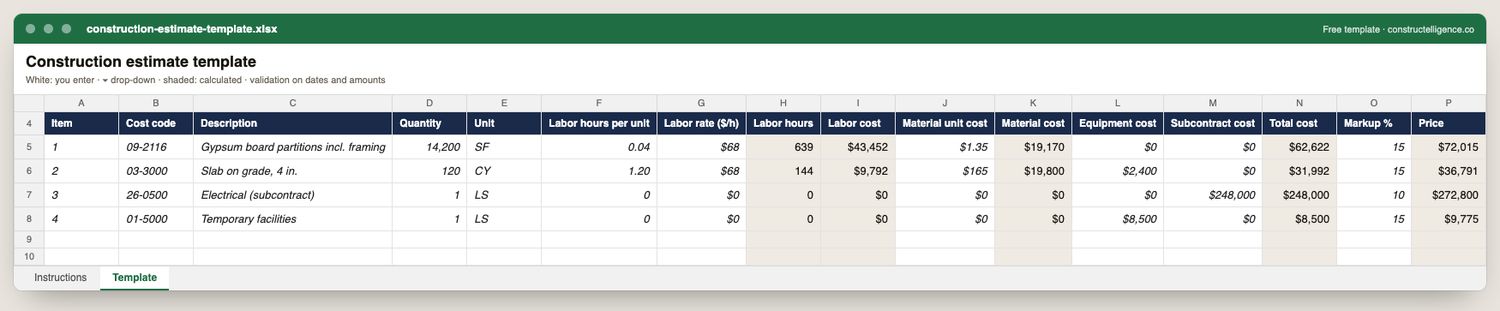
Everything a line of a construction estimate needs so it can be checked and later compared with actual cost: cost code, quantity and unit, labor productivity and rate, material unit cost, equipment, subcontract, markup — with labor hours, each cost and the price calculated.
16 columns: 11 you fill in and 5 calculated by formula and filled down 200 rows, so nothing is worked out by hand. In the Excel version, 7 columns reject entries of the wrong type (a date column only takes dates, an amount column only numbers), the header row stays frozen with filters on it, and the workbook opens on an Instructions sheet that lists every column below.
Every column, and how it is captured
| Column | Type | What goes in it |
|---|---|---|
| Item | Text | Line number, so the row can be referred to. |
| Cost code | Text | Cost code the line will be tracked against after award — the same list as job costing. |
| Description | Text | What the line is, in words the other party will recognise. |
| Quantity | Number | Enter a number. |
| Unit | Text | Unit of measure (EA, LF, SF, CY, HR, LS). |
| Labor hours per unit | Number | Productivity: hours to install one unit, ideally from your own finished jobs. |
| Labor rate ($/h) | Amount ($) | Loaded labor rate (wages + burden). |
| Labor hours | Calculated | Calculated: [Quantity] × [Labor hours per unit] |
| Labor cost | Calculated | Calculated: [Labor hours] × [Labor rate ($ ÷ h)] |
| Material unit cost | Amount ($) | Supplier price per unit, including waste. |
| Material cost | Calculated | Calculated: [Quantity] × [Material unit cost] |
| Equipment cost | Amount ($) | Equipment for the line, owned or rented. |
| Subcontract cost | Amount ($) | Subcontractor quote for the line, if subcontracted. |
| Total cost | Calculated | Calculated: [Labor cost] + [Material cost] + [Equipment cost] + [Subcontract cost] |
| Markup % | Percent | Overhead and profit on the line, 0–100. |
| Price | Calculated | Calculated: [Total cost] × (1 + [Markup %] ÷ 100) |
See it on real-looking numbers
Constructelligence is a construction intelligence platform: it reads your ERP, project and field systems read-only and does this arithmetic every week, for every job. The demo runs it on a sample eight-job portfolio.
Try the demoJoin the private betaFrequently asked questions
What should a construction estimate include?
Every item of work with quantity and unit, labor hours and loaded labor rate, material, equipment and subcontract costs, general conditions, overhead and profit — organised by cost code so it can be compared with actual cost later.
How do you calculate labor in a construction estimate?
Multiply the quantity by the labor hours per unit (productivity) to get hours, then by the loaded labor rate — wages plus payroll taxes, insurance and benefits. Hours per unit are best taken from your own completed jobs.
What is the difference between an estimate and a bid?
The estimate is your internal calculation of cost. The bid is the price you submit, after markup, with the scope, alternates and exclusions the owner asked for — see the construction bid template.
Is Excel good enough for construction estimating?
For small jobs and trade estimates, often yes. Takeoff software and estimating databases save time and errors as volume grows; see the estimating software guide.
Related guides
More in Templates & forms
- Free construction templates for Excel and Google Sheets
- Construction scope of work template: what to include, a filled-in example and a free download
- Construction schedule template: activities, workday finish dates and a free Excel download
- Punch list template: the fields that get items closed, an example and a free Excel download
- Construction change order form: what it must show, a priced example and a free template
- Construction daily report template: what to record every day, an example and a free download
- Construction budget template: budget, committed, actual and forecast by cost code — free Excel
- Construction bid template: base bid, alternates, unit prices and exclusions — free Excel
- RFI template: how to write a construction RFI, an example and a free form and log
- Construction proposal template: scope, price, exclusions and payment schedule — free download
- Construction timesheet template: hours by job and cost code, overtime and labor cost — free Excel
- Submittal log template: track every submittal from spec to approval — free Excel